
Introduction
In transiting from traditional face-to-face learning environments to more technology-centred environments, all stakeholders need effective utilization and support systems. In this sense, a dynamic shift is needed for instructors to design equivalent experiences (Simonson, 2020). This has especially been a global concern during the emergency distance education process in higher education due to the COVID-19 pandemic starting in early 2020, also described as “a wake-up call” (Czerniewicz, L., Agherdien, N., Badenhorst, J. et al., 2020; Zawacki-Richter & Bozkurt, 2022). During the pandemic, an emergency or remote distance education has been experienced in which the educational settings have inevitably transited to distance and online environments (Bozkurt et al., 2020; Hodges et al, 2020; Simonson, 2020). Higher education institutions have mostly moved to or have used the existing Learning Management Systems (LMSs), and synchronous sessions were conducted using videoconferencing tools. The inexperienced instructors have struggled to translate their lectures into synchronous or asynchronous sessions and have suffered from having a home-office infrastructure (Crawford et al., 2020). This has been even more problematic for instructors who tend to explain topics using writing/drawing instead of using a pre-prepared presentation.
Projecting to learners, it is seen that the learners have also struggled during the pandemic as well. Besides technical struggles, such as Internet access and psychological struggles due to economic and social handicaps within the conditions of lockdowns, the studies have addressed issues highlighting the needs for a high-quality education for all (Crawford et al., 2020; Mishra et al., 2021). For courses with numerical content and theorems, instructors’ one-way communication and presentations on a slide have shown to be a major barrier for learners (Kamble, Gauba, Desai & Golhar, 2021).
There have been local and global solutions during COVID-19, such as providing training and support (Stracke et al., 2022) with guidelines (UNESCO, 2020). This study introduces one such effort as a solution for instructors who struggled to account for issues by writing/drawing on board in online courses. This solution has been the design and development of a modular lightboard to be used by course instructors at a public university. This study aims to reveal the effectiveness of this newly designed lightboard from the users’ perspectives.
The Significance of this Study
A lightboard is a type of glass board design for video recordings of instructors by writing/drawing behind and facing on camera. In regular lightboards, instructors do not deal with computer systems. Therefore, they are considered low-tech solutions for creating instructional videos (McCorkle & Whitener, 2020). However, in the new design targeted in the current study, instructors use a lightboard in front of a computer in live sessions as well. Graphic tablet computers also offer a potential solution, but lightboards have been preferred as a more cost-effective and efficient solution with their capabilities. Despite this advantage, regular lightboards require a studio setting. However, there needed to be a solution for instructors’ individual uses at their homes in the conditions of the pandemic. With such a rationale, a lightboard that can be used individually in front of computers at any place has been designed and named ESBOARD. ESBOARD has been designed and manufactured using cooperation among instructors from Physics and Architecture departments for all course instructors who needed to use them in their distance education courses at the university. This study aimed to investigate the effectiveness of using this portable lightboard design from the perspectives of students and instructors. The results of this study can be beneficial for practitioners in higher education and researchers for the effective design and use of lightboards with a portability attribute not only limited to video recordings but also to be used during online live sessions.
During the emergency distance education period, using lightboards has increased during the move from face-to-face courses to distance courses due to inexpensive and easy-to-use features (Chan & Kushman, 2020; Leo & Nancy, 2022). However, instructors still need to make reservations if needed and go to the lightboard studio, probably on campuses. At least one person needs to be allocated in the studio for technical assistance. Thus, lightboards are considered expensive and hard to implement (Oranburg, 2020). In the present study, however, ESBOARD had a portable new design to be used by instructors anywhere they prefer and in front of a laptop computer. Therefore, this study can add to the literature on this new type of use and its results.
It should also be noted that synchronous sessions of online courses have other dynamics than asynchronous sessions, which means videos created in a studio environment for regular lightboard use. In the present study, however, a new use of lightboard, which is a portable use approach by instructors not in a studio but at home/anywhere setting for synchronous live sessions, is focused. Consequently, this study aims to investigate the user experiences of a portable lightboard, ESBOARD, and reveal its effectiveness for the teaching and learning processes in online courses during the COVID-19 pandemic from the perspectives of instructors and students. The following research questions are addressed:
What are the perceptions of instructors on their online teaching experiences with the ESBOARD portable lightboard?
What are the perceptions of students on their online learning experiences with the ESBOARD portable lightboard?
What are the perceptions of instructors and students on the use of the ESBOARD portable lightboard for their perceived engagement in online courses during the COVID-19 pandemic?
Literature Review
Lightboard was initially developed by researchers at Northwestern and San Diego Universities (Skibinski, DeBenedetti, Ortoll-Bloch, & Hines, 2015) and has been a technology used for online courses since 2013 (Lubrick, Zhou, & Zhang, 2019). It also has been nominated as a glass board or learning glass. Peshkin (n.d.) has described a lightboard as “a glass chalkboard pumped full of light. It’s for recording video lecture topics. You face toward your viewers, and your writing glows in front of you.” This technology has enabled the instructor appearance in a studio environment and the screen he/she uses while presenting the content to be shared for online audience/learners together. The writings/drawings of the instructor on a transparent glass board are mirrored, enabling the people on the other side to view this image accurately on the digital platform. Due to their simple and efficient use, lightboards are considered to be “a sans-technology” for instructors (McCorkle & Whitener, 2020, p. 76). The main use of a lightboard has usually been in the form of videos for courses like physics, chemistry, and mathematics that required board used for writing equations or symbols. Other than educational context, it is seen that it has been used in a music clip (i.e., ZAZ, 2013) to draw the issues inherent in lyrics as well.
There have been studies focusing on learner performance, engagement, and satisfaction with the use of lightboards. Based on peer-reviewed articles and dissertations, Lubrick et al. (2019) investigated the potential of lightboard videos on student achievement and engagement in learning. They asserted that the onscreen instructor with gestures has the potential to improve achievement and engagement with increased online teaching presence. In comparison studies focusing on student achievement, several studies have found significant differences (Wilson, 2020) or moderate increases in favour of lightboard use (Rogers & Botnaru, 2019), while some others concluded with similar results with face-to-face courses (Firouzian, Rasmussen, & Anderson, 2016). Besides, learner satisfaction and engagement have been greatest for videos or courses created using lightboards (Choe et al., 2019; Rogers & Botnaru, 2019; Schweiker, Griggs, & Levonis, 2020) and the ease of use triggered instructor enthusiasm (Fung, 2017).
Instructor eye contact has been shown a major benefit (Okumu & Vernon-Devlin, 2022), which has been a great indicator of learner satisfaction (Lopez & Spagnoli, 2021). These benefits have also been echoed in the dynamic drawing principle and gaze guidance principle by Mayer, Fiorella, and Skull’s (2020) study on five ways to increase video effectiveness. According to the dynamic drawing principle, “people learn better from a video lecture when the onscreen instructor draws graphics on a board while lecturing rather than referring to already drawn graphics”, and as for the gaze guidance principle, “people learn better from a video lecture when the onscreen instructor shifts gaze between the audience and board while lecturing rather than looking only at the audience or board” (p. 841).
Grounded on Fiorella and Mayer’s (2016) study and social agency theory (Mayer 2014), the dynamic drawing principle suggests a “talk-and-chalk approach” and requires “instances showing the instructor writing or drawing on a board or screen” (Mayer et al., 2020, pp. 842–843). This is one of the basic premises of lightboards. The gaze guidance principle was grounded on Fiorella et al.’s (2019a, b) and Stull et al.’s (2018a, b) studies, in which learner performances were compared among students viewing video lectures with a conventional whiteboard and students viewing a lightboard (i.e., in the study it is described as a transparent whiteboard involving a glass surface). The study results indicated higher performance for the latter group, who viewed instructors standing behind a lightboard and writing and drawing while looking at the camera and lecturing. Lightboards naturally support these two principles at best and, therefore can be considered effective for video courses. In a study by Fidan and Debbag (2022), the findings showed that pre-service teachers had favored interactive videos with a combination of human embodiment and content on screen using a lightboard/green screen. The main reasons were shown as the design of a real-like learning environment, which required instructor presence writing or drawing in front of the screen. The study results emphasized the importance of a real instructor’s physical appearance together with instructional content in online videos, which can be designed using a lightboard.
Implementation studies by instructors as the users of lightboard in their courses have reflected best practices for the planning and implementing processes. The following suggestions have been made for the use of markers and instructor planning (Peshkin, n.d.; Scripps-Hoekstra, 2018; Totino & Kessler, 2022):
– Have information written/drawn on the board before recording
– Use a light touch and dry-erase markers
– Use darker clothing, but avoid fully black ones and ones with texts.
Rooted in this repertoire of the literature on the use of lightboards, this study aims to extend it with the perceptions of instructors and students on their experiences during the implementation of a portable lightboard for online courses in the COVID-19 period.
Methodology
Study Design
This was a case study focusing on the experiences of the users of a newly designed tool in a technical and public university. Both levels of sampling in the case study design were used (Merriam, 1998): the case to be studied and purposeful sampling. The case was a public, not-for-profit university in Türkiye creating and using an innovative solution for instructor needs during emergency distance education. It was a technical university in the Midwest of Türkiye that offers face-to-face undergraduate and graduate degree programs with many online degree programs and had approximately 15,000 students and 700 instructors. However, during the emergency teaching period, all programs moved online, and this research investigated the period during Fall 2020 semester, in which the courses were given fully online. The sampling in this case was the participants who had actively used the tool and had interactions with students/instructors.
ESBOARD as the Innovative Solution
A small-scale compact form of lightboard was designed that can be projected in front of a computer, as shown in Figure 1, before the Fall 2020 semester began. The angle of the board to the base was designed appropriately for any 13-, 15-, or 17-inch computer. The length of the board was also designed considering the optimum distance between the user and the computer. The lights in the right and left parts of the board were designed to be used in USB ports of computer. Therefore, ESBOARD was developed as a modular board with a base, a transparent screen, and a lighting system. Figure 2 demonstrates a sample view of the tool by an instructor recorded in a live session.
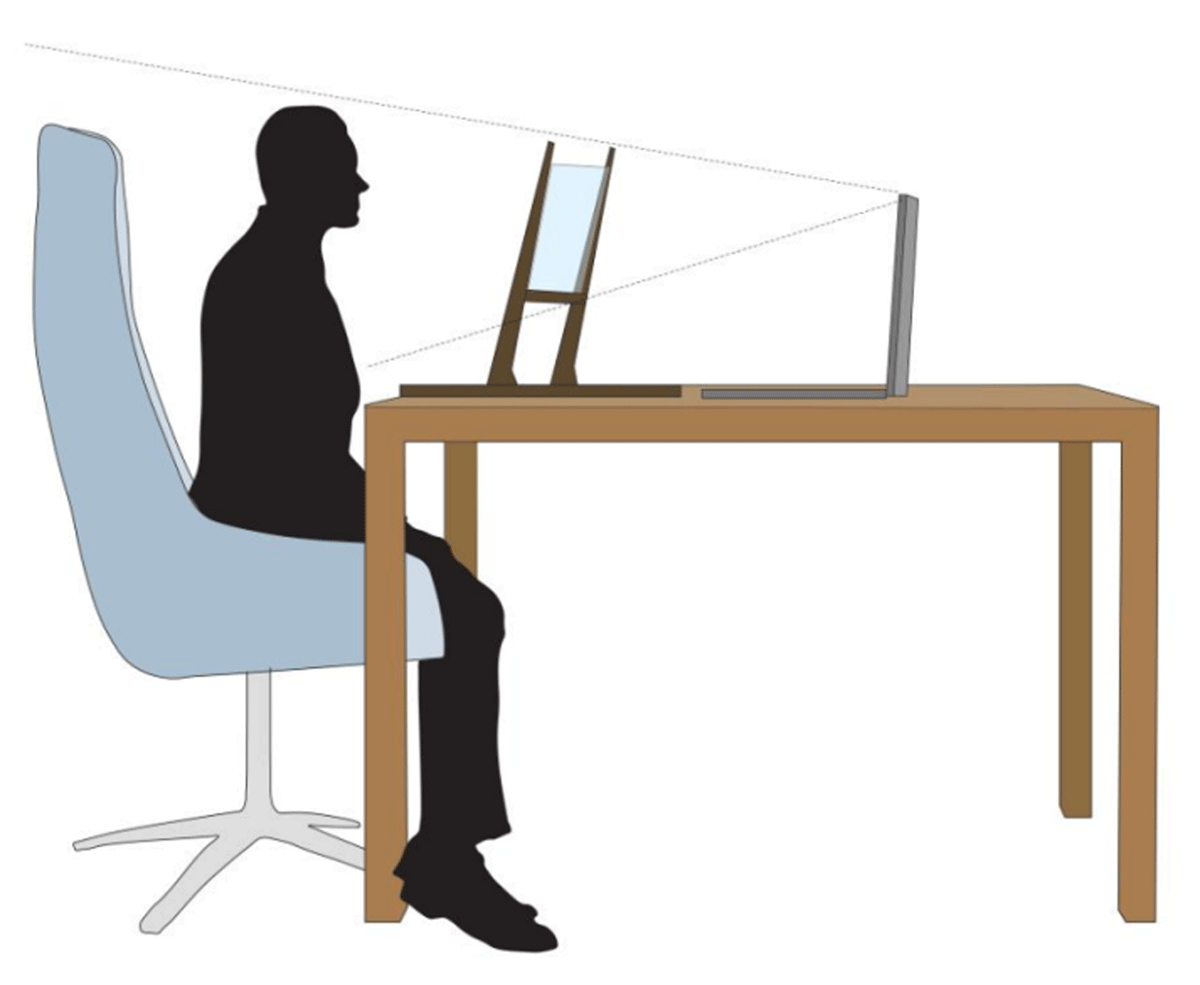
Figure 1
The Basic Design of ESBOARD.
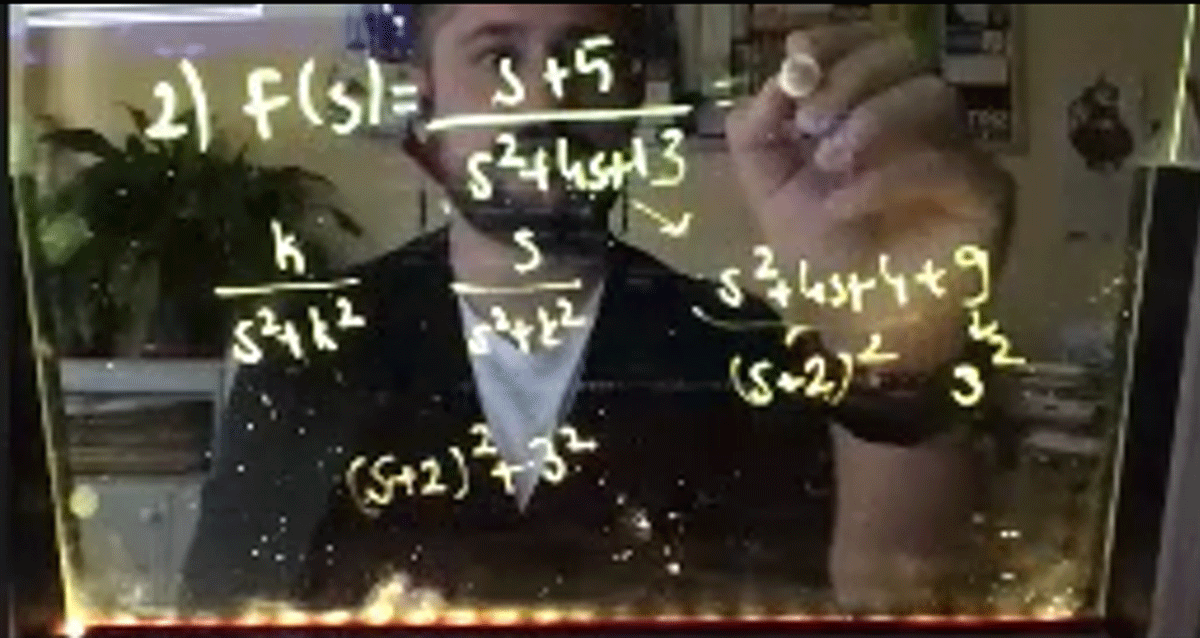
Figure 2
Sample Screenshot of ESBOARD Use in Live Session.
The Participants
The participants were recruited through voluntary participation. A questionnaire was administered to instructors of the university on their usage of the ESBOARD. A total of 88 instructors participated in the questionnaire, 53 (60.2%) of which stated to have requested ESBOARD. The instructor interviewees were recruited among volunteers in that survey and the student interviewees were then asked to participate depending on the recommendations of the Instructor-Interviewees. The students who volunteered for participation in this study were interviewed. A total of nine instructors and eight undergraduate students participated in the interviews. They were also asked to share their recordings of the online lectures, which included their use of the tool. A total of two instructors shared their recordings. Participants’ information is given in Tables 1 and 2. The participant instructors had 17 years of previous teaching experience, including mostly open-education experiences. The students had no previous distance education experience, but two of them had taken Massive Open Online Courses (MOOCs) before.
Table 1
Basic Information on Participant Instructors.
| INSTRUCTOR PSEUDONYM | DEPARTMENT | PREVIOUS DISTANCE EDUCATION EXPERIENCE | PREVIOUS TEACHING EXPERIENCE (YEARS) |
|---|---|---|---|
| Instructor-A | Statistics | Material development in open education (e.g., slides, questions, and unit summary) | 26 |
| Instructor-B | Architecture | Material development in open education (e.g., slides, questions, and unit summary) | 8 |
| Instructor-C | Industrial Design | Advisor for several open courses | 20 |
| Instructor-D | Electrical and Electronics Engineering | Material development in open education (e.g., slides, questions, and unit summary) | 9 |
| Instructor-E | Civil Engineering | No experience | 3 |
| Instructor-F | Chemical Engineering | Material development in open education (e.g., slides, questions, and unit summary) | 15 |
| Instructor-G | Industrial Engineering | Had given courses in distance education programs | 28 |
| Instructor-H | Environmental Engineering | Had given courses in distance education programs | 20 |
| Instructor-I | Avionics | Had given courses in open education programs | 24 |
Table 2
Basic Information on Participant Students.
| STUDENT PSEUDONYM | DEPARTMENT | PREVIOUS DISTANCE EDUCATION EXPERIENCE | YEAR |
|---|---|---|---|
| Student-A | Chemical Engineering | Had taken MOOC | 4 |
| Student-B | Chemical Engineering | No experience | 4 |
| Student-C | Chemical Engineering | No experience | 4 |
| Student-D | Statistics | Registered in an open program, had taken MOOC | 4 |
| Student-E | Civil Engineering | No experience | 3 |
| Student-F | Statistics | No experience | 4 |
| Student-G | Civil Engineering | No experience | 3 |
| Student-H | Architecture | No experience | 3 |
Data Collection
The main data were collected using semi-structured interviews with instructors and students. For recruiting the interviewees, three stages were used. In the first stage, instructors who had ESBOARD in the university were recruited using an online questionnaire to share their experiences on the use of the lightboard. A questionnaire was developed by the research team that included questions on using ESBOARD in online courses, especially the reasons for the use/non-use, and the potential benefits and challenges of using the tool. A total of 88 instructors completed the survey, 34 of whom stated active use of ESBOARD. In this questionnaire, the active users were invited to interviews using their e-mails, and the second stage of data collection began with the return of the voluntary participation call in the open-ended question. A total of 11 instructors stated voluntariness in the questionnaire and nine of them took part in the interviews. The last stage of the data collection was recruiting student interviewees. With the suggestion of the instructors based on completing and attending their courses, students were invited to the study and eight of them accepted to take part in semi-structured interviews. All interviews were conducted online due to pandemic conditions. A semi-structured interview protocol for each group (i.e., instructors and students) was developed by researchers. Each was asked to review by two outsider experts in the field of education having expertise in qualitative research. After improvements based on the reviews of these experts, a pilot application was conducted with an instructor to check and pilot the online implementation. Sample questions of the instructor interviews include: “Can you describe a course that you used ESBOARD, how did you begin, continue and end?”, “How did you first use it?”, “What are the benefits of using ESBOARD in your course?”, “What were the challenges of the use of ESBOARD?” Sample questions of the student interviews include: “Can you describe a course that your instructor used ESBOARD, how did it begin, continue and end?”, “Did the instructor’s use of ESBOARD affect your engagement with the course?”, “What do you think about the challenges of the instructor’s use of ESBOARD in the online course?” In addition to all these data sources, there were also two video recordings of instructors giving their online lectures using ESBOARD. These videos were also used as a data collection tool to check and enrich the findings of the interview data.
Data Analysis
A descriptive analysis was conducted for the questionnaire data, which provided the researchers with a broad view of instructors’ perceptions of using ESBOARD. A content analysis approach was utilized for the qualitative data. The interview data were initially transcribed verbatim. Then, the data were coded and grouped into meaningful categories, merged into themes related to research questions (Miles & Huberman, 1994). Data analysis was performed using NVivo 12, and the constant comparison technique that was originally suggested by Glaser and Strauss (1967) was used to develop and refine the hierarchical structures of the codes in NVivo (Leech & Onwuegbuzie, 2011) for student and instructor data. In this process, the three researchers independently coded and created the categories in Nvivo by creating nodes and attributes. Then, two sessions for negotiation were held to create common categories and themes. In these sessions, the researchers discussed the relevance of related codes and ended up with a common coding scheme. The videos were investigated to confirm the findings reported in interviews All analysis results were initially reported for instructors and students separately and then combined and interpreted among three researchers to answer the final research question.
Findings
Instructor Experiences in Online Teaching with ESBOARD
In the questionnaire, 34 instructors stated that they had experienced the use of ESBOARD. There were 19 instructors who had requested to have ESBOARD but did not intend to use it at all. With an overall analysis, including interview data, the findings were grouped into two main categories: their perceptions of the lived experiences and their suggestions for future use.
The Experiences of Using ESBOARD
The Initial Impressions
The instructors had positive first impressions when they heard about ESBOARD. The reasons they stated for the positive impressions included being able to use a portable, practical, and user-friendly tool for students, which hasthe potential for them to be visible to students. Instructor-G noted that she had the eagerness to finally had a chalkboard-like tool to use in an online environment. Instructor-F stated that he was happy to write equations while explaining them on board. Instructor-B was proud to have such a tool during the pandemic. Therefore, all instructors began using ESBOARD with enthusiasm and curiosity. The responses in the questionnaire included the idea that ESBOARD would be suitable for courses that needed board use, which was a parameter for instructors to request ESBOARD. Several instructors stated that they already owned graphic tablets and did not need an additional board.
Technical Support Needs for Set up and Related Software Use
During using the ESBOARD tool, the main technical problems were related to the screen (i.e., reflection problems), pen (i.e., cleaning and visibility problems), and set up needs with Zoom integration (i.e., Mac compatibility, view options settings). Instructor-B stated that she needed to make arrangements (i.e., closing the background light) to avoid reflections on the screen. Due to using the lightning option of the ESBOARD, Instructor-F met with the pen drying problem, which made it hard to clean the board. It had sometimes become a burden to clean the board after a long writing period. Several participants complained about problems with Mac use, and they suggested offering a guideline for Mac computers. Additionally, the Zoom view option needs to be in Speaker View, Instructor-F noted, so the screen would be in full use.
Usage Preferences
The participants stated diverse opinions on their usage preferences of ESBOARD. Instructor G stated that for formulations or criticisms of books/articles, ESBOARD would be a good choice. For Instructor-I, ESBOARD would better serve laboratory courses in which experiment schemas are demonstrated. Writing scientific equations and solving problems accordingly was a common point that was an important asset of ESBOARD. However, the participants complained about the cases in which the writing content was long. Therefore, the usage preferences had changed related to the needs of instructors on writing purposes in their course types. The instructor from the Architecture field used mostly for drawing on board, while the instructors from Engineering and Natural Sciences fields used for problem-solving and formulas.
The Perceived Benefits
The participants all agreed that one of the most important advantages of ESBOARD had been its portability and small size. This had led instructors to use a practical approach during their online courses. Instructor-A explained her perceptions: “You can use it [ESBOARD] immediately. This is a great advantage that you are writing here [in front of you] and the students can see it directly. This is very special, usable, and practical.” Instructors E and F stated that it was very useful for them to carry ESBOARD wherever he wanted, such as in the office and at home.
Four participants pointed out that using ESBOARD was very convenient for their course topics for writing and drawing. Instructor-B stated that she used ESBOARD like a sketchbook, while Instructor-F used it for solving problems using writing equations and formulas. For Instructor-E, writing on ESBOARD was very easy, which made it easy to explain things by writing on a board simultaneously.
The main pedagogical affordances of using ESBOARD have been shown as the increased interaction with students in a face-to-face resembling learning environment. This was an issue for courses in which instructors needed to explain concepts by synchronously using a board. Instructor-F stated that he could use ESBOARD for also creating instructional videos, which would be beneficial for flipped courses as well.
Another benefit was shown as the cost. ESBOARD cost like 10% of any ordinary tablet computer or graphic tablet, which made it a very cheap solution. Instructor-C and H stated that owning a graphic tablet would help instructors to write and draw much more easily, but it required a certain budget in the first place. Therefore, ESBOARD has been a cost-effective solution.
The Perceived Limitations
Cleaning the board was a common problem aligned with using pen and lightning. It was only Instructor-A who stated that she could immediately clean and move to the next writing. When the recordings were investigated, it was seen when the amount of writing and duration of explanations were more, it became harder to clean the board accordingly. Instructors C, D, E, and F complained about the cleaning problem since it caused time loss and required much effort.
Placing the board with the best view had been problematic for Instructor-E. He stated the problem as the following: “I move to right or left, or forward or backward. Students complain about not seeing the notes on the top or bottom [edges]” Instructor-C stated that “there is a transparent barrier in front of you” since he sometimes had problems with using the keyboard. The small screen size was a limitation for Instructor-F for writing content with long lines.
Instructor-B and Instructor-F mentioned the reflection problem of the board. Instructor-B stated that when she noticed the screen was reflected on the board, she closed the background light and got rid of the problem. Instructor-F decided to use a black background and use the shiny pen on board to avoid reflection problems.
Suggestions for Future
The participants had several suggestions for the improvement of ESBOARD. These suggestions included using different type of pens with long duration and easy cleaning. A white pen using a black background was suggested. Bright colours of yellow and red were also suggested. Finally, using LCD panels was another suggestion, which might transform lightboards into tablets.
Student-Experiences in Online Learning with ESBOARD
The findings on students’ data were grouped into two main categories: the perceptions of the lived experiences and their suggestions for future use.
The Experiences of Using ESBOARD
The Initial Impressions
The students were initially surprised by the ESBOARD use. It was the first time they experienced using a lightboard with their instructors. They explained their impressions with the expressions “impressive”, “surprising”, and “appealing.” One participant (C) stated that she liked how the instructor spent the effort to explain content to them. Two participants expressed their satisfaction with seeing and using a tool in their online courses.
The Perceived Benefits
The students found using ESBOARD motivating, interactive, and effective for their learning processes. Therefore, it was perceived as an efficient and usable tool. Regarding interactivity, the students pointed out how ESBOARD allowed step-by-step instruction in their online courses.
The students resembled the sessions with ESBOARD to sessions in face-to-face course sessions. Student-D stated the reason as “It reminds me real courses, the courses in normal… Because you can see the instructor’s face and follow writing content synchronously.” For Student-C, the online course was much more like face-to-face courses, which made it motivating for her. She said: “The course with ESBOARD was much more engaging. I feel like I need to be present; otherwise, I miss the course. In other courses, I feel like the same things are repeated and do not feel engaged.”
Student-C stated that the courses with ESBOARD were certainly better than other courses with presentations or writing on board using a computer mouse, which was very hard to read and understand. Student-D noted that courses with ESBOARD were better than courses with graphic tablets since the instructor’s presence was more visible. He explained:
The instructor can be seen at the same time with content writing. Therefore, it is more interactive. There are instructors using graphic tablets, which is a good method. However, it is pushing the limits of computers. The instructor cannot be seen with tablet usage. However, with the other [ESBOARD], there is not such a problem.
The Perceived Limitations
The small screen size, cleaning problems due to marker features, and no stability were stated as the main limitations of ESBOARD that had negatively affected students’ attention. With another aspect, Student-G stated that ESBOARD did not make a significant difference in her interest in the online course. Since there is a limited area on board, the writing content was limited to that screen area. For Student-A, the major problem was the remains of markers after cleaning. He remarked that “this has decreased the visual quality and caused ambiguities.” For Student-C, this problem was very distracting attention.
Discussion and Conclusion
The results of this study have shown that using lightboard with a portable design has been perceived as beneficial by all users. The initial impressions of the participants in using the tool were all positive. This might create a novelty effect at first, but it can also be argued that the background need for such a tool may reduce this effect in a short time. Although they were given clear instructions and text and video manuals on how to use the tool, right after beginning to use the tool on their owns, the instructors came across technical problems. These problems ranged from light reflections on the screen due to seating arrangements at homes/offices to software problems, such as mirroring software use and set-up needs with the synchronous tools. These problems are considered unique problems of the very first-time tool use and have unpredictable consequences. The participants, however, stated that they themselves found solutions to these problems since they hardly desired to use the tool. This result may confirm and extend the roles of early adaptors and innovators in Rogers (2003)’s Diffusion of Innovation theory, that were described as individuals who willingly experience new ideas or innovations (i.e., innovators) and individuals who are consulted by others on how to use these ideas or innovations (i.e., early adaptors). It can be asserted that within the conditions of the COVID-19 pandemic, the instructors might have volunteered to solve the technical issues and to give pieces of advice to other instructors more enthusiastically.
The participant instructors have used ESBOARD for similar and slightly diverse purposes. As expected and verified by existing literature (McCorkle & Whitener, 2020; Peshkin, n.d.; Scripps-Hoekstra, 2018), the instructors from Natural Sciences and Engineering fields have mostly been used for writing formulas, theories, and solving problems. For the design-related course, drawing has been a need and the present study has shown that ESBOARD could be used for this purpose as well. The participant students’ increased engagement with the online course was associated with the instructor’s presence while writing/drawing on board, which resembled the real face-to-face learning environment. This result has also corroborated Fidan and Debbag’s (2022) study that found instructional videos created with lightboards to be most effective as perceived by learners. Therefore, it can be concluded that the portable design of the lightboard is effective for Student-Engagement in online courses as well.
The very unique aspect of ESBOARD has been its portability and small size, which was perceived as very advantageous by the instructors for allowing a flexible approach to using the tool during live sessions anywhere they wanted to use it. Conducting courses from their homes was a considerable need within the conditions of the pandemic that required social distance and individual isolation (WHO, 2020). Since they wanted to interact with students in live sessions, none of the instructors used ESBOARD for video recording purposes, but instead, they recorded live sessions and shared using LMS for anytime use. Therefore, it can be argued that using ESBOARD portably enhanced to use in live sessions comfortably. Additionally, the participants all agreed on increased student-Instructor-Interaction, which was a major problem reported in studies investigating experiences during COVID-19 (Crawford et al., 2020; Kamble et al., 2021; Mishra et al., 2021). The final benefit has been perceived as cost-effectiveness when compared to tablet computers or graphic tablets. The comparison of ESBOARD with other tools was also made by students, and they stated that they liked the way instructor visibility with content was more efficient for their learning. This is another benefit of using ESBOARD confirming the gaze guidance principle of Mayer et al. (2020) from student perspectives.
ESBOARD has also brought several limitations in terms of marker use, lightning and placement setting. In using lightboards, erasing has been regarded as a problem for being “slow and laborious” (Scripps-Hoekstra, 2018, p. 111), and this has also been the case for ESBOARD as well. Moreover, since the screen size was small and limited, it has been even more problematic not only for instructors, but also for students during synchronous sessions. For a possible solution to this problem, Scripps-Hoekstra (2018) stressed the importance of planning ahead and writing some information before recording. Using light touch and fresh markers are also suggested and have become more imperative for the portable lightboard.
In conclusion, it can be argued that although the idea of a lightboard use is not new, the design of a portable use, as described in the current study, has enabled using and efficient solution for online courses at home during the COVID-19 pandemic. Considering that higher education will not be the same and the increase in online courses is likely to be the new normal (Stracke et al., 2022), using portable lightboards offers a great potential for future online or blended learning environments. The following recommendations can be made based on the findings of this study which can be extended to the nature of online learning in terms of lightboard use.
Using a portable lightboard can be beneficial for instructors to be flexible in using board in both synchronous and asynchronous sessions.
Using a portable lightboard can be beneficial to increase students’ engagement during asynchronous sessions and interaction with instructors during synchronous sessions.
In the design of a portable lightboard, the screen size, the quality of the pens and the adjustments need to be carefully designed.
We need to be cautious, however, in the interpretation of this study due to the very nature of the case study makes it hard to generalize the findings. Besides, the COVID-19 period had its own educational pattern, and the educational period was characterized as an emergency remote teaching, which makes it even harder to generalize the findings to other uses of distance and online learning periods (Bozkurt & Sharma, 2020). Therefore, more research studies are needed to investigate the effects of portable lightboards in long-term uses within diverse settings and during new normal periods.
Competing Interests
The authors have no competing interests to declare.