
Table 1
Project phases 1 to 4
| Activity | Activity Description | Milestone/Deliverable |
|---|---|---|
| 1. Identify popular online proctoring systems. | i. Desk-based research of popular online proctoring tools. ii. Review existing research in online exam proctoring. iii.Evaluate selected systems for further review and evaluation. | Research on possible Systems. 3 systems selected for further review and evaluation. |
| 2. Evaluate selected systems | i. Develop requirements and matrix for evaluation. ii. Trial and evaluate 3 systems as per the requirements and evaluation matrix. iii.Select one system for mock trial. | Requirements and evaluation matrix completed. One system selected for mock trial. |
| 3. Further understanding the functionalities of the selected system and preparing for mock trial | i. Buy licenses to use the system. ii. Develop quick guides for students and teachers for key functionalities of the system. | Quick guides developed. |
| i. Develop tests, identify mock trial students and train them to use the system as an exam-taker. ii. Further use of the system and note how key functionalities operate. | Mock trial students identified and trained. Mock tests and hacks developed. | |
| 4. Mock trial of the selected system with the identified students | i. Mock trial carried out. The results and experiences evaluated. ii. Student feedback discussed. iii. Selected system was further reviewed after Mock trial. iv. If necessary, a second mock trial to be undertaken. v. Guidelines developed. vi. Final Report developed. | Mock trial completed. Final Report and Guidelines developed. |
Table 2
Evaluation matrix used in Phase 3
| Proctoring Features | ProctorU | Respondus | Proctorio | AIProctor |
|---|---|---|---|---|
| Live human proctors available | Yes | No | No | No |
| Internet required | Yes | Yes | Yes | Yes |
| Secure/encrypted transferring of data | Yes | Yes | Yes | Yes |
| Student able to book exam time | Yes | Yes | No | Yes |
| Training provided | Yes | n/a | Yes | Yes |
| Proctoring provider certified | Yes | n/a | Yes | Yes |
| Students can interact with proctors | Yes | n/a | Yes | Yes |
| Student can message issues to proctors | Yes | n/a | Yes | No |
| Students get live exam instructions | Yes | n/a | Yes | No |
| Proctor able to see students screen | Yes | n/a | Yes | Yes |
| Stop proctor to view students screen | No | Yes | n/a | No |
| Recorded video reviewing option | No | Yes | Yes | No |
| Pause test/ cancel test | No | n/a | Yes | No |
| Automated proctoring | No | Yes | Yes | No |
| Keystroke checking | No | Yes | Yes | No |
| Audio recording | No | No | Yes | No |
| Browser lockdown | No | Yes | Yes | No |
| Authentication option | Yes | Yes | Yes | Yes |
| Web camera needed | Yes | Yes | Yes | Yes |
| Log reports | No | Yes | Yes | No |
| recording storage option | Yes | Yes | Yes | Yes |
| Test review option | No | Yes | Yes | No |
| Incident logs with date & time | No | Yes | Yes | No |
| Customising options for institution | No | Yes | Yes | No |
| Lockdown Features | ||||
| Available on both Windows and Mac | Yes | Yes | Yes | Yes |
| Plugin for browser | No | Yes | Yes | No |
| Avoids control options on the browser | No | Yes | Yes | No |
| Stops navigation (forward/back) | No | Yes | Yes | No |
| Stops concurrent tests | No | Yes | Yes | No |
| Stops right clicks using mouse | No | Yes | Yes | No |
| Stops printing | No | Yes | Yes | No |
| Hides taskbar | No | Yes | Yes | No |
| Hides desktop | No | Yes | Yes | No |
| Stops minimising window | No | Yes | Yes | No |
| Stops maximising window | No | Yes | Yes | No |
| Stops copying & pasting | No | Yes | Yes | No |
| Stops other applications | No | Yes | Yes | No |
| Stops starting of other applications | No | Yes | Yes | No |
| Authentication options | ||||
| User required to authenticate | Yes | Yes | Yes | Yes |
| Username provided/required | Yes | Yes | No | Yes |
| Password provided/required | Yes | Yes | No | Yes |
| Student ID required | Yes | Yes | Yes | Yes |
| Keystroke analytics | No | No | Yes | No |
| Ability to do facial recognition | No | No | Yes | No |
| Ability to do voice recognition | No | No | Yes | No |
| Fingerprint scanning required | No | No | No | No |
| Iris scanner required/available | No | No | No | No |
| Webcam Features | ||||
| Web camera required | Yes | Yes | Yes | Yes |
| Room panning allowed | Yes | Yes | Yes | Yes |
Table 3
Did you enjoy your experience with Proctorio?
| Campus | 1 (Not at all) | 2 | 3 | 4 | 5 (Very Much) |
|---|---|---|---|---|---|
| Labasa | 0% | 6% | 6% | 27% | 61% |
| Tonga | 0% | 0% | 5% | 5% | 90% |
| Lautoka | 0% | 3% | 5% | 28% | 64% |
| Samoa | 7% | 7% | 7% | 0% | 79% |
Table 4
Were you successful in completing the test with Proctorio?
| Campus | 1 (Not at all) | 2 | 3 | 4 | 5 (Very Much) |
|---|---|---|---|---|---|
| Labasa | 12% | 0% | 3% | 9% | 76% |
| Tonga | 0% | 0% | 5% | 15% | 80% |
| Lautoka | 7% | 0% | 2% | 13% | 79% |
| Samoa | 7% | 7% | 0% | 0% | 86% |
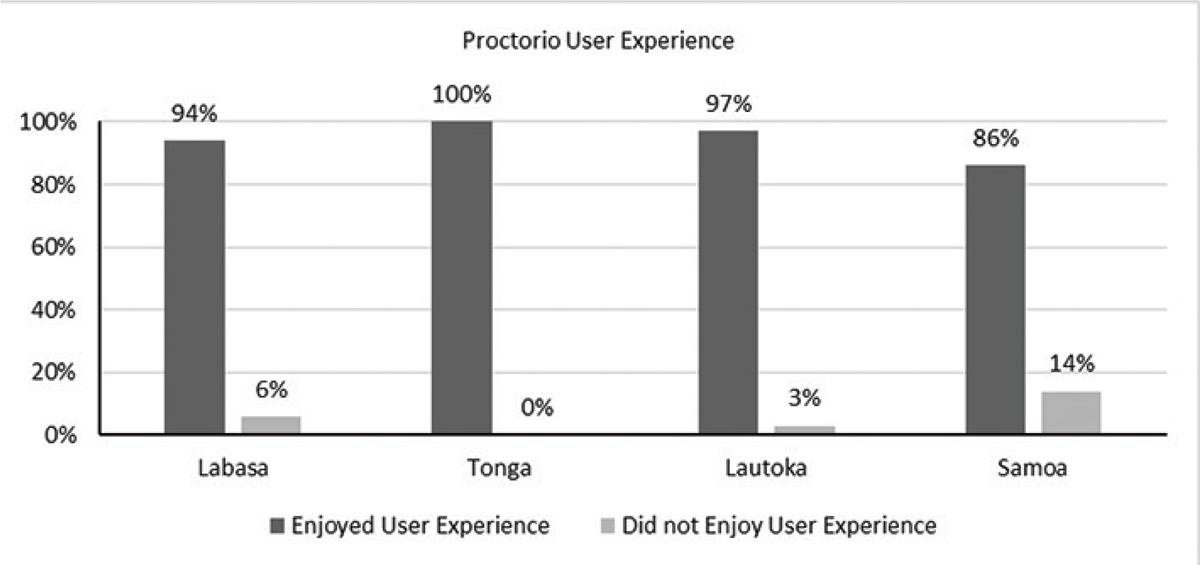
Figure 1
Proctorio User Experience.
Table 5
Were you able to control the system (E.g. able to navigate throughout the quiz)?
| Campus | 1 (Not at all) | 2 | 3 | 4 | 5 (Very Much) |
|---|---|---|---|---|---|
| Labasa | 6% | 6% | 6% | 18% | 64% |
| Tonga | 0% | 0% | 0% | 25% | 75% |
| Lautoka | 3% | 3% | 3% | 16% | 74% |
| Samoa | 7% | 7% | 0% | 14% | 71% |
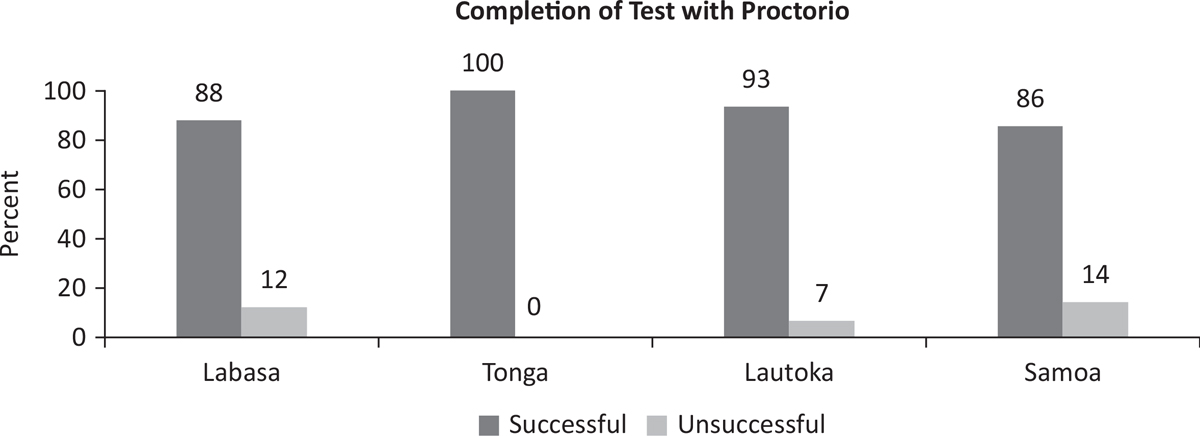
Figure 2
Completion of Test with Proctorio.
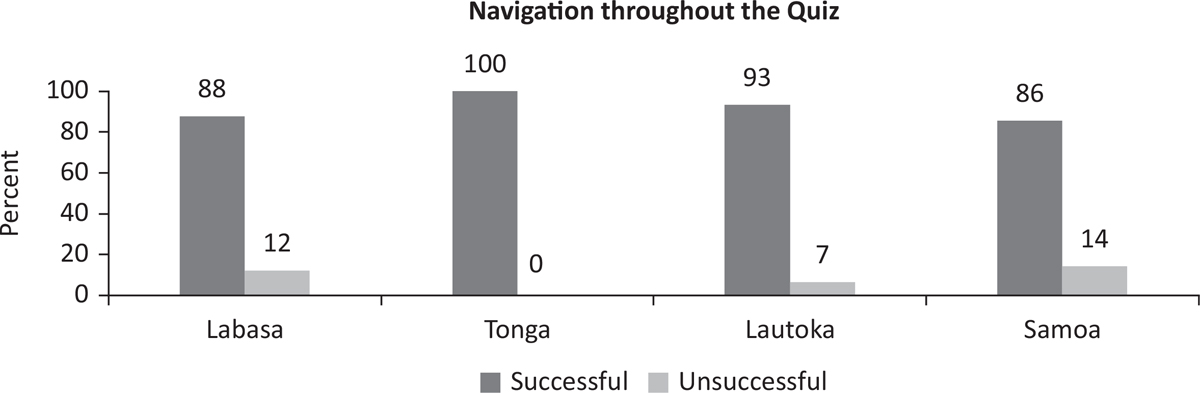
Figure 3
Navigation throughout the Quiz.
Table 6
Is the instructions provided by the Proctorio clear?
| Campus | 1 (Not at all) | 2 | 3 | 4 | 5 (Very Much) |
|---|---|---|---|---|---|
| Labasa | 9% | 0% | 9% | 6% | 76% |
| Tonga | 0% | 0% | 0% | 10% | 90% |
| Lautoka | 5% | 0% | 5% | 8% | 82% |
| Samoa | 7% | 0% | 7% | 0% | 86% |
Table 7
Did you feel uncomfortable while doing your quiz using Proctorio?
| Campus | 1 (Not at all) | 2 | 3 | 4 | 5 (Very Much) |
|---|---|---|---|---|---|
| Labasa | 30% | 6% | 6% | 12% | 45% |
| Tonga | 45% | 10% | 10% | 5% | 30% |
| Lautoka | 36% | 5% | 7% | 11% | 41% |
| Samoa | 36% | 7% | 7% | 29% | 21% |
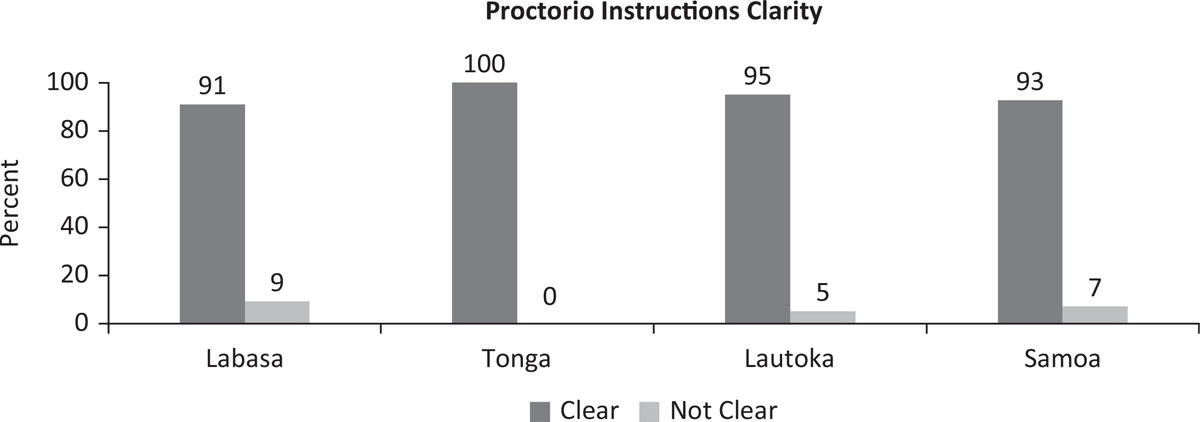
Figure 4
Proctorio Instructions Clarity.
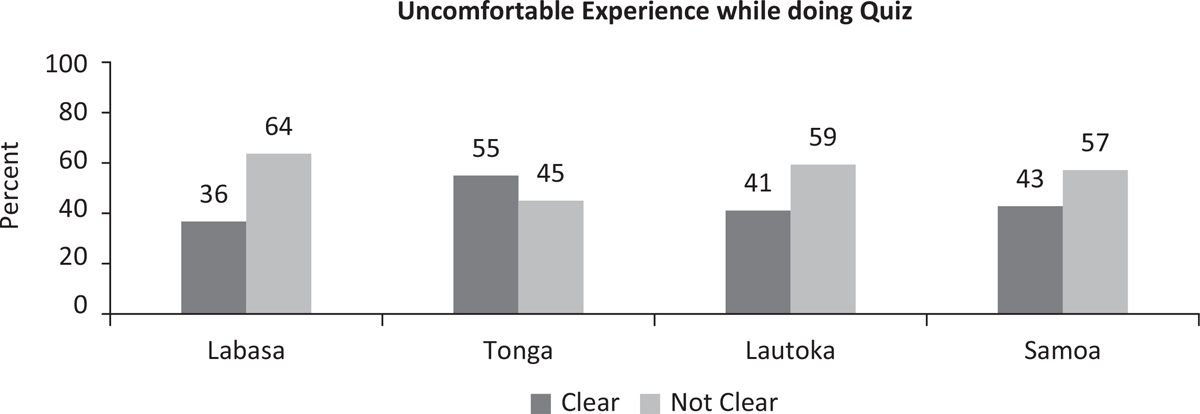
Figure 5
Uncomfortable Experience while doing Quiz.