
Table 1
The ‘Five Rs of Openness’ elements (Wiley, 2014; Wiley & Hilton, 2018).
| FIVE Rs OF OPENNESS | DESCRIPTION |
|---|---|
| Retain | the right to make, own, and control copies of the content |
| Reuse | the right to use the content in a wide range of ways (e.g., in a class, in a study group, on a website, in a video) |
| Revise | the right to adapt, adjust, modify, or alter the content itself (e.g., translate the content into another language) |
| Remix | the right to combine the original or revised content with other open content to create something new (e.g., incorporate the content into a mashup) |
| Redistribute | the right to share copies of the original content, your revisions, or your remixes with others (e.g., give a copy of the content to a friend) |
Table 2
Seven principles of UDL as defined by the University of Washington (2022).
| PRINCIPLE | DEFINITION |
|---|---|
| equitable use | The design is useful and marketable to people with diverse abilities. A website designed so that it is accessible to everyone, including people who are blind, employs this principle. |
| flexibility in use | The design accommodates a wide range of individual preferences and abilities. An example is a museum that allows a visitor to choose to read or listen to the description of the contents of a display case. |
| simple and intuitive use | Use of the design is easy to understand, regardless of the user’s experience, knowledge, language skills, or current concentration level. Science lab equipment with control buttons that are clear and intuitive is a good example of this principle. |
| perceptible information | The design communicates necessary information effectively to the user, regardless of ambient conditions or the user’s sensory abilities. An example of this principle is when a TV in noisy public areas includes captions. |
| tolerance for error | The design minimizes hazards and the adverse consequences of accidental or unintended actions. An example is an educational software program that provides guidance when the user makes an inappropriate selection. |
| low physical effort | The design can be used efficiently and comfortably and with a minimum of fatigue. Doors that are easy to open by people with a wide variety of physical characteristics demonstrate this principle. |
| size and space for approach and use | Appropriate size and space are provided for approach, reach, manipulation, and use, regardless of the user’s body size, posture, or mobility. A science lab designed for use by students with a wide variety of physical abilities is an example of this principle. |
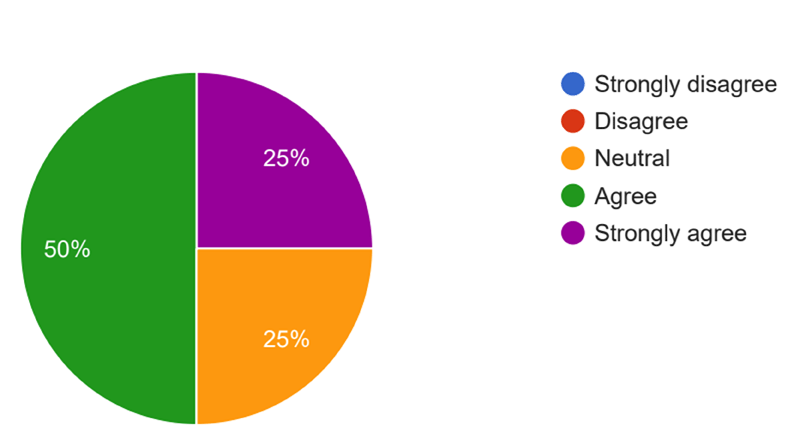
Figure 1
Responses to statement, “I usually find eBooks easy to use,” using Likert scale.
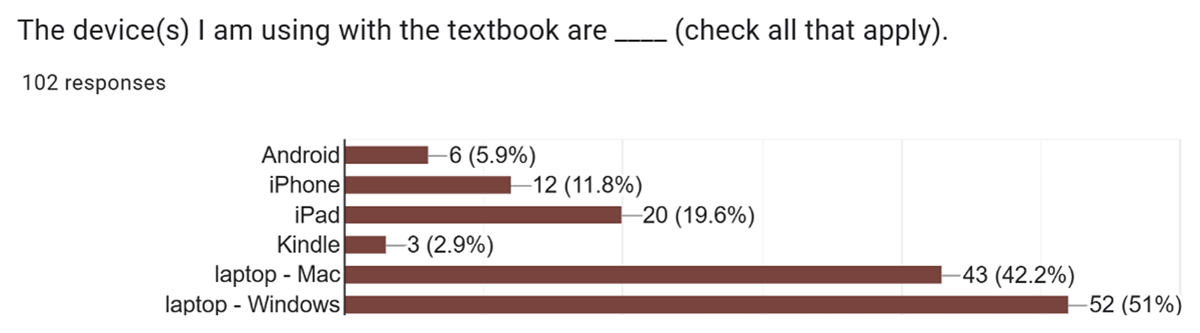
Figure 2
Devices used by students with the textbook PDF.
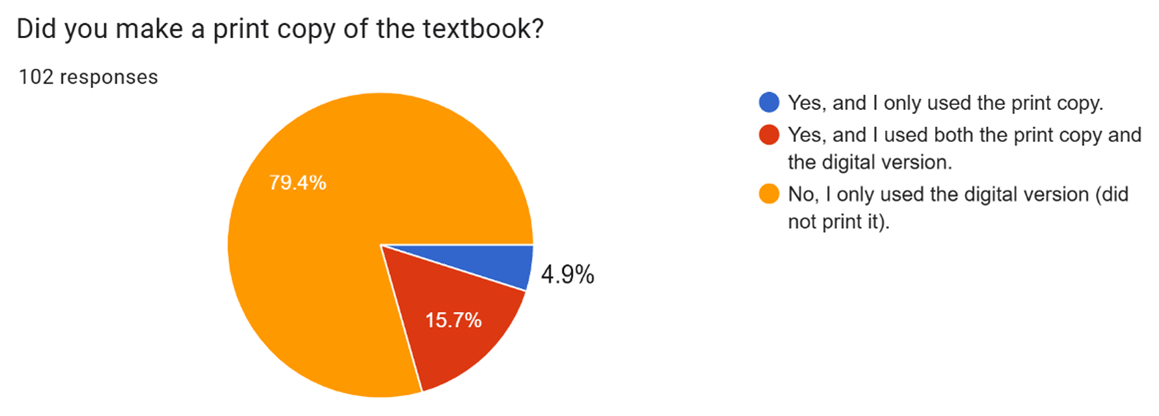
Figure 3
Students’ frequency of using print and digital (PDF) versions.
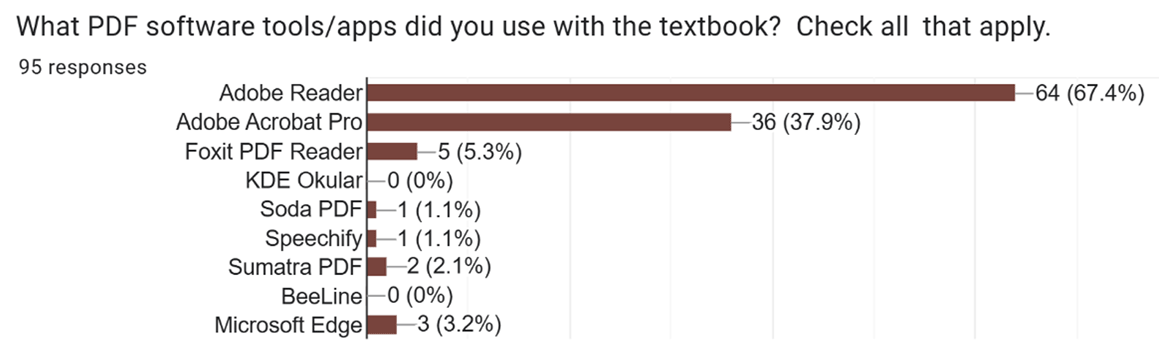
Figure 4
PDF software tools/apps students used with the textbook.
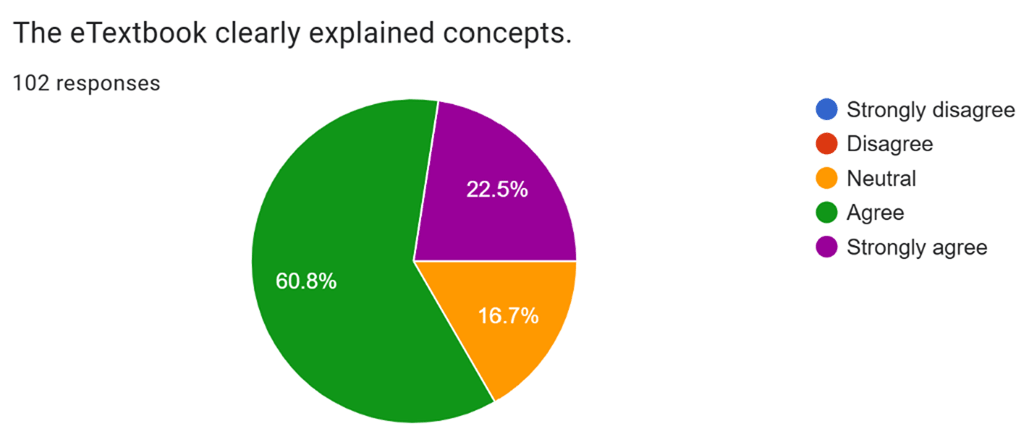
Figure 5
Student opinions of textbook’s clarity in explaining concepts.
Table 3
Phase 4: Initial themes from qualitative datasets.
| THEME | REPRESENTATIVE PARTICIPANT QUOTES |
|---|---|
| Information structures in the book affecting the user experience | This textbook is my favorite. I appreciate having chapters and supplemental readings/videos all in one place. The most successful aspects of the textbook were the content flow, use of links and embedded materials, and ease of use. |
| Immersive experience from the multimedia content, embedded videos | The most successful aspect of the textbook design was its user-friendly navigation, allowing for quick access to chapters and sections. The search function also worked well, making it easy to locate specific topics. I appreciate the clickable “contents” sections that take you to specific sections/pages. The embedded Panopto videos were a great addition, as were all other linked resources and materials. |
| Freedom from obstacles in textbook content, benefiting the user experience. | I think the textbook design is very helpful, and it helps students save on money spent on course materials. The design of the content was very easy to navigate, and I liked the table of contents in the sidebar. Impact: the “one place” approach supports accessibility, learning styles, and inclusivity. |
| Learning modes are integrated in textbook content. | I love that the videos relate directly to the text and supplement it. It’s really nice to have everything in one place. User friendly. Easier to understand. Wish all classes were set up in this way. |
| Easy to interact with the concepts, to take ownership of it, and personally connect to it. | I liked that the videos were interspersed throughout the text to break up the reading. I like highlighting phrases I feel are important and searching for key topics for review and study. Flexible, Intuitive, User-Friendly, Accessible, Accepting. |
| High quality and understandability of textbook content | I didn’t find any…of the content…difficult to understand because it seemed to kind of build itself up… as you…went through, you were able to kind of scaffold that information to get a better understanding for later chapters. |
Table 4
Instructors’ findings from new textbook roll-out.
| FINDING | IMPLICATION AND ILLUSTRATION |
|---|---|
| 1. Reduced financial barrier to entry | Reflects university’s commitment to meeting needs for working students. |
| 2. Reduced technical barrier to entry | Reflects understanding of variable technical expertise levels among LIS students. |
| 3. Reduced interoperability issues | Reflects awareness regarding increasing use of mobile devices—the content works the same on mobile as on desktop. |
| 4. Ensures consistent user experience | Less prone to variation due to eBook/eReader configurations. |
| 5. Reduced technical support requests on instructor | Lightens the workload for the instructor so their focus can be student learning. |
Table 5
Overview of UDL principles (University of Washington, 2022) and specific textbook features that addressed them.
| PRINCIPLE | DEFINITION | TEXTBOOK FEATURES |
|---|---|---|
| equitable use | Design is useful and marketable to people with diverse abilities. |
|
| flexibility in use | Design accommodates a wide range of individual preferences and abilities. |
|
| simple and intuitive use | Use of the design is easy to understand, regardless of the user’s experience, knowledge, language skills, or current concentration level. |
|
| perceptible information | Design communicates necessary information effectively to the user, regardless of ambient conditions or the user’s sensory abilities. |
|
| tolerance for error | Design minimizes hazards and the adverse consequences of accidental or unintended actions. |
|