
(1) Overview
Introduction
Vegetation and forest inventories are fundamental for ecological research, forest management, and conservation planning. Traditional data collection methods rely heavily on paper forms, which require later digitization and are prone to transcription errors and data loss. Although digital tools have been introduced for forest inventories in large national projects (e.g., PDAs in China’s fourth NFI) (1, 2), many institutions still rely on paper or mixed approaches, such as the Spanish National Forest Inventory (3).
A range of mobile applications has been proposed to support digital inventory workflows, from form-based data entry to sensor-assisted measurements enabled by commercial off-the-shelf (COTS) hardware. Examples include ArcGIS-based collection for urban trees (4), Android applications for storing tree attributes (5), ODK-based forms for community monitoring (6, 7), and biodiversity assessment applications (8). Other tools target semi-automated measurements using device sensors. For instance, ForestScanner leverages iOS LiDAR to estimate DBH and spatial coordinates (9), while Android tools such as Trestima and Katam use image and video capture for stand metrics (10). However, sensor performance can degrade under challenging field conditions, and some approaches still require substantial post-processing, limiting their operational uptake.
This paper introduces MIFCSheet, a progressive web application (PWA) for structured field data collection. The application was developed to address the aforementioned limitations by providing a lightweight, open-source, and configuration-driven solution that supports adaptation to different inventory protocols. Compared with native applications, PWAs are (1) platform-independent, (2) capable of offline operation and integration with device features such as cameras, (3) lightweight, enabling reduced resource consumption, and (4) easy to customize using standard web technologies (11). MIFCSheet was designed to replace manual note-taking and to reduce end-to-end data collection time.
MIFCSheet is not an automated measurement tool; rather, it provides a digital form for manual completion by field technicians. The software targets researchers, forest managers, and practitioners who require reliable and efficient data collection tools in remote environments. It is currently used in the project Dynamic analysis of the resilience of forest landscapes affected by fire using multisensorspectral indicators (PaF) (12). Its performance was evaluated against paper-based and audio-based data collection methods. Transcription was the main source of delay in both alternatives, with average times 25.2 min for audio and 13.2 min for paper. When field collection and transcription were considered together, MIFCSheet demonstrated the best overall performance, with an average completion time of 16.9 min, compared with 27.6 min for paper and 37.5 min for audio. This represents end-to-end time savings of 39% and 55%, respectively.
MIFCSheet was originally developed for the Linear Transect Sampling Method for Phanerophytes and Chamaephytes (MIFC), which is used to characterize vegetation in burned and unburned areas (13). The application is implemented using standard web technologies (HTML, CSS, and JavaScript) and can be installed and operated offline through modern browser capabilities.
Implementation and Architecture
The application is implemented in plain HTML, CSS, and JavaScript (Figure 1). Core functions are organized using ES6+ class-based modules to improve readability and reuse. On first use, the application and external API files are retrieved from the network and cached by the Service Worker API. Subsequent use loads resources from the cache, enabling full offline operation—a key requirement in dense vegetation where connectivity is unreliable.
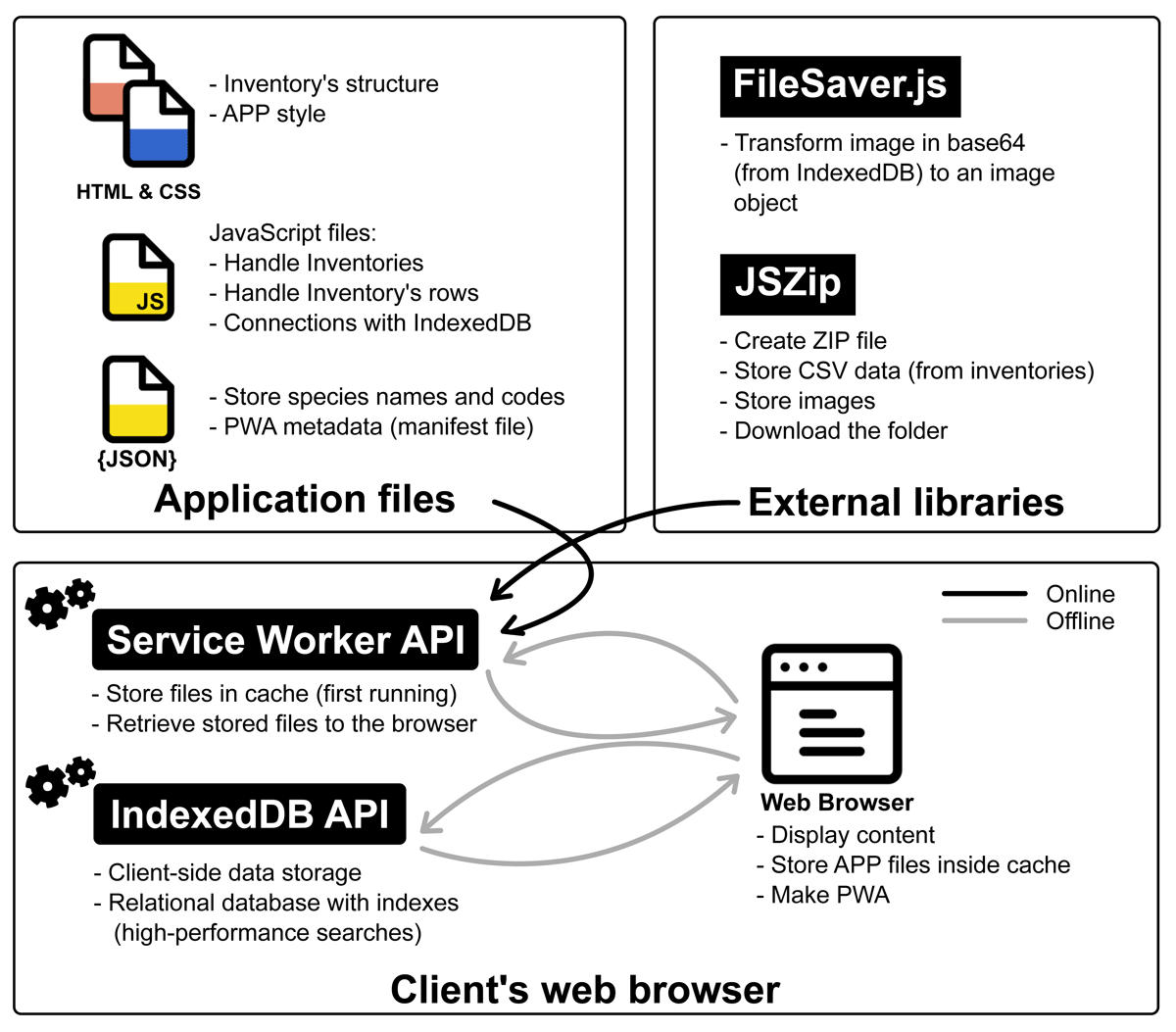
Figure 1
Application schema: application and external API files are retrieved once and cached by the Service Worker API. Subsequent requests are served from the cache.
Inventory data are stored locally using IndexedDB (14), which supports transactional operations and efficient queries. The schema (Figure 2) includes an inventory table for metadata and a row table for per-species entries. Images can be associated with an inventory or with specific rows. Storage capacity depends on the device, but inventories are typically small; for example, an inventory with 15 parameters and 300 rows is approximately 20 KB (excluding images).
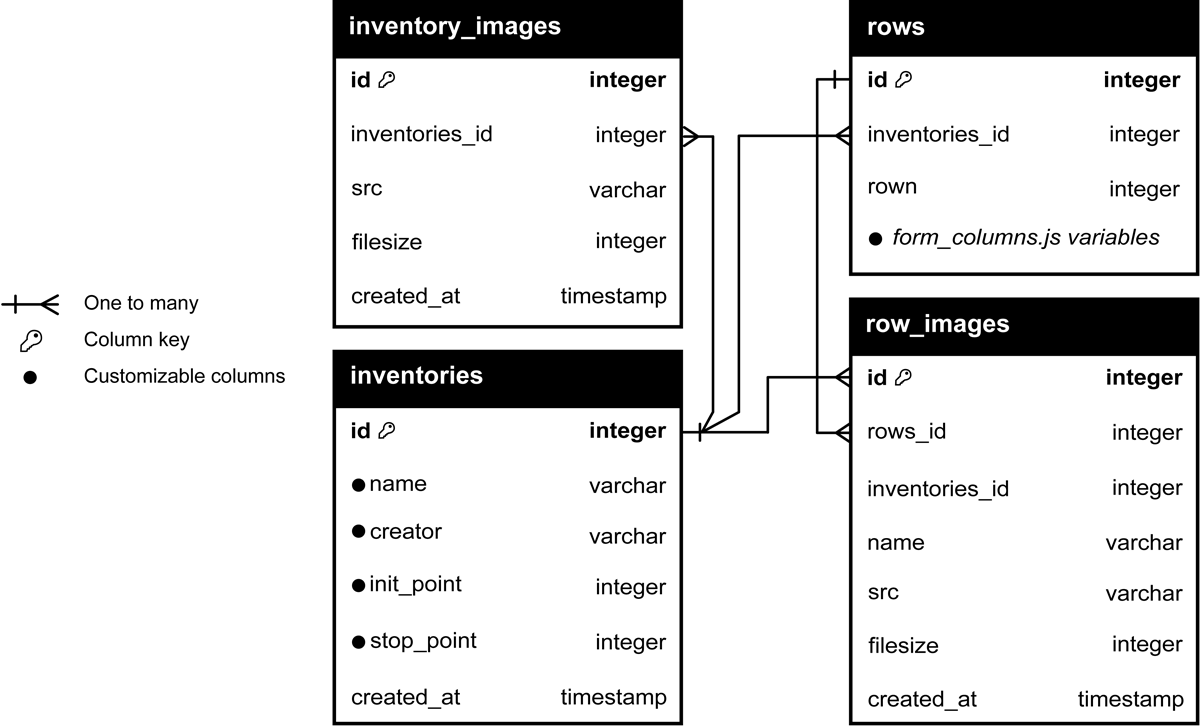
Figure 2
Database schema: tables, columns, and data types used by the application.
The form is rendered as a single page that mirrors the paper workflow (Figure 3). Section A stores metadata, and Section B stores species rows. The UI is responsive and adapts to different screen sizes.
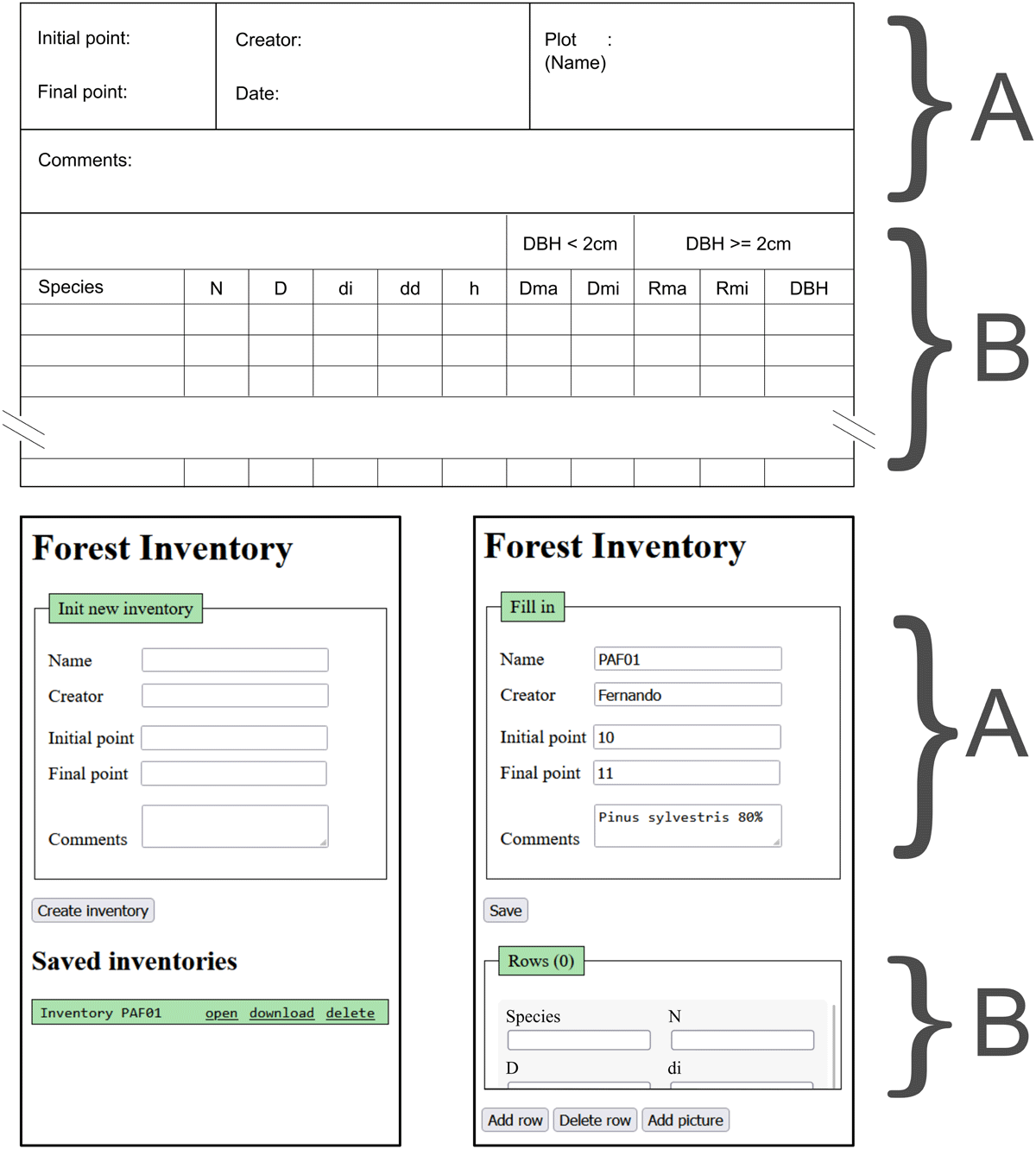
Figure 3
MIFCSheet interface. The top section shows the paper sheet layout that the application emulates. Bottom left: new inventory view with stored inventories listed. Bottom right: an open inventory with rows for data entry.
On first load, the user enters metadata and selects Create inventory. The inventory is stored and an initial blank row is created. Additional species are added via Add row. Table 1 summarizes core functions. Dates are not entered manually because creation time is recorded automatically.
Table 1
Application functions.
| FUNCTION | DESCRIPTION |
|---|---|
| Create inventory | Initialize a new inventory. |
| Open inventory | Load a saved inventory and display its rows. |
| Download inventory | Export inventory metadata, rows, and images as a ZIP archive. |
| Delete inventory | Remove an inventory from local storage. |
| Add row | Insert a new blank row in the open inventory. |
| Delete row | Delete selected row(s) from local storage. |
| Add picture | Capture an image and store it. If a row is selected, link it to that row; otherwise link it to the inventory. |
| Close inventory | Close the current inventory and return to the main page. |
Exports are packaged as a ZIP archive named after the inventory. It includes inventory_metadata.csv and rows.csv. If images exist, additional folders store inventory-level and row-level images (named by image ID and row ID). Image formats depend on the device camera.
The selected architecture also has some limitations. First, the application relies on browser-supported web technologies, such as IndexedDB and the Service Worker API, so compatibility may vary across browsers and devices. This should be considered when deploying or maintaining the application. In addition, storing data locally reduces dependence on a server-side database; however, it also introduces risks if the device is lost, damaged, or cleared, or if browser storage is manually deleted. At the same time, this local-only approach improves data protection because the application operates entirely on the user’s device: all data processing occurs locally, and no data are transmitted to external servers or other devices, thereby minimizing privacy risks and enhancing user control over sensitive information.
Quality Control
Data integrity is maintained through structured parsing, validation of configured fields, and controlled local database operations. Inventory metadata parsing stores only configured inv_header keys, required fields are rendered explicitly, and duplicate inventory names are checked before storage. Row-level validation includes conversion of numeric inputs to the appropriate integer or floating-point type, handling of both decimal comma and decimal point notation, and prevention of unintended NaN values from empty numeric fields. Select fields are also checked so that invalid or unselected options are stored as empty strings.
Quality control was addressed through an initial testing strategy based on Vitest, jsdom, and fake-indexeddb, designed to support automated testing of the core forest inventory collection workflow. The unit tests focus on the main application logic, including the data model classes, the IndexedDB wrapper, and the form and row parsing routines. The service worker was not included in this first testing stage because its behavior is more appropriately evaluated through browser-based or end-to-end tests. The test suite covers inventory metadata parsing, row generation and value preservation, IndexedDB initialization and basic database operations, including adding, retrieving, updating, and deleting records, indexed queries, and configuration consistency.
The tests also consider operational failure cases relevant to field inventory work, including duplicate inventories, deletion of inventories with associated rows and images, and missing species codes in the autocomplete logic. These checks help ensure that invalid inputs, incomplete entries, and common field-use errors do not compromise the consistency of locally stored inventory data.
In addition, the software has been extensively tested under field conditions by vegetation inventory experts within the PaF project. All core functionalities were evaluated and validated during real-world use.
Users may also verify the correct behavior of the application by performing a basic functional test with a sample inventory. This test involves completing the inventory header, creating several species rows, and downloading the inventory data. If the exported ZIP archive contains two CSV files, one with the inventory metadata and another with the inventory rows, the application can be considered to be functioning as expected. An example of a completed inventory is included among the repository files, providing a reference for the expected behavior of the application.
(2) Availability
Operating system
The application runs on any device that supports modern browsers (Table 2).
Programming Language
HTML 5, CSS 3, and JavaScript ES6+.
Additional System Requirements
Inventories are stored locally in browser-managed storage, constrained by device capacity. As a practical guideline, at least 50 MB of free storage is recommended when inventories include photos.
Dependencies
FileSaver == 1.3.2
JSZip == 3.5.0
JSZipUtils == 0.0.2
List of contributors
The software was created by Cristian Iranzo.
Software location
Zenodo
Name: CristianICS/MIFCSheet: Flexible Inventory Types
Persistent identifier: https://doi.org/10.5281/zenodo.17140284
Licence: GNU General Public License v3.0
Publisher: Zenodo
Version published: 1.0.1
Date published: 17/09/2025
GitHub
Name: MIFCSheet
Persistent identifier: https://github.com/CristianICS/MIFCSheet
Licence: GNU General Public License v3.0
Date published: 17/09/2025
Language
English
(3) Reuse Potential
MIFCSheet is configured through two JSON dictionaries in the repository (15): inventory_header.js (metadata fields, Section A in Figure 3) and form_columns.js (row variables, Section B). To customize, users download the repository and edit these two files to match the target protocol.
In inventory_header.js, each key maps to a database column name and a dictionary describing how the field is rendered and validated. Table 3 lists available options.
Table 3
Parameters supported in inventory_header.js.
| PARAMETER | DESCRIPTION |
|---|---|
| custom_name | Label shown in the UI. |
| form_type | Field type: input, select, or textarea. |
| input_type | For input: text or number. |
| required | Whether the field is mandatory (boolean). |
| display_col | Field used to describe an inventory in the inventory list. |
Row variables are defined in form_columns.js. Keys map to database columns, and each entry specifies either an input field (text or numeric) or a select field (predefined options). Table 4 summarizes supported options.
Table 4
Parameters supported in form_columns.js.
| PARAMETER | DESCRIPTION |
|---|---|
| description | Tooltip text shown at the bottom of the page. |
| form_type | Field type: input or select. |
| input_type | For input: text or number. |
| number_type | For numeric input: integer or float. |
| values | For select: list of allowable values (e.g., [‘N’,‘S’]). |
| meanings | Descriptions for each value (e.g., [‘North’,‘South’]). |
| autocomplete | Enable autocomplete (boolean); requires entries in species.js. |
| autocomplete_code | If true, display the code associated with autocomplete values. |
| autocomplete_value | Column key storing the value corresponding to the displayed code. |
Each row variable can include a short description that is displayed as a tooltip (Figure 4, bottom right). A protocol-level guideline panel can also be shown at the top of the form (Figure 4, top left), defined in index.html within the div of class tab__content.
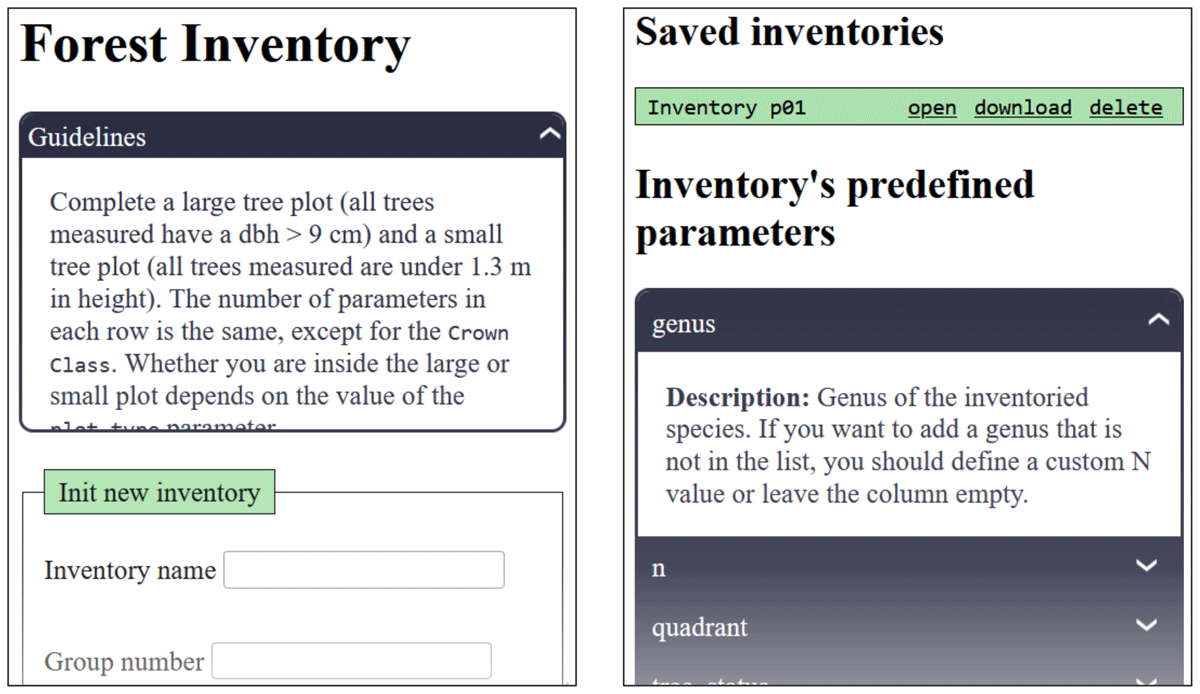
Figure 4
MIFCSheet tooltips. Top left: guideline panel. Bottom right: variable descriptions and option meanings.
To reduce repetitive input, the application supports autocomplete for species names and codes. Selecting a name fills its code automatically, and selecting a code fills the corresponding name. Date and time are recorded automatically when an inventory is created.
The species thesaurus is editable, and the same autocomplete mechanism can be extended to other fields by populating the thesaurus dictionary.
Comparative configuration of inventory protocols
Figure 5 compares two distinct forest inventory forms. On the one hand, the MIFC inventory type is displayed, which is the default implementation in the application; on the other hand, the Canadian NFI forest inventory schema is shown. Both implement (i) an inventory header (metadata) and (ii) per-species rows. The two types of inventories are stored in the application repository (15).
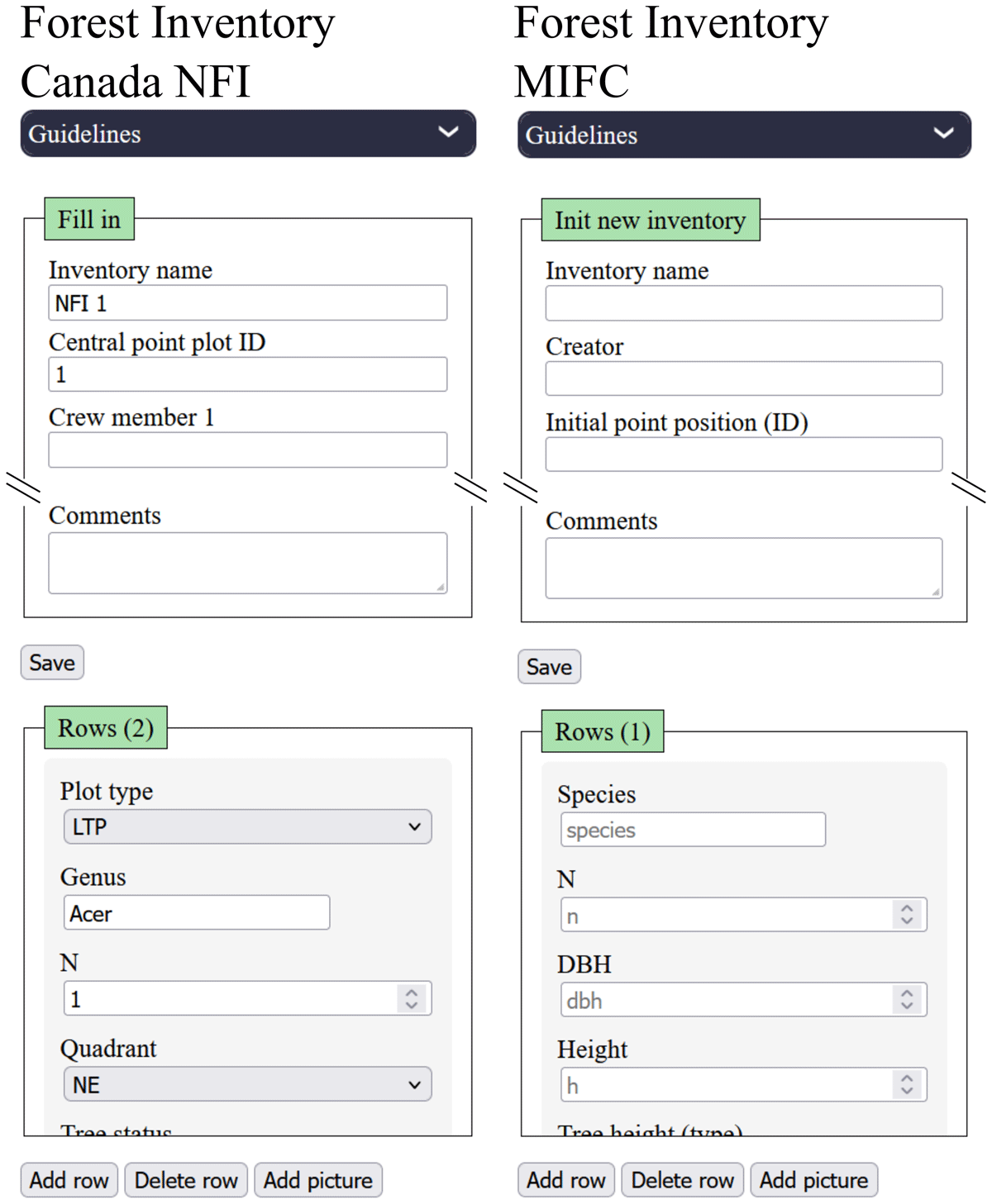
Figure 5
Comparison of the Canadian NFI adaptation (left) and the MIFC adaptation (right).
The MIFC header includes five fields: inventory ID, creator name, comments, and numeric IDs for initial and final transect GNSS points. The Canadian NFI header includes a coordinate ID for the plot center and five fields for crew member names. These were defined by editing inventory_header.js, using numeric types for IDs and text for names.
Row variables include shared fields (e.g., species/genus, height, DBH, relative position) and protocol-specific fields. In both protocols, some variables are conditionally relevant (e.g., DBH thresholds in MIFC; subplot-specific variables in Canadian NFI). To avoid dynamic row schemas, we include the union of variables and rely on the technician to complete only applicable fields. For Canadian NFI, an additional categorical field specifies plot type (e.g., Large Tree Plot, Ecological Plot) and other predefined-option fields (e.g., quadrant) capture location within the plot.
Image attachment supports required photo documentation (e.g., the eight mandatory photographs in the Canadian NFI workflow) by linking images to the inventory or to a specific row.
Support mechanisms
The software is made available as is, with no associated support services. If a user detects an error, an issue can be submitted to the application’s GitHub repository (15), and it will be addressed as quickly as possible by the maintainers.