
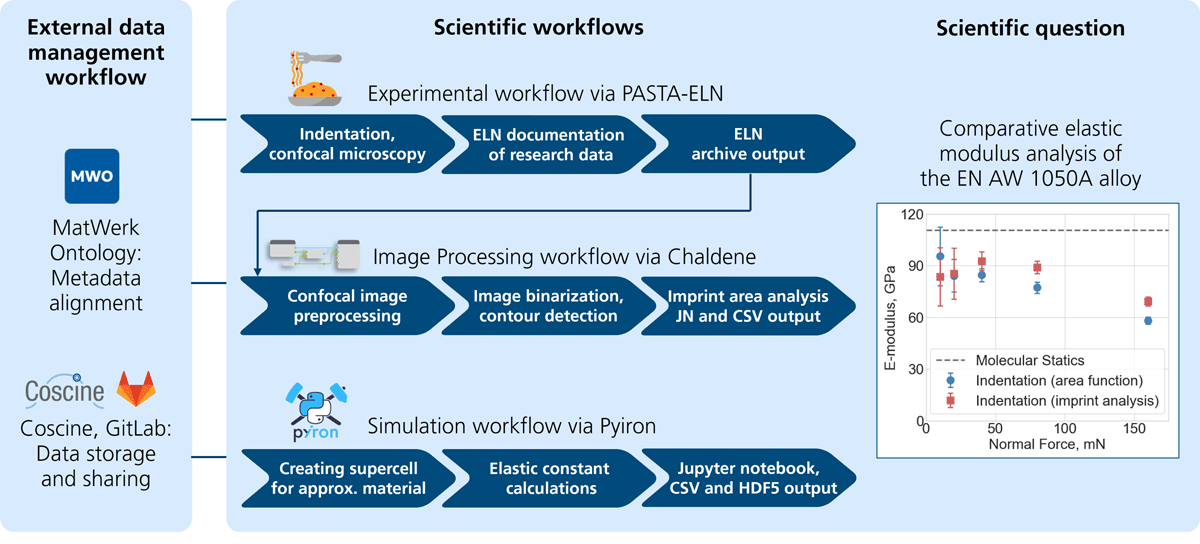
Figure 1
Overview of the workflows in the user journey and its scientific challenge. The process begins with the preparation of aluminum samples, which are then deformed using nanoindentation. The resulting nanoindentation data is used to calculate Young’s modulus. To determine the contact area, the indentation imprint is measured using confocal microscopy, and the images are analyzed accordingly. Finally, molecular statics simulations are conducted to compute the energy for different configurations, allowing for the calculation of Young’s modulus for the aluminum alloy.
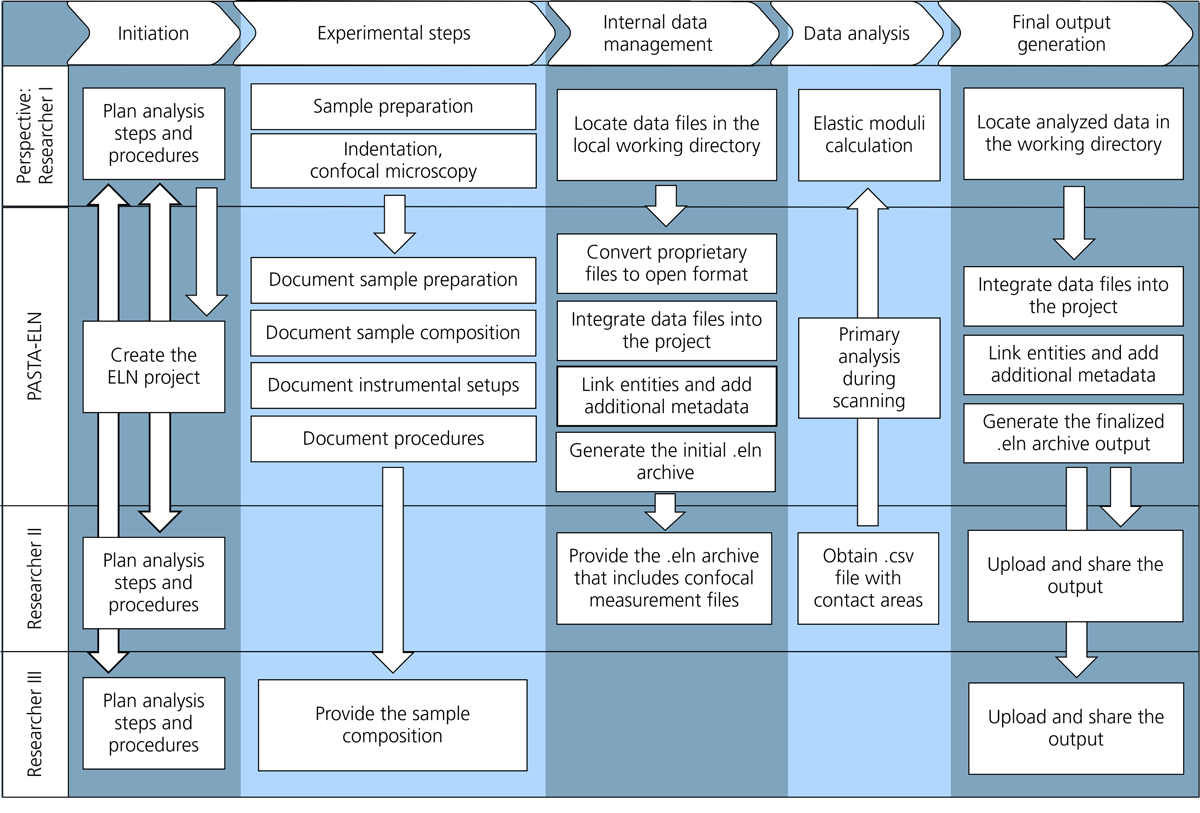
Figure 2
Experimental workflow within the user journey, illustrating the perspective of Researcher I, who uses PASTA-ELN for research data management. The workflow comprises five main tasks—initiation, experimental steps, data management, data analysis, and output—each with subtasks that connect to other Researchers and the PASTA-ELN software. Documentation and annotation subtasks ensure workflow provenance.
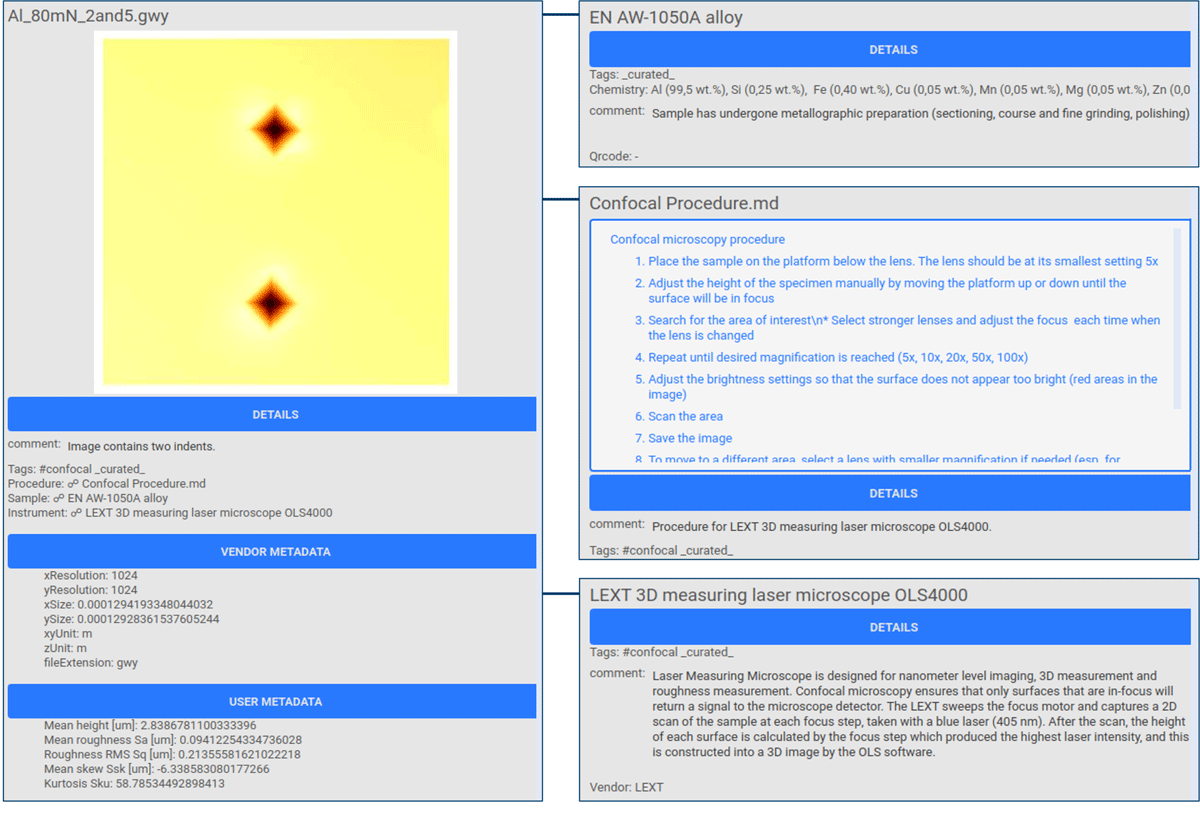
Figure 3
PASTA-ELN project screenshots showing extracted data and metadata from the confocal microscopy GWY file and the linked Sample, Procedure, and Instrument instances. Metadata is categorized into Details (general metadata), Vendor Metadata (extracted from the measurement file), User Metadata (defined by the user), and Database Metadata (required for ELN operation; omitted here). The measurement on the left is linked to a sample, procedure, and instrument, displayed on the right.
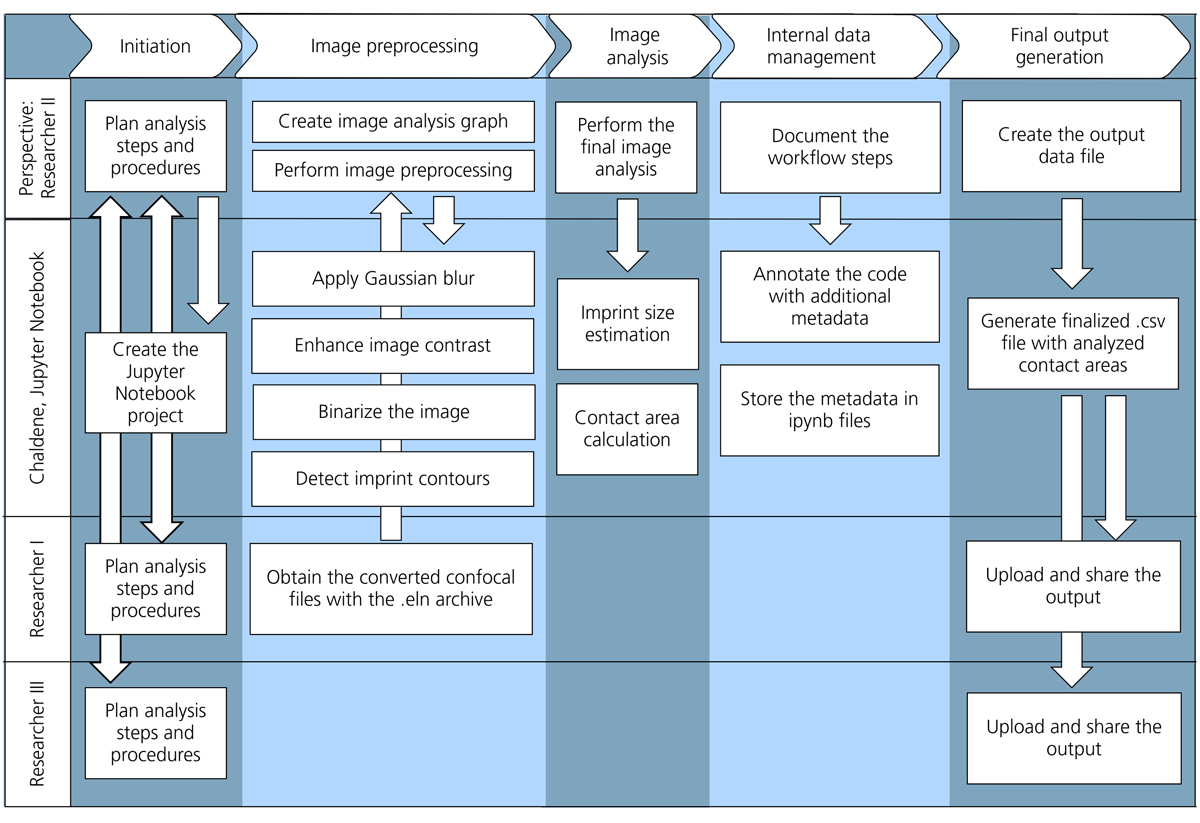
Figure 4
Image processing workflow as a part of the user journey, demonstrating the perspective of Researcher II, who uses Chaldene as a scientific image processing tool. The workflow consists of five tasks—initiation, image preprocessing, analysis, data management, and output—each with subtasks that connect to other Researchers and integrate with the Chaldene software.
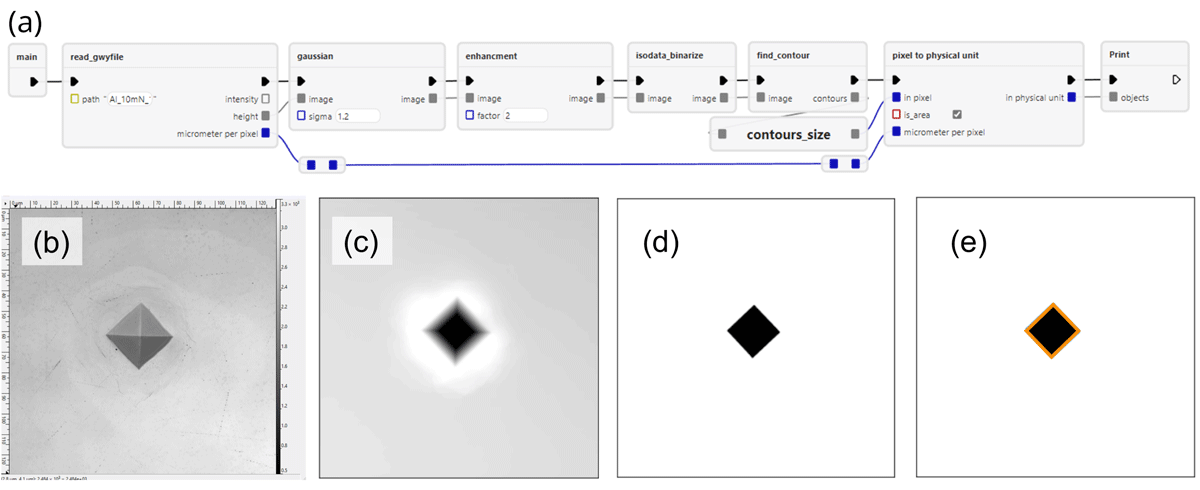
Figure 5
(a) Chaldene image processing workflow represented as a series of interconnected nodes (rectangles) linked by edges (lines). The nodes correspond to key processing stages: data ingestion, Gaussian blur, enhancement, binarization, and physical area evaluation. (b–e) Confocal microscopy images illustrating different stages of the workflow: (b) raw light reflection, (c) raw height profile, (d) binarized image using the Isodata algorithm, and (e) binary image contour.
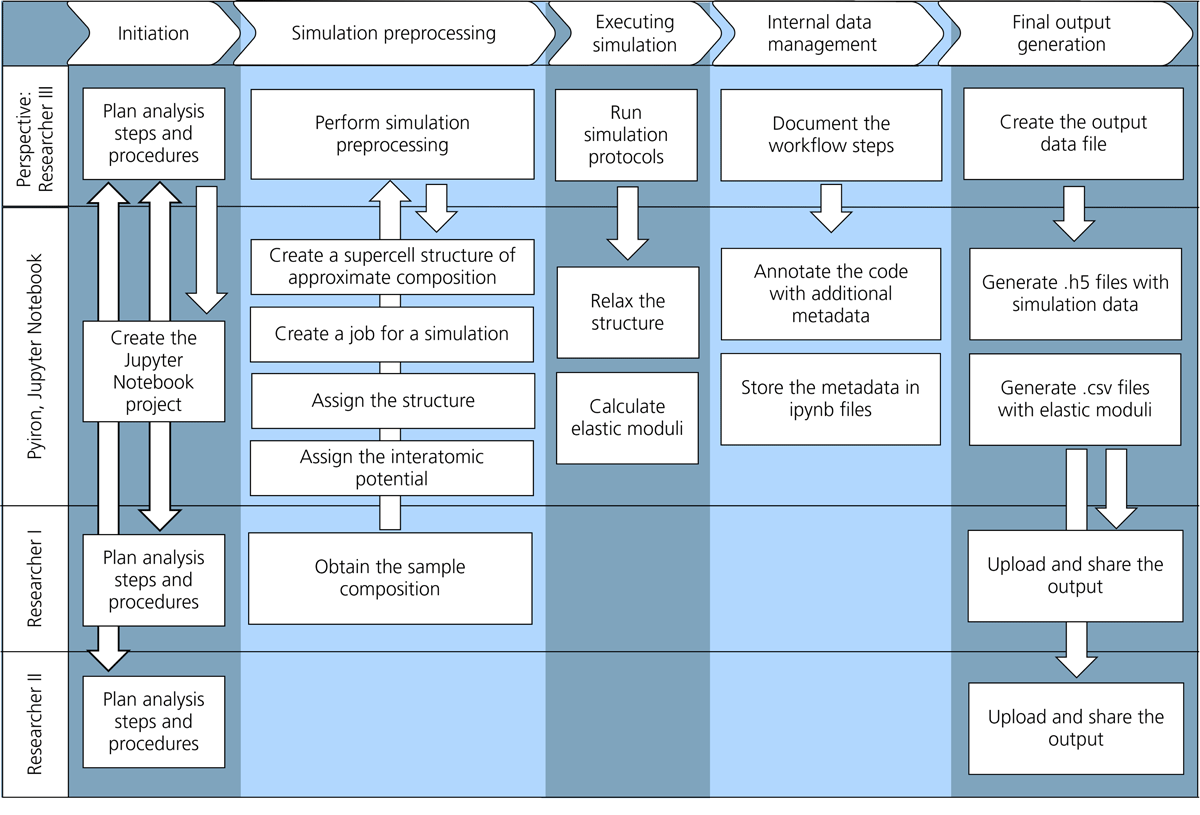
Figure 6
Simulation workflow as a part of the user journey, illustrating the perspective of Researcher III, who uses pyiron as the computational framework. The workflow comprises five main tasks—initiation, preprocessing, simulation execution, data management, and output—each with associated subtasks that connect to other researchers, the pyiron software, and its database. The entire workflow is implemented within a Jupyter Notebook.
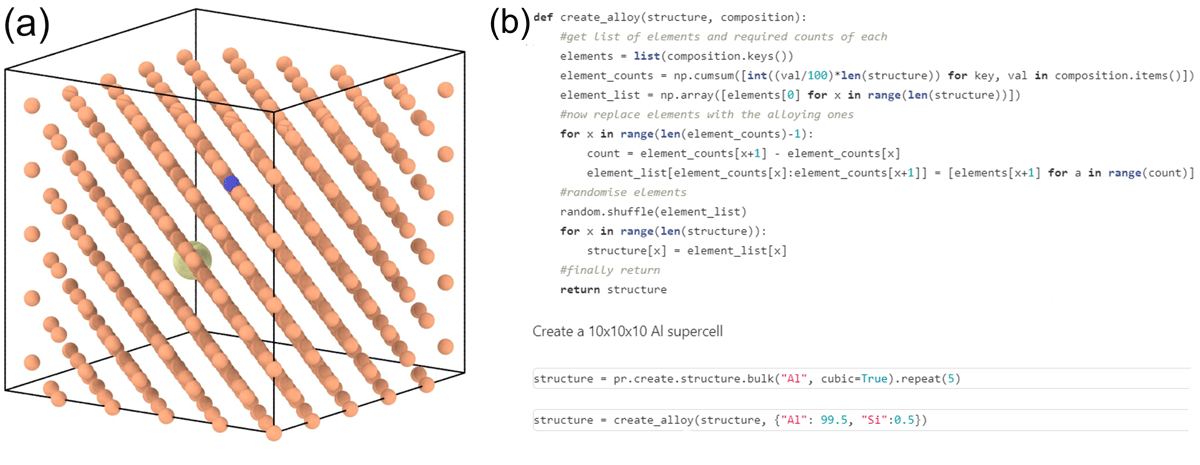
Figure 7
(a) Supercell of Al atoms used in the molecular statics simulation, with randomly placed impurity atoms. The [111] planes of the FCC structure are visible along the viewing direction. (b) Jupyter Notebook snippet from the simulation workflow, highlighting the creation of the supercell during preprocessing and the inclusion of impurity atoms.
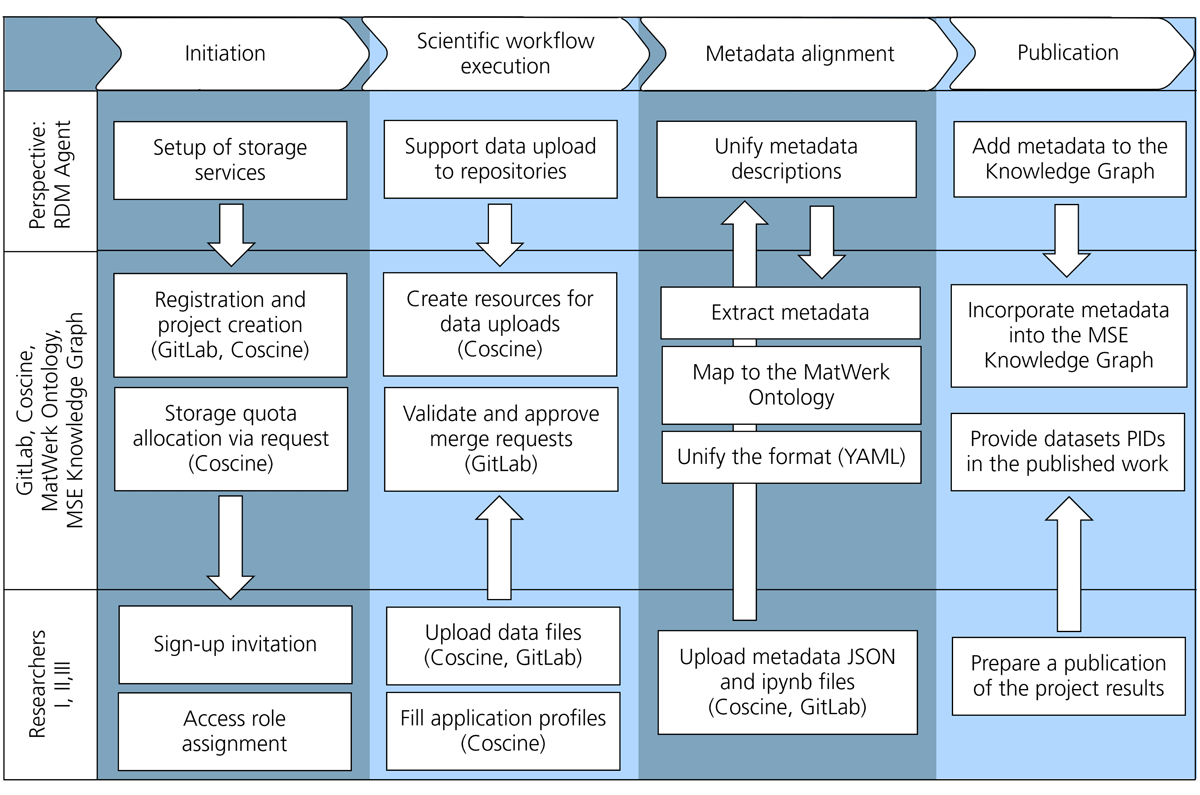
Figure 8
External data management workflow as a part of the user journey. The workflow comprises four main tasks—initiation, data upload support, metadata alignment, and publication within a knowledge graph—along with PIDs of the repository entries. Subtasks connect Researchers, repositories, and the knowledge graph.
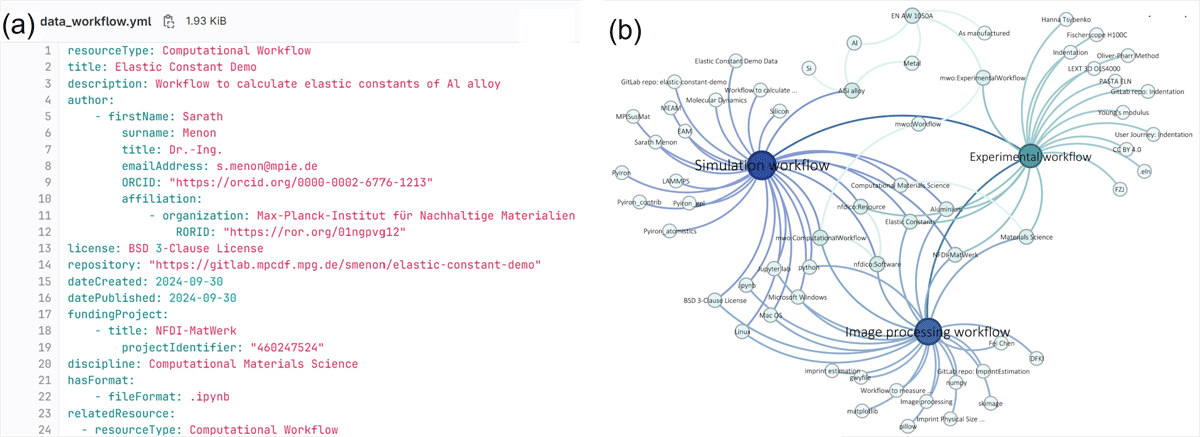
Figure 9
(a) A snippet of the YAML file with metadata from the computational workflow aligned with the MatWerk 2.0 Ontology to highlight that the YAML format is beneficial for manual data entry and automatic processing. (b) The visualization of the triples that populated the MSE Knowledge Graph, which highlights the strongly interconnected metadata and the hierarchy of the node-structured data.
Table A1
Description of the FAIR data principles implementation in the finalized datasets published in GitLab and Coscine repositories.
| FAIR DATA PRINCIPLES | DESCRIPTION OF IMPLEMENTATION | |
|---|---|---|
| Findable | F1. (Meta)data are assigned a globally unique and persistent identifier | All the Coscine resources with uploaded (meta)data files are automatically assigned with an identifier that is globally unique and persistent. The registry service responsible for assigning and resolving the PIDs of digital objects is the Handle.Net Registry (HNR). |
| F2. Data are described with rich metadata | The metadata files are bundled with the data files and contain the resources’ descriptions (discipline, funding project, title, publication date, etc.). The files are in human- and machine-readable YAML format, which improves the findability of the resources. | |
| F3. Metadata clearly and explicitly include the identifier of the data they describe | The metadata files include the PID URL to the Coscine resources they are referring to as well as the URL to the location of the resource within the GitLab repository. | |
| F4. (Meta)data are registered or indexed in a searchable resource | The visibility of the Coscine project and the resources is set to ‘public’, therefore, the files are listed in a Coscine-wide search for the appropriate (meta)data. The project can also be searched for in the GitLab repository. In addition, the (meta)data can be discovered by SPARQL-querying of the MSE Knowledge Graph. | |
| Accessible | A1. (Meta)data are retrievable by their identifier using a standardized communications protocol | Users can use the contact form (available via PID URL) to obtain permission from the project owner and access the (meta)data of the Coscine resources. The (meta)data are also publicly available on GitLab. In both cases, the (meta)data are retrievable through HTTP(S). |
| A1.1 The protocol is open, free, and universally implementable | The http(s) is free and open and can be implemented globally to retrieve the (meta)data. | |
| A1.2 The protocol allows for an authentication and authorization procedure, where necessary | Coscine Users can authenticate to search for the project-specific (meta)data. Authentication and authorization are not required to access the GitLab project and the related (meta)data. | |
| A2. Metadata are accessible, even when the data are no longer available | The assigned PIDs of the Coscine resources allow the metadata to be long-term accessed. | |
| Interoperable | I1. (Meta)data use a formal, accessible, shared, and broadly applicable language for knowledge representation. | The metadata stored in the YAML files is aligned at the top level to the MatWerk 2.0 Ontology, which uses a formal knowledge representation language OWL. The MatWerk Ontology specification is published online and is accessible to the community. |
| I2. (Meta)data use vocabularies that follow FAIR principles | The MatWerk Ontology aims to follow FAIR principles. For instance, its classes and properties have globally unique and persistent identifiers (IRIs) that can be resolved using a standardized communication protocol (HTTP(S)), and it uses a formal, accessible, shared, and broadly applicable language for knowledge representation OWL. | |
| I3. (Meta)data include qualified references to other (meta)data | Metadata files include meaningful links to other related entities, such as applied ontology for metadata descriptions, affiliated organizations and authors, as well as the applied software package. | |
| Reusable | R1. (Meta)data are richly described with a plurality of accurate and relevant attributes | The metadata clearly describes the content of the data. It includes license information under which data can be reused and information about the data creation context. |
| R1.1. (Meta)data are released with a clear and accessible data usage license | The (meta)data includes usage rights information (BSD 3-Clause License for the source code and Creative Commons Attribution 4.0 International License for other (meta)data). | |
| R1.2. (Meta)data are associated with detailed provenance | The provenance metadata in YAML files includes the authorship information, date of creation, employed scientific methods, applied software, and instruments. In addition, the ELN file includes the descriptions of instruments and procedures in the experimental workflow, whereas the Jupyter Notebooks contain simulation workflow descriptions. | |
| R1.3. (Meta)data meet domain-relevant community standards | The dataset contains files in well-established formats common in materials science projects, for example, MD, CSV, HDF5, GWY. The datasets are organized as data and metadata bundles. The metadata files use the templates for standard descriptions and are all aligned to the MatWerk Ontology, which represents the research activities in Materials Science. |