
Introduction
Online education is a burgeoning instructional area. As more students choose the flexibility of distance learning, information professionals have responded accordingly. One effective tool to address the needs of this expanding online student body—and enhance the experience of face-to-face learners—is instructional videos.
At the Howard Community College (HCC) Library, we demonstrated our commitment to serving our students and partnered with faculty in the most responsive ways possible through the creation of videos. Based on insights from previous work experiences, we were guided by the following values: acknowledging our students’ learning styles, respecting the diversity of our learning community, and committing to periodic quality control. We also implemented best practices identified by other practitioners in the field.
HCC is one of Maryland’s 16 community colleges, located in Columbia Maryland. It has more than 13,000 credit students and almost 9,000 noncredit continuing education students. Seventy-four percent of students attend classes part-time (as of FY 2023). HCC students have diverse ethnic backgrounds, orientations, views, and cultures.
The library provides resources in support of students and the curriculum, with more than 160 databases for articles, ebooks, and streaming media. A lean but well-curated print collection supports the curriculum and students’ literary appetites. The library employs seven full-time librarians, three part-time Librarians, and 13 staff. Research assistance is provided in-person and via chat. Information literacy sessions are held with many classes each semester, supporting both traditional college students and older adults continuing their education.
To serve our students, we wanted to create videos that were visually appealing, engaging in content, and respectful of their time. This article describes how we followed our values and employed best practices in our video creation process.
Literature Review
Requiring viewers to read too much text for an online presentation, whether it is a PowerPoint or video, taxes students’ brains and can lead to information overload and disengagement. Instead, only include the essential text for viewers to understand the point you are trying to make. Tomczyk et al. noted many benefits for visual learners.1
Dividing the content into meaningful chunks can make it easier for users to digest the content.2 Context and depth can be provided with a voiceover recording and closed captioning.
Bates notes, “The rise in popularity of shortform content allows libraries to engage with a new generation of students who are born digital natives and have different learning needs. Research shows that students learn better digitally when information is presented in small, frequent chunks rather than all at once.”3
This is the reality for students and society in general today and meeting the learner where they are can only help them engage with the content. According to Darby and Lang, short videos also are an answer to wordy content. “One of the pervasive problems of online classes is that they can be text-heavy, dry, and boring. Students are often confronted by an off-putting wall of text. An increasingly feasible solution? Creating short videos to deliver content.”4
Shorter videos also allow for easier updating because there is less content to revise. In addition, these videos can be sequenced into a collection called Playlists on YouTube or on a LibGuide, providing context and recommended follow-up videos. In addition, they support the pedagogical practice of scaffolding. According to Dirksen, scaffolding helps students by supporting them through incremental steps. This can be accomplished by limiting what students are exposed to initially and then adding more difficulty as students increase their skills. Other scaffolding methods include walkthroughs and supports.5
Grabbing students’ attention helps them add learned content to their short-term memory.6 With asynchronous videos, it is very easy for students to click away. In face-to-face library instruction (LI), students have classroom social expectations that discourage them from walking out of the session. Length may serve the same purpose when students view videos: Gutierrez-Gonzalez, Zamarron, and Royuela noted in their study about video-based lectures for undergraduate medical education that, “… shorter videos were associated with higher viewing and audience adhesion ….”7
YouTube provides a definition for engagement: “YouTube engagement metrics (views, likes, dislikes, and subscriptions) reflect how many times your YouTube video or channel has been interacted with. These metrics can be an important measure of your video or channel’s overall popularity.”8
Tomaszewski promoted the idea of “library snackables” as a way to maintain engagement in instruction. Snackables in this context are defined as, “pedagogical strategies that allow library users to digest information content in short bites.”9 Brevity is the key to this approach: The goal is to convey the intended knowledge in small time bites that may appeal to younger students. Tomaszewski crystallized the benefits:
Considering the short attention span, the incessant need for gratification, and the tech-savvy nature of Gen Z students and beyond, it is anticipated that the demand for short videos and other “Library Snackables” will only continue to increase. The onus will be on forward-thinking librarians to integrate communication tools with pedagogical strategies in order to meet the changing needs of library users.10
Butler et al. discussed the need to keep videos current through monthly checks by Reference staff, who monitor new database interfaces at their library.11 They also tracked projects and facilitated communication through Google Sheets and a Trello board.
Tomczyk et al. interviewed 16 pre-service teachers and identified several potential benefits of instructional and tutorial videos. One respondent saw the “on-demand nature and the ability to access material regardless of time and location” as an inherent benefit. Videos by their nature are not time-bound, and therefore they do not restrict when learners may view them. Another respondent agreed, stating that, “these types of digital learning resources also provide an opportunity for learners to review content at their own convenience, with the ability to revisit the content being delivered.”12
Videos at the HCC Library
HCC Library Director Nana Owusu recognized how videos could improve our service model. He identified an equity issue with online students, who did not have the same level of support from the library as in-person students. To address this issue and to increase the information literacy skills of online students, he wanted to hire a librarian to produce library videos. He also wanted to strengthen the Library team by ensuring that the librarian possessed instructional design skills.
After filling the position, we were left with where to start with the video production. We identified several scenarios where videos could help students’ information literacy needs, such as an instructor not requesting an LI session, a student missing an LI session, or a student needing additional help.
In these cases, students would benefit from watching videos that dealt with their specific learning needs. Students who had attended an LI session could also reinforce their learning from watching these videos. In addition, the videos provided an equivalent learning opportunity for online students.
We had several goals for this initial group of videos. Our goals focused on where to find citations from library databases, citation basics, understanding how databases work, and how to develop keyword search strings, to name a few.
Beyond this initial collection, we sought to understand other student needs that could be addressed through videos. One obvious way to determine these needs was to mine reference/research transcripts in Springshare’s LibAnswers for content. These transcripts told us in the students’ own words what they needed from us. They provided context and useful avenues for further consideration.
During this process, we, like everyone else, were interrupted by the pandemic. This forced an adjustment, as everyone transitioned to the virtual classroom. Suddenly, online learning was the only mode of learning available. This was a challenge and an opportunity. We were forced to adapt to students’ needs on the fly in unfamiliar ways, but we tapped into reserves of creativity and resilience.
Determining Content
One way our videos were useful was to correct known problems. For example, students who attempt to access library databases sometimes experience issues with browser warnings due to outdated browser cookies or updated browser security features (Figure 1). It is much easier to refer a student to a short video that demonstrates how to change their browser settings than it is to explain it over text or phone. This also ensured consistency in our responses and helped part-time librarians who may not have been as familiar with this process as full-time librarians.
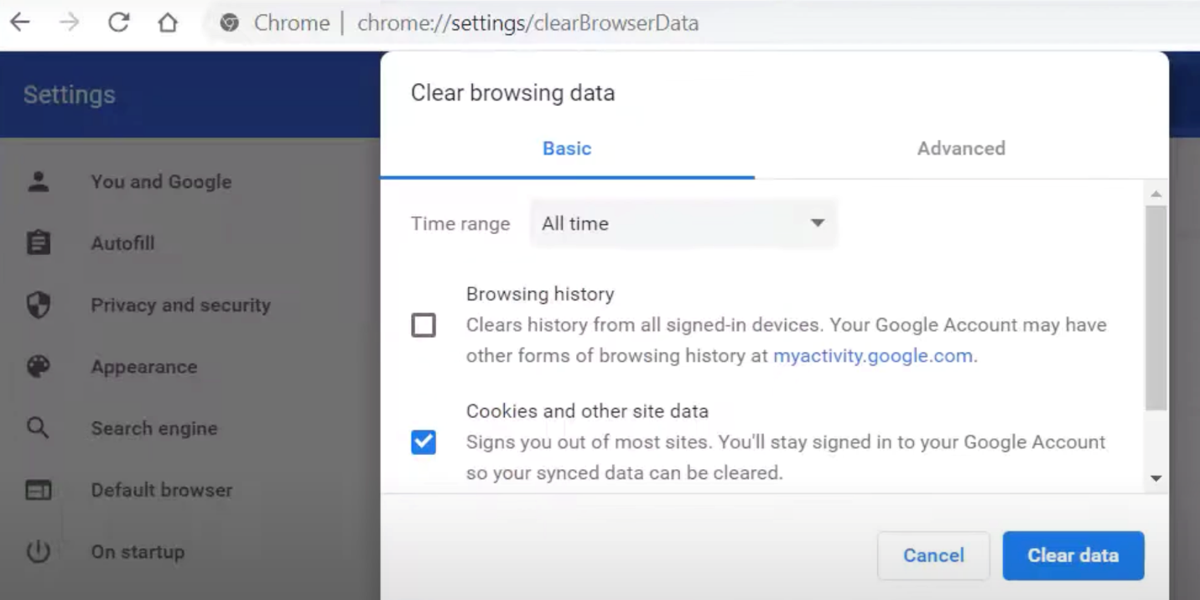
Figure 1
How To Fix Browser Warnings: https://youtu.be/PZT96hRr0z8.
Many of the HCC Library databases are subscription products that often have temporary/session-based URLs. This leads to many problems—observed in LI sessions and Reference transactions—with students submitting expired links for their assignments. We created a video to show students how to avoid this issue: “How To Find Permanent Links”: https://youtu.be/iItVMSfuJi0.
We found that reference questions were not the only area where instructional videos could be helpful. We also strived to market library resources, and videos played an important role in this effort. One resource—Academic Video Online (AVON)—was new to HCC and needed promotion. For AVON, we created a video to showcase the database’s features and demonstrate its two interfaces (one available through ProQuest and the other through the native AVON interface). This helped us to demonstrate the library’s value to faculty. We targeted our marketing of AVON to faculty because we wanted to encourage them to embed videos into their Canvas courses, thereby increasing views and justifying the cost.
Three other database videos required a section on creating user accounts. In many cases, librarians had already created their own accounts and could not access the interface to create the necessary new user screenshots. We worked around this problem in several ways. For The New York Times, a family member who was also a student was able to provide screenshots that allowed us to complete the video. In The Chronicle of Higher Education video, we showed both the Sign Up and Sign In tabs and signed in with an existing account while directing users to sign in with their own accounts. For the Libby app video, a colleague downloaded the app, set up an account, and took screenshots during the process.
The most popular videos dealt with citations and academic honesty, specific videos for MLA and APA citation style formats, and how to access citations from databases. Interest in citations extends beyond the U.S. border and traffic from international visitors was substantial. Not only does making the videos freely available help HCC students, faculty, and staff, but it also benefits those outside the U.S. and enhances HCC’s reputation.
We also leveraged video instruction to help our students with citations. A “Citing Basics” video eased students into our robust Cite & Write LibGuide. In addition, APA and MLA style videos were available to faculty to embed in their Canvas course pages. The videos supplemented extensive help texts. They offered an introduction to students unfamiliar with citations.
Video Creation Process
Throughout our creative process, we remained mindful of copyright and Creative Commons (CC) licenses. For example, the use of cut-out photos was part of a paid subscription from eLearningArt, which retained copyright for these images. They gave us permission to use the images in our public videos as long as they were not altered, but that meant that we could not attach a CC license to these videos with eLearningArt images. This meant others could link or use our videos, but they could not alter them for their own purposes.
CC video, images, and music were utilized in the creation of some of our videos. For example, our Understanding Databases video (https://youtu.be/53mFtlNL2Dc) featured cooking video clips to help students learn the difference between general and subject-specific databases.
HCC’s student population is diverse. It was important to respect this diversity through cut-out photos that, “represent the faces of our students.” Another important aspect of this effort was including voiceover recordings from different staff members who reflected this diversity. Examples of videos with diverse vocal styles include “Citing Basics” (https://youtu.be/UJDfX7JKVvE), “Welcome to the HCC Library” (https://youtu.be/5jAmmMt4tzw), and “Learning Commons: Presentation Media Rooms” (https://youtu.be/e0eSFLHQB50).
The learning object creation process varied case by case. Some video creation began with detailed meetings with faculty, which involved identifying expectations and necessary elements. One example of this collaboration with faculty is the “Searching and Citing Creative Commons Works” video (https://youtu.be/igvGyrh1Mko). At the request of English faculty who ask students to use CC works in their courses, this video walks students through the process of finding CC images, understanding the importance of citing CC images, and how to cite CC images in MLA citation style format.
Other videos grew organically within the library team. These videos were a mixture of library orientation and research aids. In these cases, we would often talk with colleagues about ideas for new videos and give them an outline of what to cover. Once the outline was generated and consensus reached, we moved to the script phase. Our best scripts had bracketed descriptions of what was happening in the video visually, which served as a form of storyboarding. This helped with selecting images that best represented the material being conveyed at that moment. We would not proceed to creating the video until we had team sign-off on the script, because it is easier to edit a script than try to re-do a video. The small size of our team gave us the freedom to create videos in a less formal way.
We used the versatile subscription-based Camtasia software to record and edit the videos. We chose to record and edit audio mostly with Audacity, which is a free program. Audacity is user-friendly and offers a rich interface for editing—for example, deleting the filler words and verbal tics inherent to voice recordings. Above all, we strove to ensure that our audio quality was very good. According to Creative Impressions Media, “Viewers are likely to forgive minor visual imperfections, but they are far less forgiving of audio issues, which can distract from the content and message.” Including high quality audio in a video is also an accessibility issue, as those with sight disabilities primarily rely on sound to understand the content. Clear audio enhances the experience for non-native English speakers as well.13
Once we finalized a video, we would upload it to the library’s YouTube channel. Depending on the nature and purpose of the video, we would then make it available to users via that channel, a link embedded in a Canvas course page, a libguide, a chat conversation, or an individual email.
Video Applications
Our videos served many purposes. For example, they were very useful in our live reference chat service and our LI sessions. When helping individual students on chat, we could save time by giving them a link to any of the more practical videos, such as How to Fix Browser Warnings or Setting up an Appointment with a Librarian. We also included videos in specific LibGuides, which could be sent to students in need.
Videos also offered another way for students to learn information literacy. For example, as part of a flipped classroom effort, students in some introductory English 101 courses were provided links to videos about how to select keywords and narrow a topic. Student and faculty reaction was positive, but this flipped effort was not formalized. To truly gauge its effectiveness, this flipped classroom approach needs to be a part of the regular workflow when communicating with teaching faculty.14 This flipped approach could cut down on the lack of time in typical one-shot LI instruction sessions, which is a common complaint of librarians.
Student assessment was a missing element of these stand-alone videos. Without a grade or assignment, some students may lack the motivation to watch these videos and therefore learn the content. Pixton notes that, “Often in IL instruction, intrinsic forms of student motivation are beneficial, if not essential, to maximizing the benefit of out-of-class work.”15 Brame concurs with this point about student interaction: “Follow short videos with interactive questions within an LMS, as done by Keithly and colleagues (2015), or within Google Forms, as done by Caudel and colleagues (2015).”16
To address this issue, a tutorial called HCC Library Basics was developed that had students watch a series of pre-existing videos and test themselves at the end. We created the tutorial using SpringShare’s LibWizard and linked it to a LibGuide with our collection of videos. We did not attach a grade to this tutorial, and it was not included in any Canvas courses (https://howardcc.libwizard.com/f/hcclibrarybasics-tutorial).
Because library interfaces, databases, and assignments will be updated, keeping track of learning objects is important, according to Pitts and Fritch.17 At the HCC Library, we followed this principle by creating several YouTube playlists. These playlists included Most Videos, Faculty, INFO 100 and other program-specific videos, Presearch, Searching, Help, Databases, Citations, Help, Welcome, and In-Text & Parenthetical Citation.
Statistics
Although anecdotal evidence about the success of any video may be accurate, usage statistics can validate these hunches. Analyzing statistics helps determine the effectiveness of the videos and gives insight into viewer behavior. YouTube Analytics provides statistics about individual videos and entire collections. Looking back five years to 2018–19 and comparing that data to 2023–24 numbers (Table 1), we see interesting trends.
Table 1
General Viewing Statistics.
| DATE | 7/1/2018–6/30/2019 | 7/1/2023–6/30/2024 |
|---|---|---|
| Videos | 32 | 50 |
| Views | 3,497 | 22,992 |
| Watch Time | 61.3 (hours) | 557.8 (hours) |
| Avg. View Duration | 1:03 (minutes) | 1:27 (minutes) |
| Avg. % Viewed | 39% | 47.5% |
What is interesting is that the average viewing duration in minutes did not change that much, even with the inclusion of some Zoom LI sessions recorded during the pandemic in 2020–21. These videos were 20 to 30 minutes in duration, but most students only watched 25 to 33% of each at best. This is solid evidence that longer videos are not worth the effort or as effective for our students.
As shown in Table 2, mobile device usage to view our videos increased dramatically. It is noteworthy that using mobile phones did not lessen the viewing time but rather increased it. It is unknown if the use of mobile phones was the reason for this increase. However, it does show we should not be concerned with students using mobile phones to watch our videos.
Continuing our drive for better accessibility and comprehension, we included closed captioning in all our videos. Table 3 shows how often users have selected closed captioning.
Table 3
Closed Captioning Statistics.
| DATE | 7/1/2018–6/30/2019 | 7/1/2023–6/30/2024 |
|---|---|---|
| Closed Captioning Used | 46% | 49% |
| Closed Captioning Hours Used | 27 | 223 |
| Avg. Viewing Time | 1:00 | 1:10 |
Closed captioning was consistently used almost 50% of the time, which is remarkable. It shows that providing closed captioning is worth the time and effort.
Because HCC supports an international student body, our videos are viewed by users outside of the United States. Data on U.S. viewership is shown in Table 4.
Table 4
U.S. Statistics.
| DATE | 7/1/2018–6/30/2019 | 7/1/2023–6/30/2024 |
|---|---|---|
| U.S. Views | 40% | 62% |
| U.S. Watch Time | 27.7 (hours) | 44.7 (hours) |
Surprisingly, U.S. views were higher in the most recent 2023–24 year (as percentage of total views) than they were five years previously. This suggests that international views have fallen or more instructors have included the videos in their Canvas course pages, which are watched by more U.S. students. These statistics also may be skewed by viewers using virtual private networks, which mask their physical location.
Creating videos requires focused attention on the need to be mindful of changes to library websites and spaces. While creating a video about how to access databases, we noticed that the EZProxy login page had not been updated with the most current library template and did not provide technical support information. We requested the Systems Librarian to update the EZProxy login page prior to making the database access video. The drive to create a video prompted a positive change.
In addition, video updates are needed when physical changes are made in the library. When the director agreed to move furniture near the main entrance to create a more welcoming flow, this prompted a new version of a welcome video. The updated video also was improved with the inclusion of a current photo of some of the library staff.
Conclusion
At the HCC Library, we sought to level the playing field for online students and others. This endeavor resulted in a set of procedural norms and a collaborative and creative environment. This creative, positive attitude sparked innovative ideas for producing and developing videos that better served our students.
Notes
[1] Łukasz Tomczyk, Maria Lidia Mascia, and Francisco David Guillen-Gamez, “Video Tutorials in Teacher Education: Benefits, Difficulties, and Key Knowledge and Skills,” Education Sciences 13, no. 9 (September 2023): 11, doi:https://doi.org/10.3390/educsci13090951.
[2] Julie Dirksen, Design for How People Learn (New Riders, 2016), 90.
[3] Margaret Bates, “Creating Short-Form Content for Academic Libraries: A Workflow,” Reference Services Review 52, no. 3 (2024): 406, https://doi.org/10.1108/RSR-07-2024-0037.
[4] Flower Darby and James M. Lang, Small Teaching Online: Applying Learning Science in Online Classes (Wiley, 2019), 51–52.
[6] Robert M. Gagné, The Conditions of Learning (Holt, Rinehart and Winston, 1977), 292–3.
[7] Raquel Gutiérrez-González, Alvaro Zamarron, and Ana Royuela, “Video-Based Lecture Engagement in a Flipped Classroom Environment,” BMC Medical Education 24, no. 1 (2024): 10, https://doi.org/10.1186/s12909-024-06228-x.
[8] YouTube, “How Engagement Metrics Are Counted,” YouTube Help, n.d., https://support.google.com/youtube/answer/2991785?hl=en#:~:text=YouTube%20engagement%20metrics%20(views%2C%20likes,video%20or%20channel’s%20overall%20popularity.
[9] Robert Tomaszewski, “Library Snackables: A Study of One-Minute Library Videos,” The Journal of Academic Librarianship 49, no. 2 (2023): 102647, https://doi.org/10.1016/j.acalib.2022.102647.
[11] Emily F. Butler et al., “How to Produce Effective How-To Library Videos,” Computers in Libraries 42, no. 4 (May 2022): 16, https://marymountuniv.idm.oclc.org/login?url=https://www.proquest.com/trade-journals/how-produce-effective-library-videos/docview/2655634579/se-2.
[13] “How Can Quality Audio Enhance the Impact of Your Video Productions?,” Creative Impressions Media, March 16, 2024, https://www.creativeimpressionsmedia.com/post/the-importance-of-audio-in-video-production-cannot-be-overstated.
[14] Jane Mason Adamson and Sandra Lee Hawes, “A Principled Approach: Using Instructional Design to Enhance Synchronous Online Instruction,” in Creative Instructional Design: Practical Applications for Librarians, ed. Brandon K. West, Kimberly D. Hoffman, and Michelle Costello (Association of College and Research Libraries, 2017), 166.
[15] David Pixton, “Teaching Expert Information Literacy Behaviors Through Decision-Based Learning,” College & Research Libraries 84, no. 6 (2023): 949, doi:https://doi.org/10.5860/crl.84.6.934.
[16] Cynthia J. Brame, “Effective Educational Videos: Principles and Guidelines for Maximizing Student Learning from Video Content,” CBE — Life Sciences Education 15, no. 4 (2016), https://doi.org/10.1187/cbe.16-03-0125.
[17] Joelle Pitts and Melia E. Fritch, “Flipping Out(ward): Changing the Instructional Model for Large-Enrollment Courses,” in Creative Instructional Design: Practical Applications for Librarians, ed. Brandon K. West, Kimberly D. Hoffman, and Michelle Costello (Association of College and Research Libraries, 2017), 237.
Acknowledgements
We want to thank Alison S. Gregory, Dean of Libraries, Assistant Provost for Special Projects, Associate Professor, Marymount University, and Nana Owusu-Nkwantabisa, Director, Library & Learning Commons, Howard Community College for their support and input.
Competing Interests
The authors have no competing interests to declare.