
(1) Overview
Introduction
Soundscape: Regulation and representation
The study of the acoustic environment has evolved from noise mitigation to a soundscape approach centered on human perception in context, formalized in the ISO 12913 series. ISO 12913-1:2014 defines the soundscape concept (1), while ISO/TS 12913-2:2018 standardizes perceptual data collection (2).
Soundscapes are represented using the circumplex model of perceived affective quality, structured by the orthogonal axes of Pleasantness and Eventfulness (3). ISO/DTS 12913-3:2025 provides trigonometric methods to reduce eight perceptual attributes to coordinates within this space (4). However, median-based representations have been criticized for failing to capture perceptual variability (5), leading to the use of probabilistic approaches such as bivariate Kernel Density Estimation (KDE) and tools like Soundscapy (5). Cross-cultural research from the Soundscape Attribute Translation Project (SATP) further demonstrates the need for adjusted angular relationships, supported by the Structural Summary Method (SSM), which assesses conformity to the circumplex model using cosine functions (6, 7).
The representation of soundscape data is theoretically grounded in the circumplex model of perceived affective quality, which organizes human responses within a two-dimensional affective space defined by the orthogonal axes of Pleasantness (x-axis) and Eventfulness (y-axis). To produce the standard soundscape scatter plot, Part 3 of ISO 12913 provides trigonometric projection formulas that reduce scores from eight perceptual attributes—pleasant, vibrant, eventful, chaotic, annoying, monotonous, uneventful, and calm—into a single coordinate pair (x, y) scaled between –1 and +1 (5) (Figure 1).
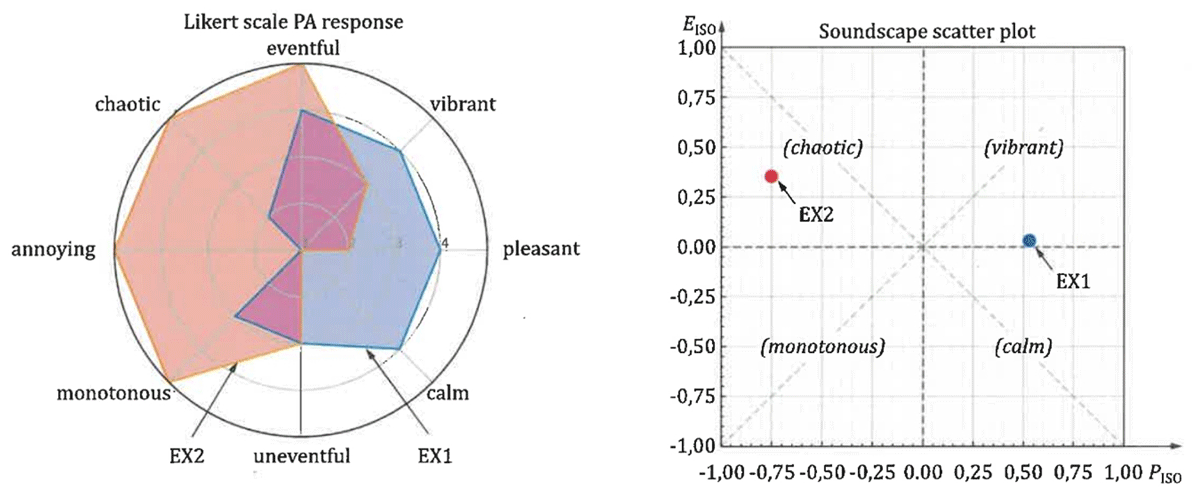
Figure 1
ISO 12913-3 (2025), representation proposal.
Python as a tool for calculation and representation
Python has become the dominant language for scientific computing due to its readable syntax and vast ecosystem of specialized libraries (8).
At the core of numerical computation, NumPy enables efficient matrix operations, while SciPy provides high-level functions for signal processing and mathematical analysis (9). The Pandas library is the industry standard for managing large, heterogeneous tabular datasets (10). Computational speed is significantly enhanced through GPU acceleration using libraries like CuPy, allowing for the high-speed estimation of econometric models and pixel-wise strain measurements (11, 12).
For data visualization, Matplotlib serves as the primary engine for generating publication-quality figures with precise control over every graphical element (13). Specific research needs are met by specialized tools, such as Ratcave for 3D cognitive psychology stimuli (14) and PyVT for the graphical analysis of fluid dynamics (15). Finally, integration with electronic notebooks such as Jupyter enables full documentation of the analytical workflow by combining code, data, and results in shareable formats, thereby ensuring scientific transparency and shareable format (10).
Graphical representation in contemporary scientific research has transitioned from a manual, labor-intensive process to a sophisticated digital workflow facilitated by the Python open-source ecosystem (8, 10). Across diverse disciplines, the focus has shifted toward standardization, interactivity, and the communication of complex, multidimensional data (5, 15).
Standardised perception and probabilistic models
In the field of soundscape research, graphical representation is governed by the ISO 12913 series, which traditionally employs a two-dimensional circumplex model to map human perception along the axes of Pleasantness and Eventfulness (5). Modern software solutions now advocate for moving beyond ‘single-point’ median representations toward bivariate KDEs and heatmaps (16). This approach better reflects the inherent uncertainty and diversity of human responses, providing a more nuanced visual summary of group perceptions (5).
Domain-specific visual analytics
Specialized software tools demonstrate how graphical representation is tailored to the unique requirements of different scientific fields:
Fluid Dynamics: The use of ‘scene modules’ allows for the simultaneous rendering of multiple geometric elements, such as cut planes, streamlines, and vector fields, facilitating multivariate analysis (15).
Mass Spectrometry: Graphical ‘fingerprints’ such as van Krevelen plots and Kendrick mass defect maps are essential for interpreting the chemical complexity of organic samples (17).
Digital Image Correlation (DIC): Visualization is critical for measuring full-field displacement and strain, often represented through contour plots and line cuts that map physical deformations (18).
Geology and Physics: Tools provide automated generation of ternary diagrams, rose diagrams, and magnetic equilibrium reconstructions, ensuring that figures meet the precision required for high-level publications (8, 19).
Theoretical background
Soundscapy: The essential python architecture
Soundscapy is an open-source Python library designed to provide a standardized and accessible framework for the characterization and analysis of soundscape perception, strictly adhering to the ISO 12913 series of standards (Soundscapy: A python package for soundscape assessment and analysis). The software specifically addresses the limitations found in traditional ISO methods, which often struggle to summarize the collective perception of groups or specific locations accurately (5).
Python architecture and core functionalities
The architecture of Soundscapy is built upon a modular ecosystem of scientific Python libraries to ensure both flexibility and performance:
Data Handling and Processing: The package utilizes Pandas as its primary engine for managing large-scale survey datasets, allowing for robust data cleaning and validation (16).
Probabilistic Visualization: Departing from the traditional ‘single-point’ median method, Soundscapy leverages Matplotlib and Seaborn to implement a distribution-based approach (5). It uses bivariate KDEs to visualize the collective perception of a space as a shaded distribution within the two-dimensional circumplex model (Pleasantness vs. Eventfulness) (16).
Acoustic and Psychoacoustic Analysis: For the treatment of binaural recordings, Soundscapy subclasses standard signal classes to provide a dedicated binaural class (16). This class integrates three specialized toolboxes: (i) Python Acoustics: For calculating standard-referenced acoustic indices such as LAeq and LZeq, (ii) Scikit-maad: For extracting ecoacoustic and bioacoustic indices, and (iii) MoSQITo: For computing complex, time-varying psychoacoustic metrics like loudness, sharpness, and roughness (16).
Workflow and reproducibility
A key architectural feature is the focus on research reproducibility through the AnalysisSettings class, which allows users to define and share analysis parameters via YAML files (16). Furthermore, the package is optimized for high-throughput research, supporting parallelized batch processing of multiple recordings to significantly reduce computational time on multi-core systems (16).
Ultimately, Soundscapy serves as a comprehensive ‘modeling and prediction pipeline’ that bridges the gap between raw acoustic data and nuanced human perceptual outcomes (16). However, advanced statistical analyses—such as SSM and ISO—and research requirements, such as plotting of medians or data filtering, as well as a user-friendly graphical environment, are not implemented in Soundscapy.
Graphical environment: Toward user-friendly operation
Python provides several frameworks that transform technical code into applications with intuitive buttons and commands, making them accessible to researchers without deep programming expertise:
PyQt5/Qt: This framework is the most robust choice for desktop applications, supporting complex workflows in seismic hazard assessment (20), fluid dynamics (15), and high-resolution mass spectrometry (17). Tkinter: This built-in module is utilized for lightweight interfaces, such as the control systems for microscopes (21) and plotting tools for Nuclear Magnetic Resonance (NMR) spectra (13). Flask and InertiaJS: These are employed to build reactive web applications that allow manual data entry and real-time synthesis of dynamical controllers (22). Jupyter Notebooks: By providing a cell-based interactive environment, they remove barriers for users performing bioacoustic or neurophysiological analytics (9, 10). Pyinstaller: This is a crucial tool for packaging these Python applications into standalone executables (.exe or .dmg), allowing final users to install and run them like traditional commercial software (23).
Statistics according to SSM: The necessary analyses
In soundscape analysis, the SSM is a robust statistical procedure designed to evaluate whether empirical data conform to a theoretical circumplex structure (24). In the field of soundscape research, the SSM functions by fitting a cosine curve (a sinusoidal wave) to the scores of perceptual attributes as they are arranged around the circumplex space defined by the dimensions of Pleasantness and Eventfulness (7).
The most prominent features of the SSM statistical process include fundamental parameters that parsimoniously summarize the profile of the data (7, 24). Elevation (e): The average score across all eight perceived affective quality attributes. Amplitude (a): The degree of differentiation or specificity in the profile, indicating how much the scores deviate from the average. Displacement (d): The exact location on the circle where the peak of the profile (the most dominant theme) occurs. Goodness of Fit (R2): This metric determines how well the data fit the expected sinusoidal pattern; values above 0.8 are generally considered ‘good,’ whereas those below 0.7 are deemed ‘unacceptable.’
A significant advancement in the SSM is the integration of resampling-based bootstrap methods. While the traditional SSM was purely descriptive, these modern extensions allow researchers to draw statistical inferences by calculating confidence intervals for the parameters. This enables rigorous comparisons between different constructs or groups, such as testing whether two different cultures or genders perceive the same acoustic environment in a significantly different manner (24).
The SSM is the central analytical tool for the SATP, an international initiative to standardize soundscape descriptors in 18 languages (6). Its application has revealed critical linguistic and cultural nuances. It helped identify that terms like ‘eventful’ carry emotional weight in English, which may not be present in literal translations like the Spanish ‘con actividad’ (7).
Research using the SSM has demonstrated that because different languages do not maintain strict 45-degree relationships between attributes, adjusted angles are required to accurately locate perceptions within the circumplex model and ensure international comparability (6).
The method allows researchers to distinguish between ‘neutral’ soundscapes—which produce a flat profile and a poor R2 fit—and those that evoke strong, consistent emotional responses (7).
In summary, the SSM provides the necessary mathematical framework to validate the location of attributes within the ISO 12913 series and to objectify the subjective experience of the acoustic environment across global contexts.
Implementation and architecture
The architecture of SoundGraphy is based on a functional tripod: creation of a graphical environment and a user-friendly and intuitive data entry system, representation improvements of the soundscape according to ISO 12913, and finally, incorporation of SSM statistical analyses.
Graphical and usability improvements
While Soundscapy provides a robust foundational architecture for programming-centric users, it fundamentally lacks a user-friendly graphical environment for researchers without deep coding expertise. SoundGraphy directly addresses these operational barriers by introducing a dedicated graphical user interface (GUI) and an intuitive data entry system.
Leveraging Python-based application frameworks, the software transforms rigid script execution into interactive controls. This streamlined environment includes several core usability enhancements over Soundscapy, some of which are addressed below.
Intuitive, standalone control interface
Soundscape research is inherently cross-disciplinary, attracting professionals from diverse fields—such as acoustics, building construction, architecture, and environmental physics—many of whom do not possess computer programming backgrounds. SoundGraphy eliminates the technical prerequisite of knowing Python by offering an interactive and highly intuitive GUI built upon CustomTkinter, a Python library that uses Tkinter with the aim of providing enough mechanisms to create modern attractive GUIs. To support the current software usability standards and reduce visual fatigue during long analysis sessions, the interface features fully integrated Light Mode and Dark Mode configurations. Furthermore, by utilizing PyInstaller, the software is compiled and packaged into a self-contained executable application. This allows end-users to install and run the program natively like traditional commercial desktop software, operating seamlessly on their machines without needing a Python installation, shell terminal configurations, or manual package dependency management.
User-friendly data-entry
Graphical profiling in soundscape analysis involves massive datasets that consolidate widespread human perceptual surveys. Traditionally, these datasets are stored across varying spreadsheet structures and platform ecosystems. Powered by the robust Pandas engine, SoundGraphy effortlessly ingests these large, heterogeneous tabular files, supporting both proprietary formats and open-source file categories—including Microsoft Excel (.xlsx), Google Sheets, and plain-text Delimiter-Separated Values, such as standard CSV spreadsheets. Because independent international research teams employ highly customized tabular layouts with varying variable names, the software features an integrated manual mapping utility. Instead of forcing users to rewrite their data to match a rigid template, this utility enables researchers to directly bind each of the eight standardized ISO 12913 perceptual attributes to its corresponding column in their specific spreadsheet via simple drop-down menus (See Figure 2).
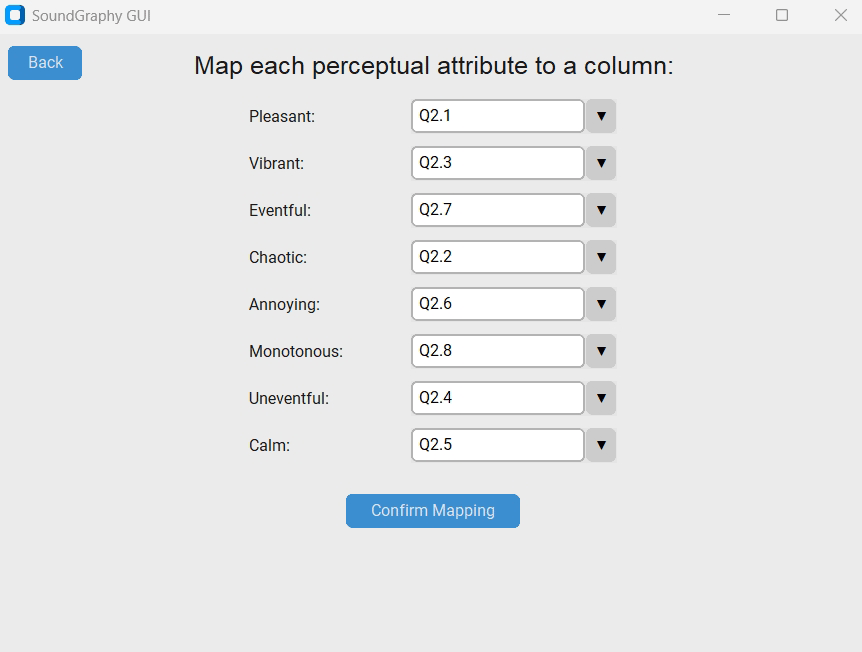
Figure 2
Example of a custom mapping from columns to the perceptual attributes.
Advanced database filtering system
Empirical soundscape databases contain complex, multi-dimensional environmental and social variables that extend far beyond raw emotional metrics. Ingestion profiles contain varied spatial metadata (e.g., different cities, neighborhoods, or specific urban acoustic environments), distinct temporal markers, and diverse demographic participant backgrounds. In practical application, investigators rarely need to target an entire database at once; rather, thorough scientific investigations, require slicing the data to isolate highly specific observational scenarios. For example, a researcher might want to examine the exact acoustic perception profile of an urban square strictly during peak traffic hours on working weekdays between 7:00 AM and 9:00 AM. Previously, investigators had to manually partition, filter, and clean raw data files using external database software prior to running any specialized plot code. SoundGraphy completely automates this pre-processing stage by implementing an integrated, real-time database filtering system, allowing users to instantly segment, refine, and isolate targeted datasets directly inside the application environment before generating any graphical representations.
To accommodate these diverse data types, SoundGraphy’s integrated filtering engine features dynamic, context-aware logical operators tailored to the specific nature of each selected database column:
- Temporal Data Filtering (Date and Time Columns):
For variables managing chronological data, the system provides specialized operators to easily capture discrete seasonal, weekly, or hourly windows. Researchers can isolate data subsets using intuitive operations such as:
- Before/after (to segment data chronologically around specific events)
- Between/outside (ideal for framing precise hourly shifts, such as the 7:00 AM to 9:00 AM peak traffic window)
- On/not on (to target or exclude exact evaluation dates)
- Numerical Metric Filtering (Continuous and Discrete Variables):
For quantitative variables—such as the age or a Soundscape Quality Index—the platform deploys standard mathematical logical bounds (See Figure 3). This enables precise thresholding through operators including:
- >, ≥/<, ≤ (to filter out extreme noise levels or quiet background thresholds)
- =/≠ (for targeting specific rounded response brackets)
- Between/outside (to capture or isolate data falling within narrow statistical ranges)
- Categorical Domain Selection (Low-Variety Variables):
For columns containing descriptive labels or low-cardinality categorical data, SoundGraphy bypasses rigid text-matching syntax. Instead, it dynamically scans the column and generates a manual checklist interface. This allows researchers to effortlessly check or uncheck specific attributes to include in the active working memory. This utility is perfectly suited for quick segmentation across:
- Demographic markers (e.g., gender categories such as Male/Female)
- Temporal conditions (e.g., calendar classifications like Weekday/Holiday)
- Spatial identifiers (e.g., specific alphanumeric tracking codes designating the exact measuring site or urban square, such as STOP01 or STOP02)
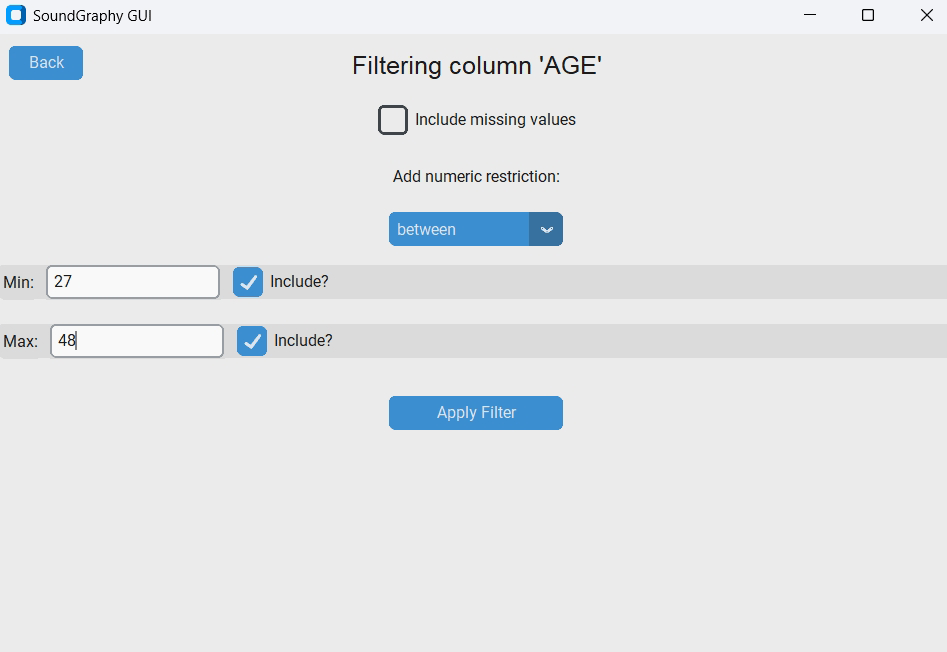
Figure 3
Numerical filtering example, where the quantitative variable ‘AGE’ is isolated using the ‘between’ logical operator to restrict the active dataset to participants aged 27–48 years old, inclusive. The interface also highlights options to manage missing values and toggle boundary inclusion thresholds.
By embedding these tailored multi-type filtering parameters directly into the GUI, SoundGraphy bridges the gap between raw data warehousing and localized perceptual analysis, allowing complex cross-conditional soundscape profiles to be generated in just a few clicks.
Improvements to the representation of soundscape (ISO 12913)
While foundational packages like Soundscapy support basic multidimensional plotting, configuring specialized graphical plots remains highly complex and restrictive for the end-user. SoundGraphy significantly upgrades this visualization architecture by introducing four overarching categories of data representations—each with deep configuration options—along with automated categorical hue differentiation.
Categories of graphical representation
Two-dimensional Cartesian projections (The ISO circumplex plane)
This core category focuses on the traditional coordinate space defined by the orthogonal PISO and EISO axes. While Soundscapy serves as the underlying pipeline for these coordinates, its visualization settings are notoriously difficult to adjust natively. A scatter plot is the basic graphic used in this category, where all the single responses are projected to a single point in the Cartesian axes. However, when datasets are excessively dense, managing individual scatter points becomes unreadable. SoundGraphy solves this by providing some additional features that can be freely combined by the user.
- Kernel Density Options: Employs probabilistic bivariate KDE to visualize collective perception as shaded distributions. Some custom variants are allowed:
Full Percentile Contour Spectrum: Displays the entire distribution range across every decile (from P10 up to P90).
Isolated P50 Contour: Limits the visualization exclusively to the core P50 boundary in order to reduce the data shown even more, therefore not overwhelming the end-user.
Each decile can be rendered either as a solid filled region or as a clean vector outline.
- Marginal Axis Distributions: Users can choose whether or not to display the univariate kernel distribution curves along the top and right margins of each axis, providing a quick view of data density for both PISO and EISO independently.
- Automated Attribute Labeling: SoundGraphy automatically overlays the eight standardized perceptual attributes (pleasant, vibrant, eventful, chaotic, annoying, monotonous, uneventful, and calm) onto their exact angular locations. The location of these labels has been carefully chosen in order to not be placed where most of the scattered data points are.
- Integrated Median Representation: Because single-point median representations are highly valued for summarizing an entire environment’s acoustic profile, users can opt to automatically overlay a composite median marker. SoundGraphy calculates this by extracting the statistical median of each of the eight individual perceptual dimensions and subsequently projecting the resulting vector onto the Cartesian plane strictly according to the ISO standard equations. Depending on the user’s aim, a label can optionally be added to that marker.
Box-and-whisker plots
Powered by the Seaborn statistical visualization library, boxplots are essential in soundscape research because they reveal the underlying data distribution, interquartile range (IQR), and outliers that single median points completely obscure. SoundGraphy offers two deployment paths for this format:
- Classic Approach: Automatically places the eight standardized perceptual attributes along the X-axis to showcase the comparative rating spreads of each emotional index side by side.
- Personalized Bi-Axis Variables: Allows researchers to explicitly customize what variables occupy the X and Y axes. For instance, a user can chart discrete stimulus evaluation points (e.g., specific measurement locations) against a dependent axis like Eventfulness to analyze structural variance across diverse urban conditions.
Custom X versus Y scatter plot
For multi-dimensional exploration beyond standard soundscape metrics, SoundGraphy features a highly flexible, custom bivariate plotting tool. This feature allows users to map any two numerical or categorical variables from the imported spreadsheet against each other on a customized Cartesian coordinate system (X-axis vs. Y-axis).
Upon selecting this visualization mode, a dedicated user interface prompts the user to assign specific columns for both axes, providing an unrestricted framework for cross-variable analysis (e.g., examining the relationship between participant age and a specific perceptual attribute response, or comparing different acoustic indicators).
Radar plots (spider charts)
Radar plots provide an alternate circular profile mapping that matches how survey protocols are structured around participants. These charts map the intensity of responses across the eight directional components simultaneously, letting the user directly analyze the eight perceptual attributes and not only their projections.
To prevent visual clutter, SoundGraphy enforces a practical GUI constraint based on a maximum threshold of data rows (or stimuli categories) simultaneously. If the filtered dataset is below this limit, the chart displays every individual response as a separate profile. However, if the dataset exceeds this threshold, the application intelligently adapts: it displays a warning dialog to the user and automatically calculates and plots the median profiles instead. This dynamic aggregation prevents the overlapping shapes from becoming an unreadable web, preserving crisp visual clarity for comparative studies without restricting larger datasets.
Structural Summary Method (SSM) fitting
This entirely novel analytical representation tracks empirical conformity to the circumplex system by converting data into continuous sinusoidal curves. Because it represents a core structural contribution of SoundGraphy, its mathematical and visual deployment is detailed extensively in the following section.
Categorical variable differentiation (hue mapping)
One of the most critical visual analytical advancements in SoundGraphy is the native implementation of variable-based color differentiation. Environmental soundscape databases are highly heterogeneous; researchers frequently need to visually compare separate data subsets on a single coordinate canvas. SoundGraphy integrates an automated grouping utility that allows users to pick any categorical metadata column to drive the plot’s color palette. This enables immediate visual comparison across key research parameters:
- Spatial Tracking: Comparing different physical measurement stations or specific urban squares on a single canvas to see how spatial design alters perception.
- Temporal Classifications: Evaluating the distinct behavioral shift between Weekdays and Holidays, or analyzing diurnal patterns across changing hours of the day.
- Demographic Cross-Sections: Slicing spatial clusters by participant background indicators (such as age groups or gender responses) to verify cross-cultural perceptual divergence.
By automating these advanced formatting and grouping routines, SoundGraphy removes the need to write custom Matplotlib or Seaborn color-mapping scripts, letting researchers isolate complex acoustic interactions directly from the interface.
Statistical incorporation of SSM analyses
A primary and novel contribution of the SoundGraphy software system is the complete integration of the SSM. While baseline open-source software tools like Soundscapy excel at handling traditional multi-dimensional data processing and bivariate probability density plots, they fundamentally do not support advanced circumplex validation methods. Prior to the development of SoundGraphy, researchers looking to evaluate structural conformity to the circumplex model had to extract raw scores, migrate them out of their plotting ecosystem, and manually perform complex mathematical curve fitting and data visualization using external scripting setups or custom statistical frameworks. By bridging the gap between descriptive mapping and inferential geometric verification within a single interface, SoundGraphy introduces a dedicated analytical module that implements both the statistical computations and the graphical validation plots required for SSM.
Mathematical foundations and parameter estimation
The SSM serves as a robust statistical procedure designed to evaluate whether empirical soundscape survey responses adhere to the theoretical circumplex geometry dictated by the ISO 12913 standards. Rather than treating the eight perceptual attributes as isolated variables, the SSM treats them as a continuous, interrelated profile ordered around a 360-degree circular space. SoundGraphy leverages the specialized Soundscapy library backend to execute the mathematical regressions. Through this framework, the software evaluates the profile of the data by fitting a sinusoidal cosine curve to the empirical scores. This mathematical optimization outputs three fundamental parameters that parsimoniously summarize the entire acoustic perception profile: Elevation (e), Amplitude (a), and Displacement (d).
Graphical sinusoidal verification layout
Beyond calculating these numerical metrics, SoundGraphy features an automated plotting sub-module to visually verify the goodness of fit. The software automatically constructs a standardized two-dimensional line chart that contrasts empirical observation against the optimized mathematical model:
- The Horizontal Axis (X-Axis): It maps the eight standardized perceptual attributes. Crucially, they are plotted in a strict, mathematically sequential angular order (which depends on their position in the 2D plane) to allow the data to be fitted to a continuous cosine wave. This order is: pleasant, vibrant, eventful, chaotic, annoying, monotonous, uneventful, and calm.
- The Vertical Axis (Y-Axis): It represents the response intensity values assigned to each perceptual attribute. On this coordinate system, SoundGraphy projects two distinct lines simultaneously to compare the real and the fitted values for each perceptual attribute:
The Empirical Profile (Real Data): This represents the direct experimental data, plotted as a series of connected points reflecting the statistical median score calculated for each of the eight individual soundscape attributes.
The Theoretical Profile (Predicted Fit): This represents the idealized circumplex model curve generated by the SSM regression. For every corresponding octant angle (α), the software uses the parameters supplied by Soundscapy and computes the predicted Y-axis position using the following trigonometric function:
The predicted fit can either be represented as a polygonal connected line, or as the actual sinusoidal function.
This visual representation, alongside the R2 parameter, provides a streamlined tool for assessing cross-cultural translation shifts and geometric variations across diverse international contexts.
Quality control
Given the authors’ research group experience in soundscape research, SoundGraphy has been validated and tested using data from the numerous measurement campaigns carried out by this group since late 2016. Prior to the development of SoundGraphy, data analyses in accordance with the international standard ISO 12913 and other traditional statistical techniques were carried out based on the authors’ expertise in the field. Particular attention has been paid to ensuring that the SoundGraphy interface and its various options are interpreted correctly, and to including the visualization and analysis options requested by researchers in this field.
In summary, the SoundGraphy tool was tested by comparing its results with those that had already been verified using traditional expert analysis methods. To this end, the software has undergone testing using our own data for over six months, with early versions shared with select colleagues. The authors gathered suggestions for improvement and optimization based on this experience, and these have shaped the current version of the software.
Illustrative examples
To demonstrate the practical capabilities, dataset flexibility, and advanced visualization features of SoundGraphy, two distinct experimental scenarios were simulated using example datasets available in the public repository. These scenarios illustrate how the software processes different data collection methodologies—namely, soundwalks across multiple areas and localized in situ assessments—while strictly complying with the data reduction and projection standards defined by the ISO 12913 series. The primary metrics extracted from both datasets are compiled in Table 1, which lists the median scores for the eight perceptual attributes (PAs1) alongside their respective PISO (Pleasantness) and EISO (Eventfulness) coordinate projections.
Table 1
Median PA values and projected ISO Pleasantness (PISO) and Eventfulness (EISO) coordinates for multi-site and single-site example datasets.
| PA | 1 | 2 | 3 | 4 | 5 | 6 | 7 | 8 | PISO | EISO |
|---|---|---|---|---|---|---|---|---|---|---|
| SITE | P | CH | V | U | CA | A | E | M | ||
| 1 | 3.0 | 1.0 | 3.5 | 3.0 | 4.0 | 1.0 | 3.0 | 2.0 | 0.537 | –0.110 |
| 2 | 3.0 | 3.0 | 2.0 | 2.0 | 2.0 | 4.0 | 4.0 | 3.0 | –0.250 | 0.207 |
| 3 | 3.0 | 2.0 | 3.0 | 2.0 | 3.0 | 2.0 | 4.0 | 3.5 | 0.140 | 0.097 |
| 4 | 3.0 | 4.0 | 3.0 | 1.0 | 3.0 | 3.5 | 4.0 | 3.0 | –0.125 | 0.384 |
| Single site | 4.0 | 4.0 | 3.0 | 2.0 | 3.0 | 3.0 | 4.0 | 3.0 | 0.030 | 0.280 |
The column definitions for the two example datasets are as follows: N (first column): identification number of the data series; STOP (second column): hypothetical location being evaluated—only one in the first example file and four in the second example file; and AGE (third column): fictitious age of the respondent. Finally, the eight perceptual attributes (PA) are represented by columns Q2.1 to Q2.8 (Columns 4 to 11) with Q2.1 representing ‘pleasant’ (p), Q2.2 ‘chaotic’ (ch), Q2.3 ‘vibrant’ (v), Q2.4 ‘uneventful’ (u), Q2.5 ‘calm’ (ca), Q2.6 ‘annoying’ (a), Q2.7 ‘eventful’ (e), and Q2.8 ‘monotonous’ (m). PISO and EISO are calculated from these eight values using ISO 12913-3 formulas.
Multi-site soundwalk analysis
The first application evaluates a multi-site dataset containing 120 survey responses collected across four sequential locations (30 entries per site), simulating an urban soundwalk trajectory. This scenario demonstrates SoundGraphy’s ability to handle spatial metadata via the ‘STOP’ tracking variable and leverage its advanced categorical plotting tools.
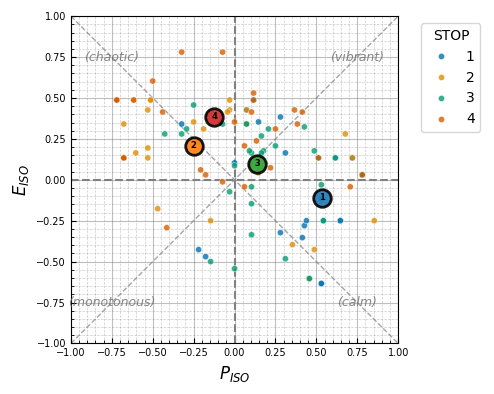
Figure 4
Two-dimensional Cartesian projection (scatter plot).
Individual responses from the multi-site dataset projected onto the PISO and EISO axes, displaying an integrated median representation marker for each of the four stops.
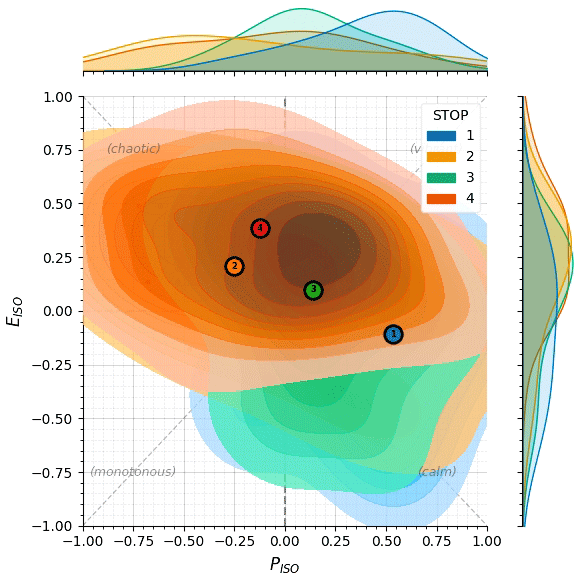
Figure 5
Kernel density option (full percentile contour spectrum).
Provides bivariate distribution layout showing human response variance across all deciles from P10 to P90, accompanied by independent marginal axis distributions.
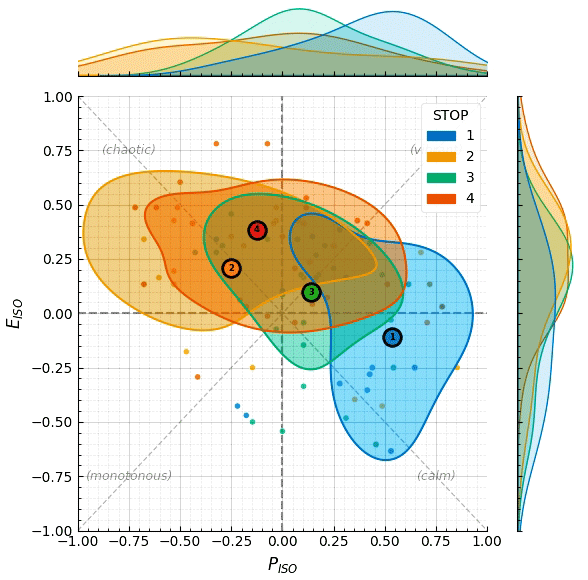
Figure 6
Kernel density option (isolated P50 contour).
Shaded vector limits restricted exclusively to the core P50 boundary, enabling a simplified visual comparison of overlapping spatial categories on a single plane.
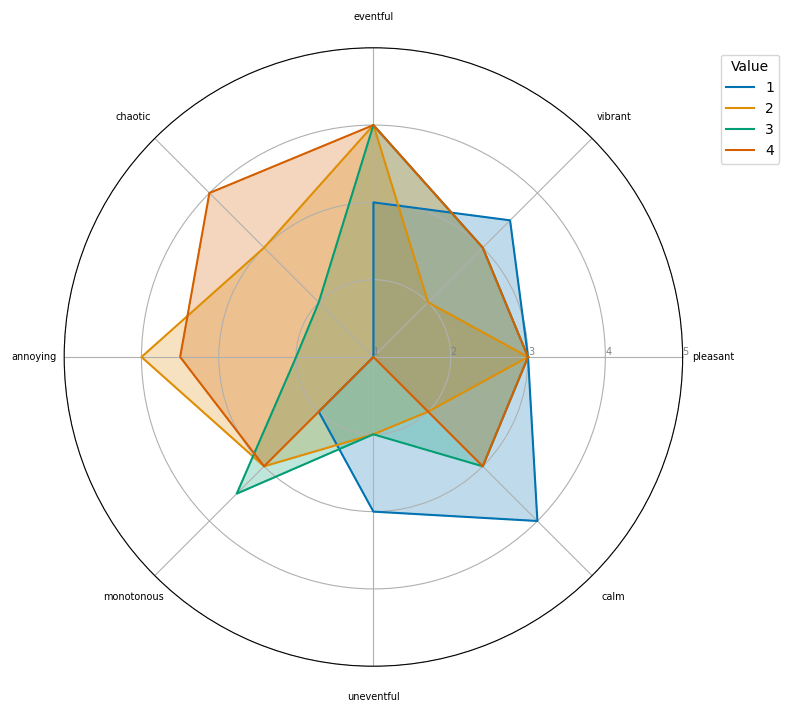
Figure 7
Radar plot (spider chart) for multi-site evaluation.
Simultaneous circular mapping comparing the median response profiles of the eight standardized perceptual attributes across Stops 1 to 4.
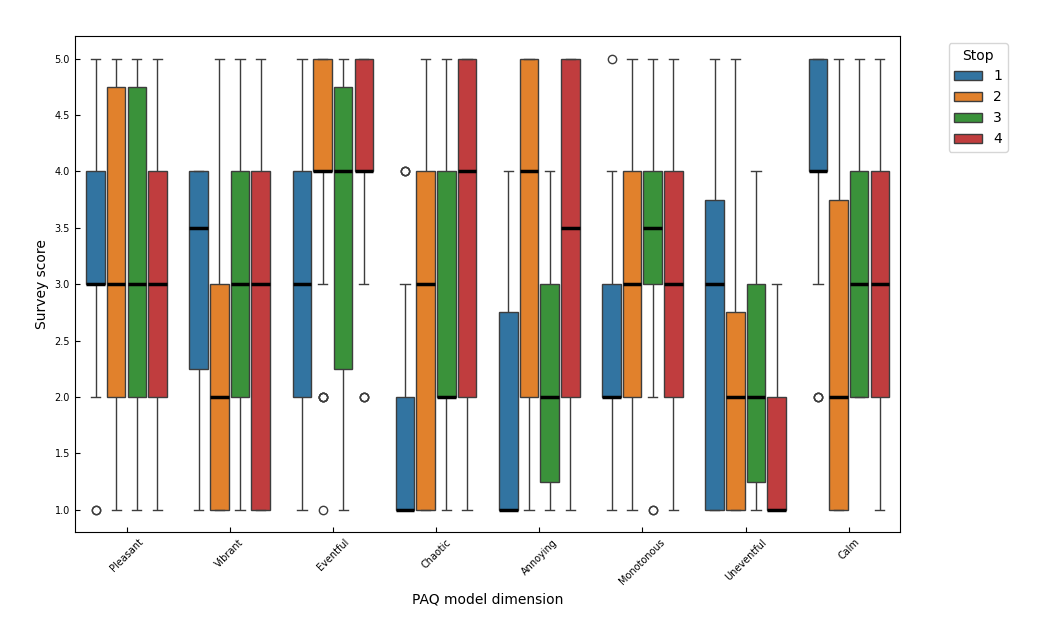
Figure 8
Box-and-whisker plot.
Statistical distribution spread revealing the IQR, internal medians, and outliers for each of the eight standardized perceptual dimensions, grouped by evaluation site.
Localized in situ assessment
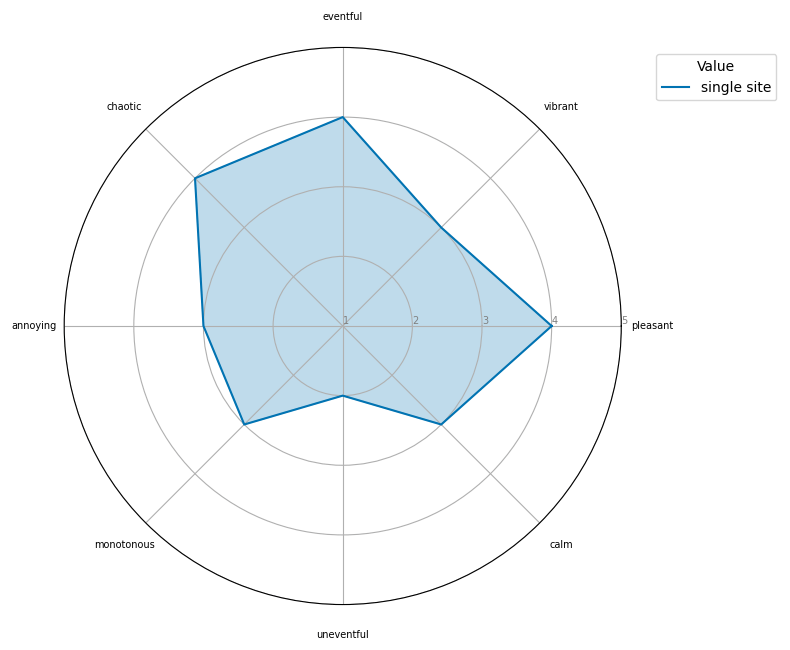
Figure 9
Radar plot (spider chart) for a single site.
Circular profile mapping displaying the individual intensity metrics and dominant perceptual orientations for the localized in situ assessment.
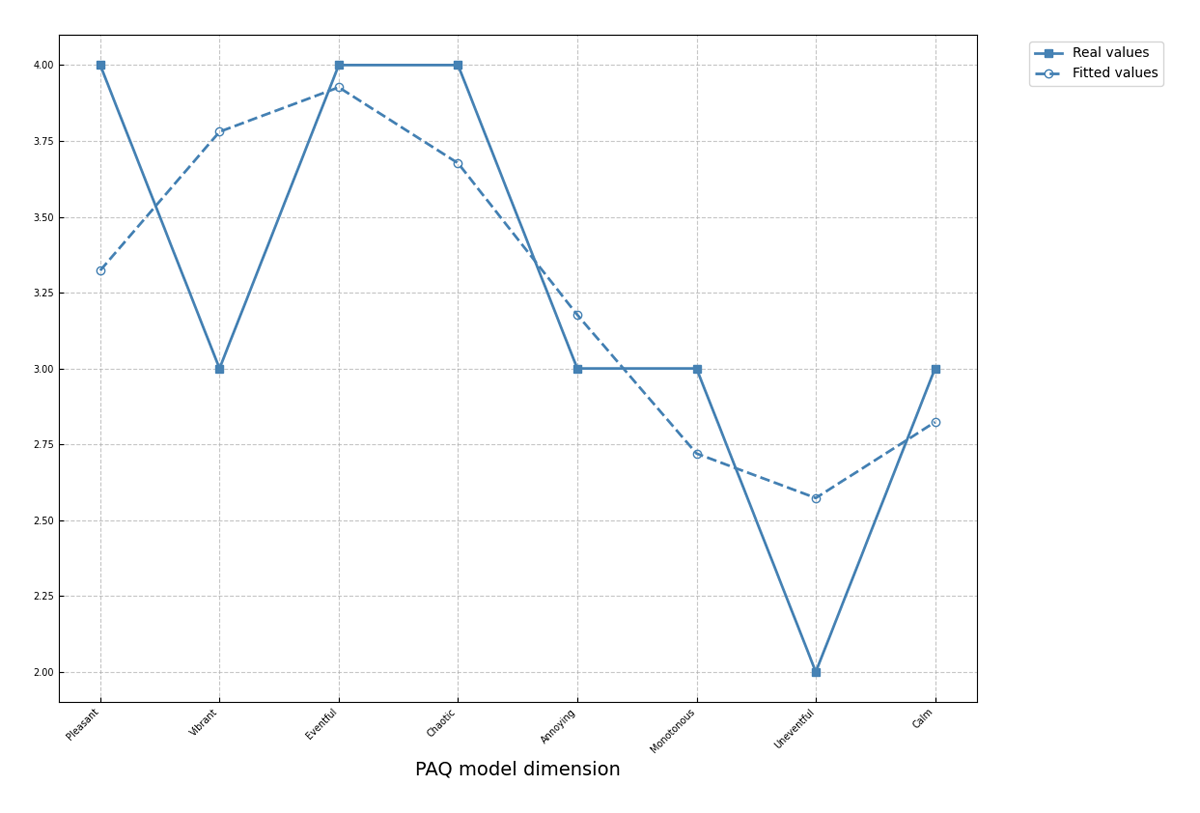
Figure 10
Structural Summary Method (SSM) fitting.
Standardized two-dimensional layout contrasting the empirical profile against the optimized theoretical profile wave to verify geometric conformity to the circumplex model.
(2) Availability
The new Python tool ‘SoundGraphy’ is available in the following public GitHub repository: https://github.com/arturo-olvrs/SoundGraphy.
Operating system
The software provides standalone binaries compiled via automated continuous integration matrix runners (GitHub Actions) using a Python 3.10 baseline environment. Minimum version compatibilities are classified as follows:
1. Pre-Compiled Standalone Binaries (Guaranteed Support):
Windows: Windows 10 or higher (64-bit).
macOS: macOS Ventura 13.0 or higher.
Linux: Ubuntu 24.04 LTS or higher (or equivalent distributions requiring GNU C Library glibc >= 2.35).
2. Source Code Execution (Theoretical Extended Backward Compatibility):
Because the computational core and the CustomTkinter graphical interface are written in standard Python, the software may execute successfully on older operating systems if initiated directly from the raw source code using a compatible Python interpreter (>= 3.9). This extends potential backward compatibility down to Windows 7 SP1, macOS High Sierra (10.13), or older Linux distributions (glibc >= 2.27), although these legacy environments are not explicitly covered by the automated testing pipelines.
Programming language
Python >= 3.9 (64-bit).
The computational core, database filtering architecture, and GUI of SoundGraphy are written in standard Python.
Pre-Compiled Standalone Binaries: The automated continuous integration pipeline (GitHub Actions) provisions a native Python 3.10 deployment environment to compile and bundle the standalone execution assets across Windows, macOS, and Linux platforms. End-users executing these pre-compiled applications do not require a local Python installation.
Source Code Execution: For investigators executing or extending the application directly via the raw source code, Python 3.9 represents the absolute minimum version compatibility. This threshold is strictly enforced by the downstream scientific dependencies (including Pandas, SciPy, Seaborn, and the underlying Soundscapy assessment pipeline) that have deprecated support for older Python interpreters.
Additional system requirements
Processor: Standard multi-core x86–64 or ARM64 processor.
Memory (RAM): 4 GB minimum.
Disk Space:
Standalone Application: Approximately 200 MB.
Source Code Environment: Up to 1.5 GB for the local installation of the Python interpreter and the required scientific package dependencies.
Input Devices: Standard keyboard and mouse (or equivalent pointing device) required to operate the GUI.
Output Devices: Standard display monitor with a minimum resolution of 1280 × 720 pixels to visualize and interact with the data plots. No specialized audio hardware is required.
Dependencies
The standalone executable versions are self-contained and do not require manual dependency installation. For source code deployment, the software requires the following core Python libraries (minimum version compatibility specified), which are stated in the requirements.txt file:
CustomTkinter >= 4.0.0 (For the modern GUI and Light/Dark mode implementation).
pandas >= 1.3.0 (For heterogeneous data frame ingestion, dynamic column-mapping, and database filtering).
numpy >= 1.20.0 (For efficient matrix formulations and ISO standard coordinate projections).
soundscapy >= 0.5.0 (Used as the mathematical backend for the structural calculation of the soundscape circumplex model coordinates).
matplotlib >= 3.4.0 (The primary plotting engine utilized for publishing-quality Cartesian and polar geometries).
seaborn >= 0.11.0 (For statistical data distribution layouts, including automated multi-site boxplots).
scipy >= 1.7.0 (For internal numerical optimization routines).
pyinstaller >= 5.0.0 (Strictly required if compiling the source code into standalone executable binaries).
Software location
Archive
Name: Zenodo
Persistent identifier: 10.5281/zenodo.22099610
Licence: MIT License
Publisher: Arturo Olivares Martos
Version published: 1.0.1
Date published: 18/07/26
Code repository
Name: GitHub
Identifier: https://github.com/arturo-olvrs/SoundGraphy
Licence: MIT License
Date published: 18/07/26
Language
The software, repository, and supporting files are provided in English. The user interface is in English.
Sample data
The repository includes two Excel files that serve as example datasets. They are located in the ‘Examples’ folder and are named ‘Example_1stop’ and ‘Example_4stops,’ respectively. The examples shown in Figures 4, 5, 6, 7, 8 were generated using the ‘Example_4stops’ data file, while those shown in Figures 9 and 10 were generated using the ‘Example_1stops’ data file.
(3) Reuse Potential
The development of SoundGraphy addresses a significant methodological gap in acoustic research by providing an integrated, open-source environment for the characterization and statistical verification of human perception. For this reason, this tool can be used in many research environments, not just acoustics. This is thanks to its three core functional pillars:
Democratization of Data Analysis: SoundGraphy successfully removes the technical barriers inherent in traditional programming-centric workflows. By offering a user-friendly GUI and a standalone executable, the software makes sophisticated acoustic climate analysis accessible to a cross-disciplinary audience who may lack expertise in Python or manual dependency management.
Enhanced Probabilistic Visualization: The software advances the representation of ISO 12913 data by transitioning from reductive ‘single-point’ median plots to more nuanced bivariate KDE. This approach, supplemented by customizable radar plots and automated categorical hue mapping, allows researchers to better account for the inherent diversity and uncertainty of human responses across different spatial and temporal contexts.
Rigorous Statistical Validation: A primary contribution of this tool is the native integration of fitting empirical data to mathematical sinusoidal curves. By means of this, SoundGraphy enables the objective of understanding circumplex models that are very popular in many areas of psychology because they provide a concise explanation of complex psychological areas, such as emotions and interpersonal relationships.
Put together, SoundGraphy is a research tool that can be useful for architects and urban planners who undertake the difficult work of designing urban environments that improve the quality of life and therefore promote health and wellbeing. At the same time, the software would also be useful to environmentalists, including environmental psychologists. These specialists pay particular attention to the interaction between humans and the environment, as well as the factors that influence how people move around and experience the city. It could also be useful for psychologists, as it allows perception data to be analyzed in terms of a circumplex, making interpretation of data much easier and serving as a comprehensive ‘modeling and prediction pipeline’ that bridges the gap between raw survey data and nuanced perceptual outcomes, ultimately supporting a more evidence-based design in the global built environment. Overall, SoundGraphy will be useful for any researcher in any field who is interested in applying ISO 12913, but does not have the necessary programming knowledge or skills to use specific software packages for the job.
Note
Author Contributions
Arturo Olivares Martos: Software development, theoretical development, validation and author.
Rafael García-Quesada: Project conceptualization and leadership, validation and author.
Jerónimo Vida Manzano: Project management, leadership, data analysis, testing and author.