
Table 1
Four major types of metrics collected at GES DISC.
| TYPE OF METRICS | METRICS |
|---|---|
| Key Metrics | The operational distribution metrics recording overall user data/service access and download activities for the following three major groupings:
|
| Bugzilla Ticket Metrics | Collecting and retrieving significant anduseful info from user questions or feedback mentioned in UserAssistance Tickets:
|
| Giovanni Publication Metrics | Collecting/gleaning significant and useful info from our Giovanni user journal publications in regard to:
|
| Website Metrics (via Google Analytics) | Collecting useful info on User Website Access via utilization of the Google Analytics Tool.
|
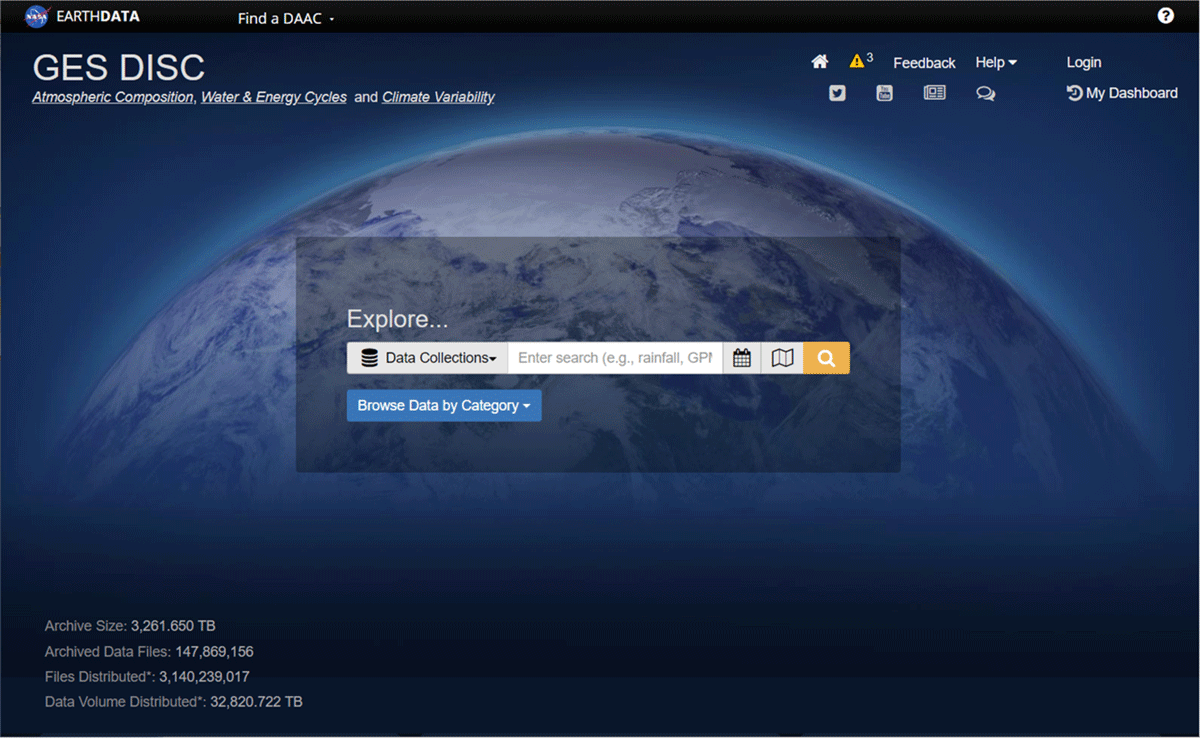
Figure 1
The homepage of GES DISC with search capabilities for datasets, tools, documentation, alerts, data releases, news, FAQs, publications and more.
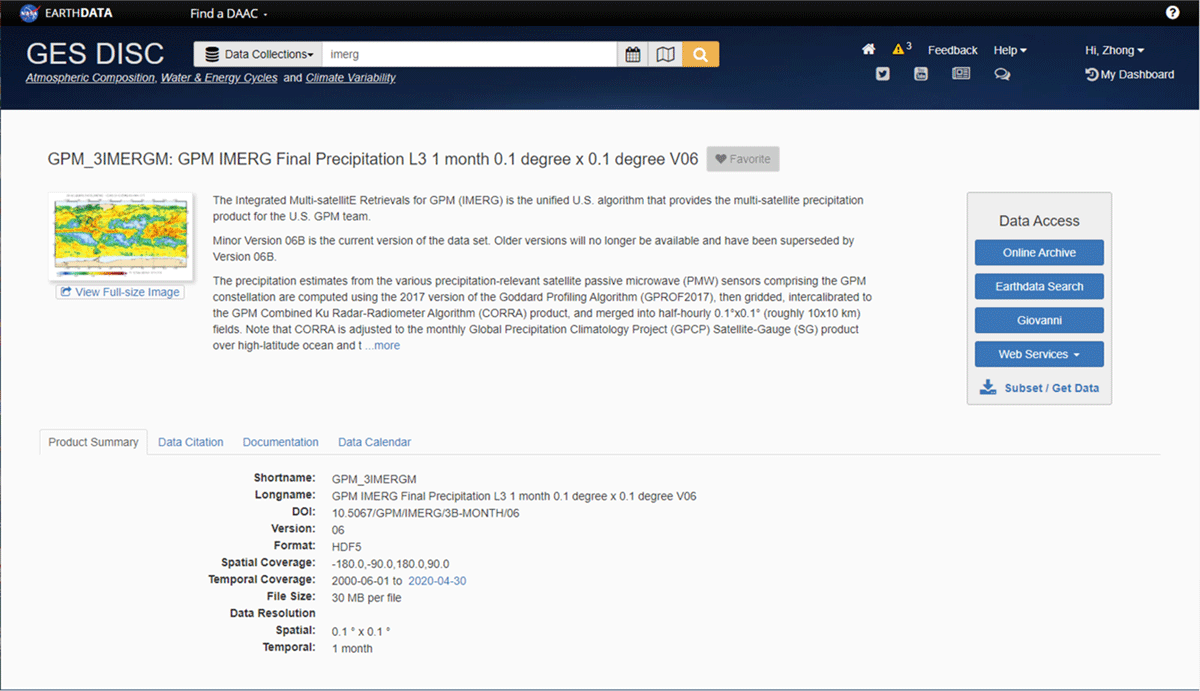
Figure 2
An example of the dataset landing page for the popular NASA Integrated Multi-satellitE Retrievals for GPM (IMERG) monthly dataset. A one-stop ‘shop’ design allowing easy access to data and dataset related information.
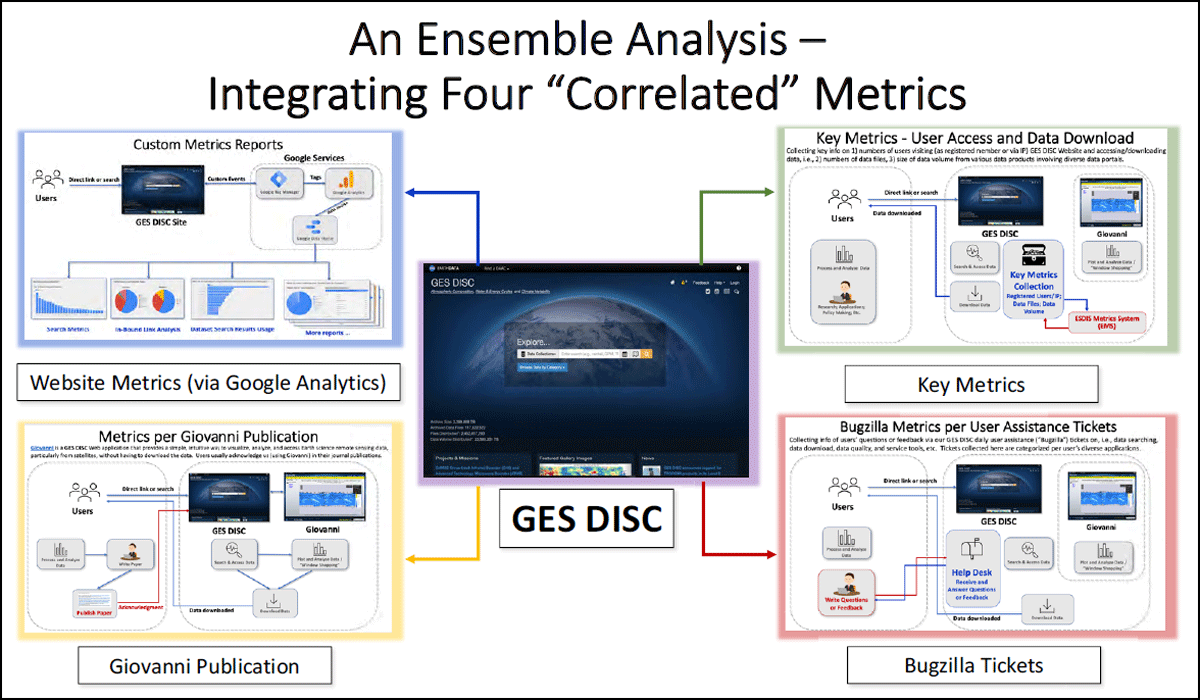
Figure 3
A schematic of four “correlated” metrics at GES DISC. More details with examples are shown in Figures 4, 5, 6 and 7.
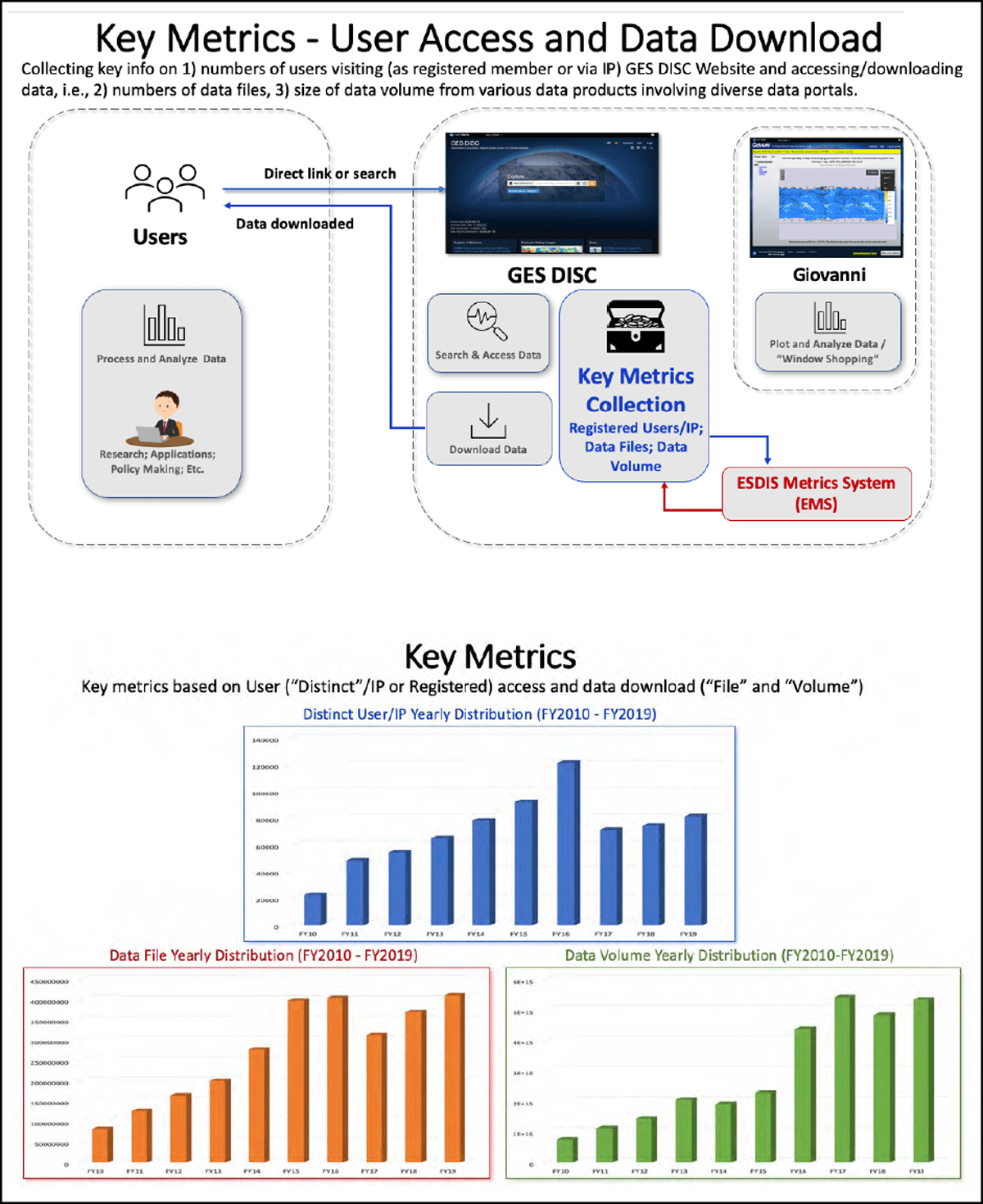
Figure 4
The schematic of the collection workflow (top), and the yearly, i.e., FY2010 – FY2019, distributions of distinct user/IP (middle), data file (bottom left), and data volume (bottom right).
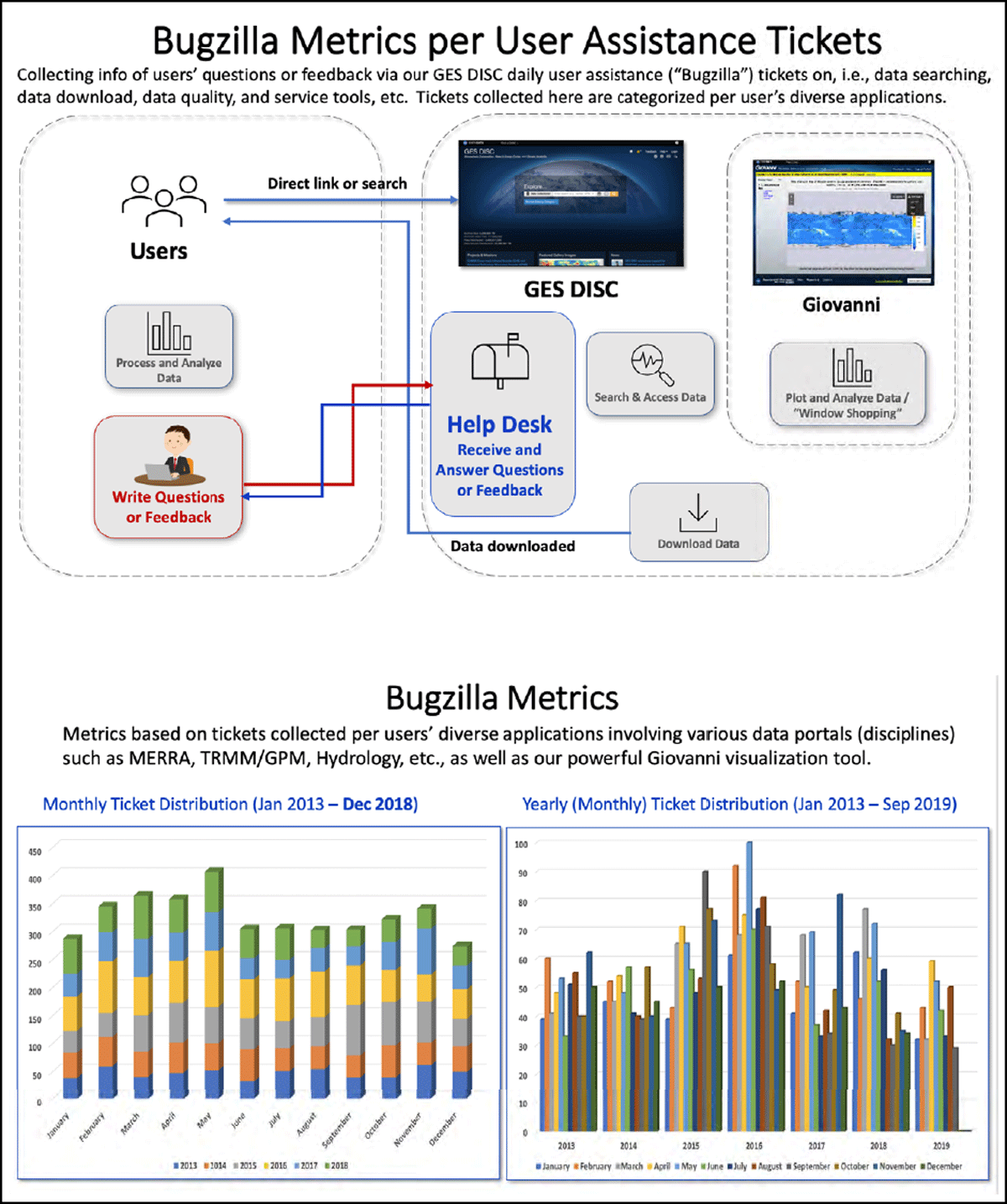
Figure 5
Bugzilla metrics – user assistance tickets. Top: a schematic of the collection workflow. Bottom: Monthly (2013-2018, left) and yearly (201301-201909, right) ticket distributions presented in two different perspectives.
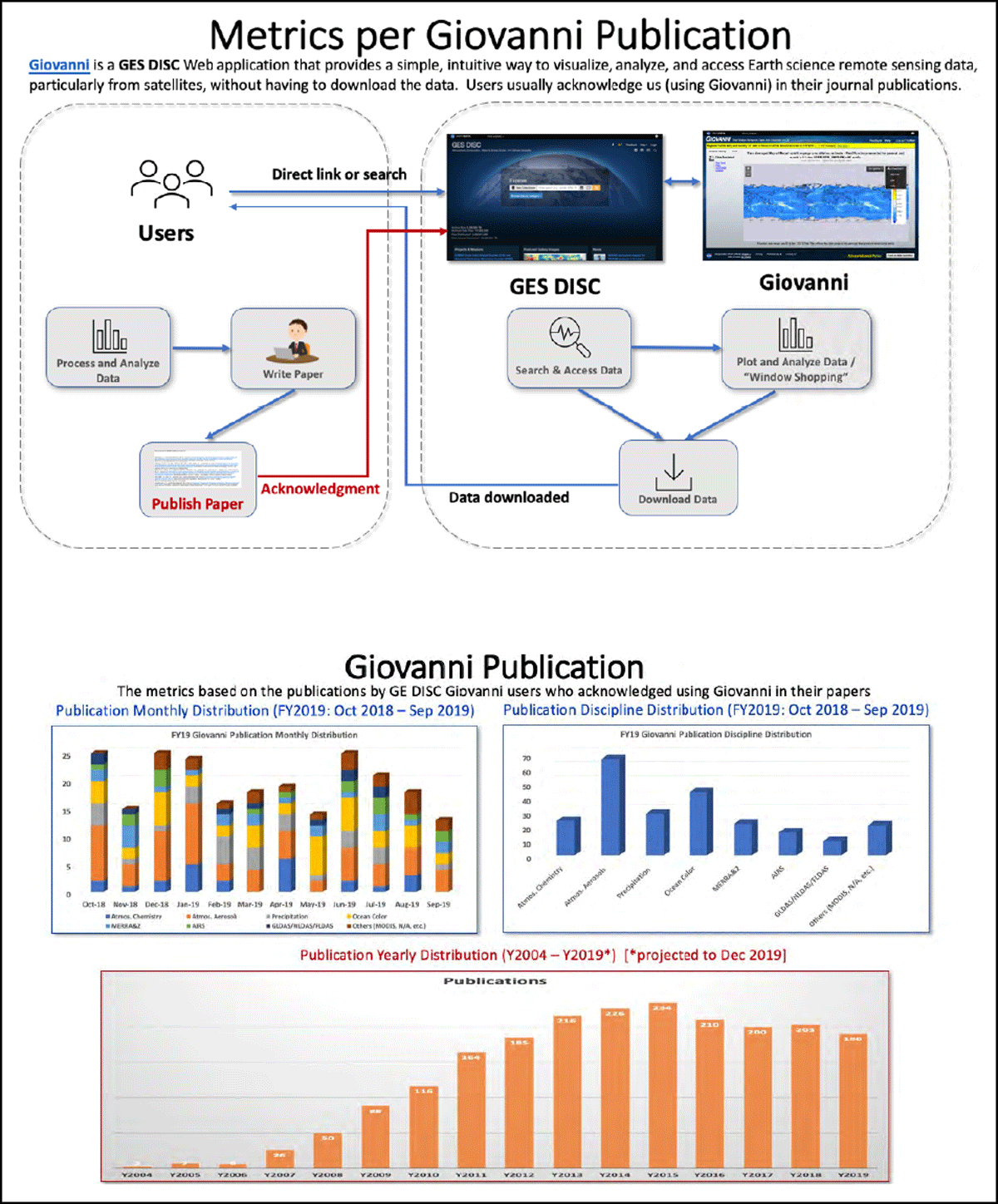
Figure 6
Giovanni publication metrics. Top: a schematic of the collection workflow. Middle: Monthly publication distributions of diverse disciplines (left) and the respective distributions of individual disciplines (right) for FY2019. Bottom: Yearly publication distributions for Y2004-Y2019* [*projected to Dec 2019].
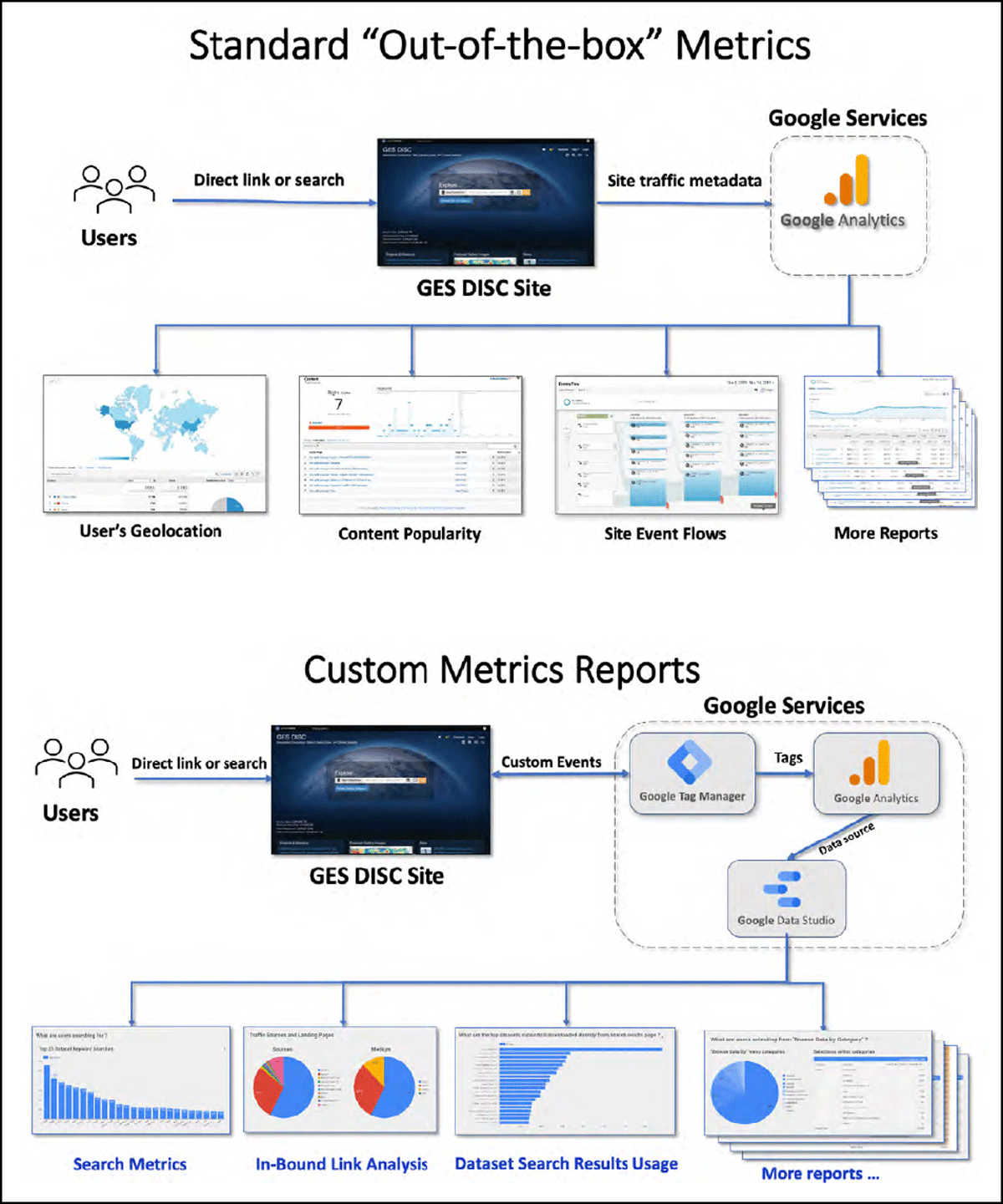
Figure 7
Standard “out-of-the-box” metrics. Top: a schematic of the collection workflow. Bottom: a workflow to generate GES DISC website custom metrics reports.
Table 2
Required fields of the EMS collection metadata and its search terms.
| FIELD NAME | DESCRIPTION | MAX LENGTH | EXAMPLE |
|---|---|---|---|
| product | This is a product identifier or the short name of the dataset… | 80 | AIRIBRAD |
| metaDataLongName | Identification of the long name associated with the collection or granule. | 1024 | AIRS/Aqua infrared geolocated radiances |
| productLevel | NASA data processing levels (i.e., 0, 1, 1A, 1B, 2, 3, 4). | 10 | 1B |
| discipline | Designates the scientific area of application (i.e., Ocean, Atmosphere, Land, Cryosphere, Volcanic, Solar, Raw data, Radiance). | 500 | Atmosphere |
| mission | An operation to provide scientific measurements with space-based and/or ground-based measurement systems (i.e., platforms, satellites, field experiments, and aerial measurements, etc.). For a multi-mission product, list all missions separated by a semi-colon (;). The primary mission should be listed first. Each mission should have 1 or more instruments associated with it. If there are multiple missions and multiple instruments, then the relationships between the missions and instruments should be defined. | 80 | Aqua |
| instrument | Consisting of a collection of one or multiple sensor instruments to provide scientific measurements. For a multi-instrument product from one mission, all instruments are listed and separated by a comma (,). If the product (e.g., a combined product) involves multiple missions and multiple instruments, the instruments from each mission are separated by a semi-colon (;).The order of instruments should be in the same sequence as the mission field. If not applicable, enter: “N/A”. (NOTE: the number of missions entered must pair evenly to number of instruments delimited by “;” i.e., if two missions entered: “mission1;mission2” then at least two instruments: “instrument1;instrument2” or “N/A;N/A” or “instrument1a,instrument1b”; “instrument2a,instrument2b” etc.) | 80 | AIRS |
| processingCenter | Data center where this product was generated. | 80 | GESDISC |
| archiveCenter | Data center where the data product is archived. This value is usually ‘GESDISC’. | 50 | GESDISC |
| eosFlag | Flag to indicate whether the data product is an EOS (NASA EOS 2021) or Non-EOS product. Values: E for EOS and N for Non-EOS. | 1 | E |
| productFlag | Flag denotes the type of product. Values: 1 = Data Product, 2 = Instrument Ancillary, 3 = System/Spacecraft and 4 = External. For a non-ECS product, use the value 1. | 1 | 1 |
| publishFlag | Flag to indicate whether the product and its associated granules be published to EMS or not. This value is usually ‘Y’. | 1 | Y |
| searchTerm | File name, directory, path, ESDT, Data Provider internal product IDs or other information that uniquely identifies a data product as it appears in an EMS Data file. The searchTerm should not include URL query strings and associated name value pairs. searchTerms can include full strings or substrings. Values within this field are always treated as regular expressions (e.g., ‘.+MOD1[1-9].+’). Therefore, reserved grep/egrep characters should only be used when they are needed. By default, we will use the product Shortname. Let OPS staff know if any specific pattern needs to be added to a product. | 200 | AIRIBRAD |
| dataSource | Assigns the data source (e.g., the system, subsystem, file, table or other identifying information) where the logs/flat files/metadata are generated (e.g., airs, aura, disc, reason, urs). Currently, GES-DISC has identified five data source groups. Each group and its associated hosts are listed as follows:
| 50 | airs |