

Figure 1
Logo of Kadi4Mat.

Figure 2
Conceptual overview of the infrastructure of Kadi4Mat. The system is logically divided into the two components ELN and repository, which have access to various data handling tools and technical infrastructures. The two components can be used both graphically and programmatically via uniform interfaces.

Figure 3
Conceptual overview of the workflow architecture. Each workflow is defined using a graphical editor that is either directly integrated into the web-based interface of Kadi4Mat or locally, with a desktop application. The process manager provides an interface for executing workflows and communicates on behalf of the user with multiple process engines, to which the actual execution of workflows is delegated. The engines are responsible for the actual processing of the different steps, based on the information defined in a workflow. Data and metadata can either be stored externally or locally.

Figure 4
Overview of the implementation of Kadi4Mat, separated into front end and back end. The front end uses classic web technologies and is usually operated via a web browser. In the back end, the functionality is split into the web and the core component. The former takes care of the external interfaces, while the latter contains most of the core functionality and handles the interfaces of other systems. A plugin component is also shown, which can be used to customize or extend the functionality of the system.
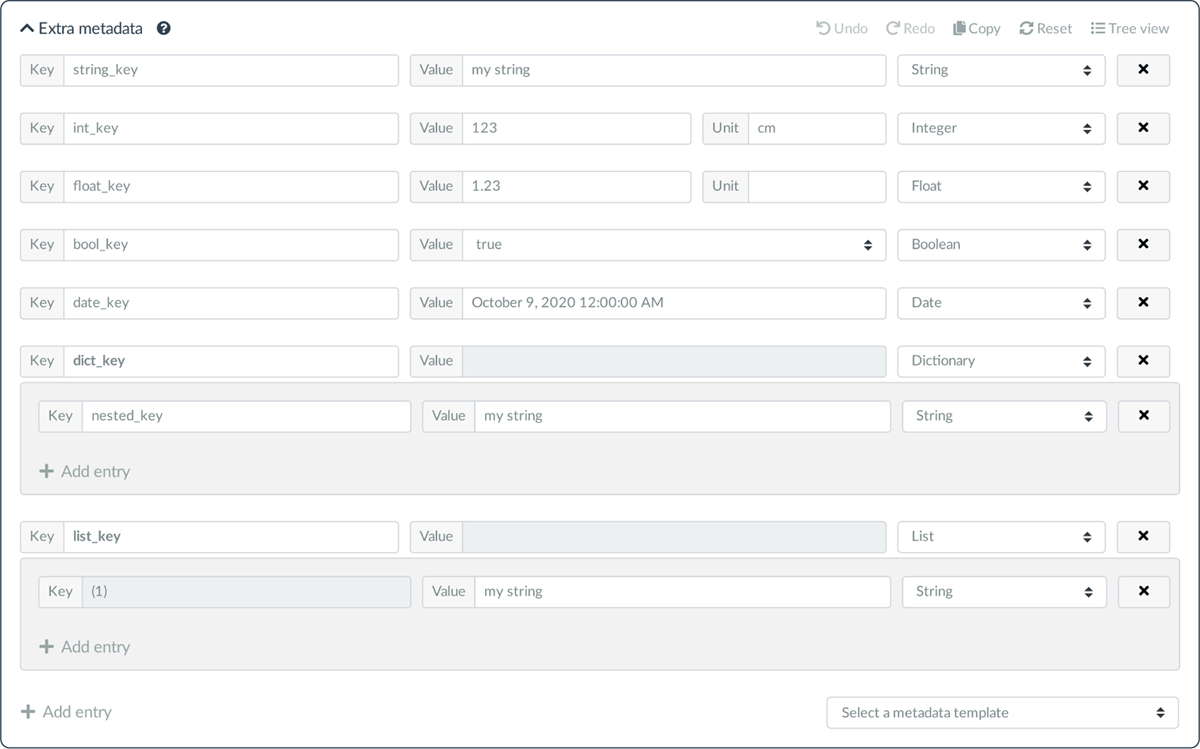
Figure 5
Screenshot of the generic metadata editor, showing the different types of metadata entries currently possible. The last two examples of type dictionary and list contain nested metadata entries. In the upper right corner, a menu is displayed that allows performing various actions, one of which switches to a tree-based overview of the metadata. The ability to select metadata templates is shown in the lower right corner.

Figure 6
Screenshot of a record overview page. The basic metadata is shown, followed by the generic metadata entries (shown as extra metadata). The menu on the top allows various actions to be performed on the current record. The tabs below the menu are used to switch to other views that display the files and other resources associated with the current record, as well as access permissions and a history of metadata revisions.

Figure 7
Screenshot of the search functionality of records with the corresponding search results. In addition to providing a simple query for searching the basic metadata of a record, the generic metadata can also be searched by specifying desired keys, types or values. The searchable types are derived from the actual types of the generic metadata entries, e.g. integers and floating point numbers are grouped together as numeric type. Various other options are offered for filtering and sorting the search results.
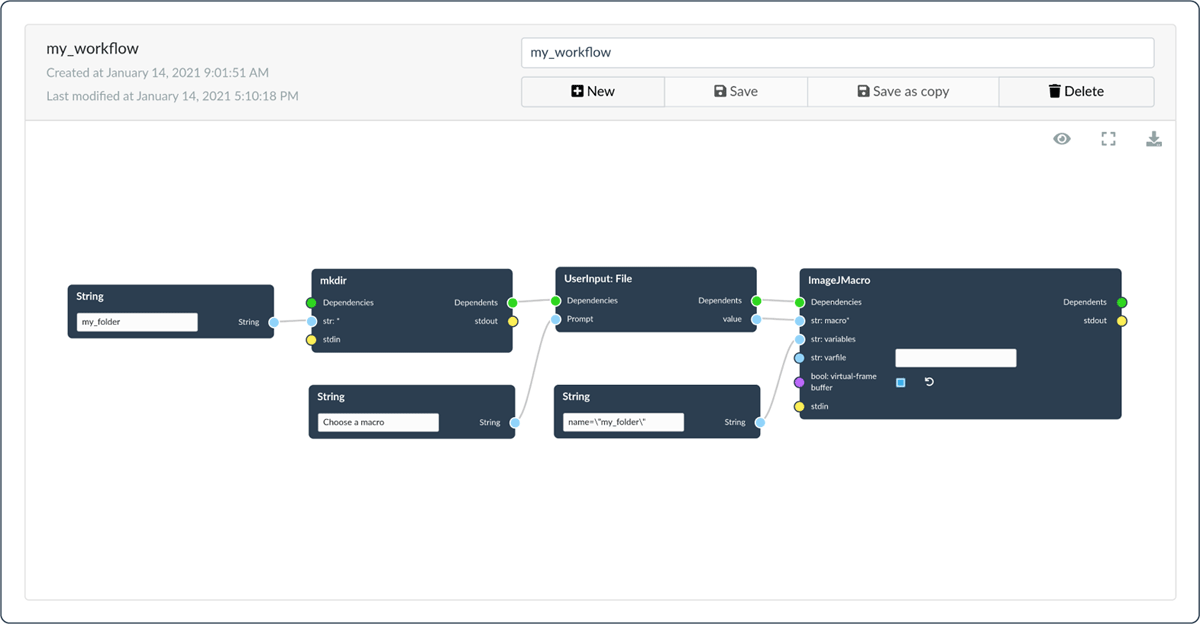
Figure 8
Screenshot of a workflow created with the web-based node editor. Several String input nodes are shown, as well as a special node that prompts the user to enter a file (UserInput: File). The two tools mkdir and ImageJMacro are used to create a new directory and to execute an ImageJ (Schindelin et al. 2015) macro file, respectively. The latter uses the input file the user was asked for. Except for the input nodes, all nodes are connected via an explicit dependency.
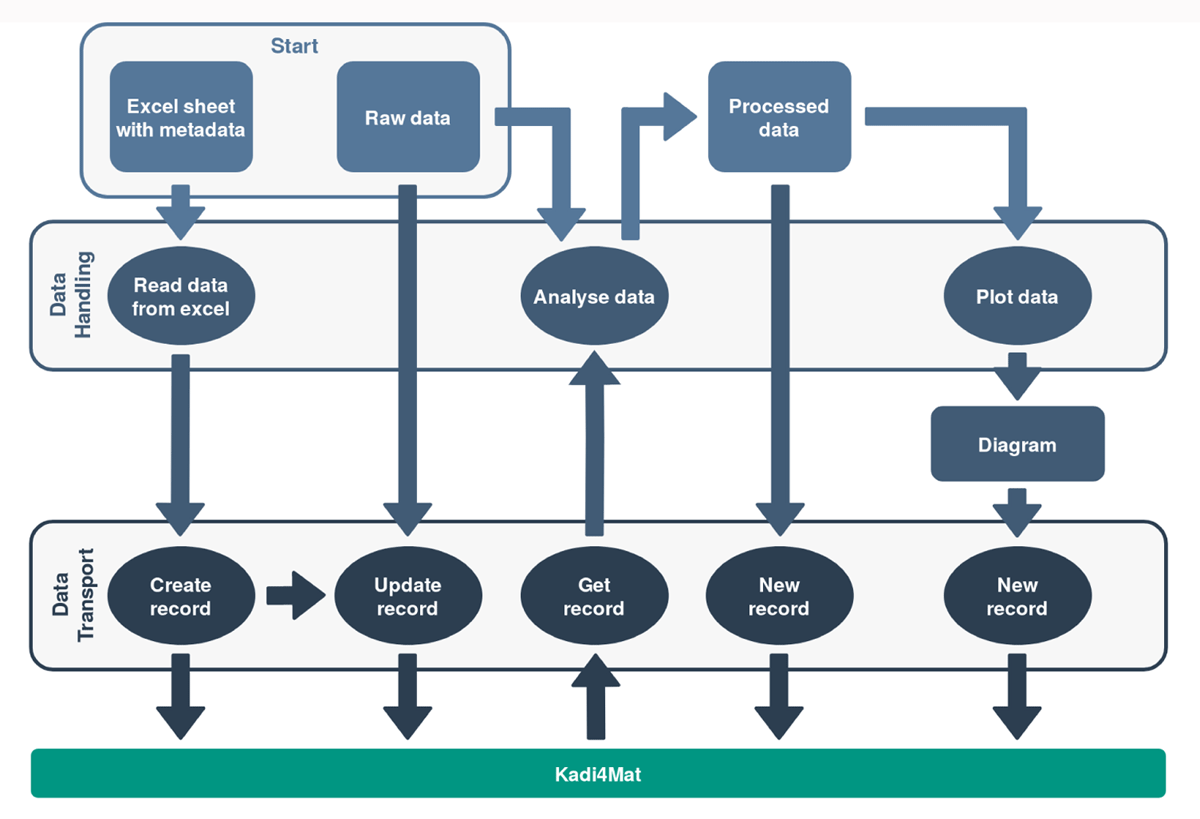
Figure 9
Overview of an exemplary workflow using Kadi4Mat. The starting point is raw data and corresponding metadata stored in an Excel spreadsheet. The tools used in this workflow are divided into tools for data handling and tools for data transport, the latter referring to the Kadi4Mat integration. In a first conversion step, the metadata are transformed into a format readable by the API of Kadi4Mat and linked to the raw data by creating a new record. The raw data is further analysed using the metadata stored in Kadi4Mat. Finally, the result of the analysis is plotted and both data sets are uploaded to Kadi4Mat as records. All records can be linked to each other in a further step, either as part of the workflow or separately.