
Table 1
User Scenario Template. See Stocks et al. (2019) for an annotated user scenario template with additional usage tips and example responses.
| Summary Information Section |
|---|
| Use Case Name |
| Contacts: Roles for the contacts are taken from the ISO 19115 CI_RoleCode vocabulary, and at a minimum should capture the interviewer (as Author) and interviewed scientist (as pointOfContact/originator). |
| Link to Primary Documentation: a single reference that describes the scenario, if it exists. Additional related references are captured below. |
| Permission to make public? (Yes/No); Permission granted by; Date permission granted |
| Science Objectives and Outcomes: overview of the scientific goals and importance of the scenario. |
| Overarching Science Driver: high-level scientific impetus. Can referencing agency priorities or strategic science plans documentation as relevant. |
| Scenario Detail Section |
| Actors: key people and/or systems involved in the project. |
| Preconditions: preconditions, requirements, assumptions, and state changes necessary for the scenario to be executed. |
| Critical Existing Cyberinfrastructure: existing data repositories, software, etc. needed. |
| Measures of Success: the important outcome or product if the scenario workflow is completed. |
| Basic Flow: steps to be followed in doing the user scenario. Often referred to as the primary scenario or course of events. |
| Alternate Flow: any alternate workflows that might occur, e.g. to handle error conditions. |
| Activity Diagram: a picture or flow chart that captures the major workflow steps, actors at each step, inputs and outputs at each step, and optional alternate paths. |
| Major Outcome and Post Conditions: conditions that will be true of the state of the system after the scenario has been completed. Including what happens with data and other products after the project finishes. |
| Problems/Challenges: any significant or disruptive problems or challenges that prevent or interfere with the successful completion of the activity. For each one, list the challenge and who/how it impacts; what, if any, efforts have been undertaken to fix these problem; recommendations for tackling this problem; how the larger community can address this problem. |
| References: links to other relevant information such as background, clarifying and otherwise useful source material. Include web site links, project names, overall charters, additional points of contact, etc. This section is distinct from Primary Documentation, which just describes the particular scenario. |
| Notes: Any additional important information. |
| Technical Section |
| Data Characteristics: describe all the data involved in the scenario, both existing and desired, as follows: |
| Data Source(s) |
| Data Format(s) |
| Volume (size) |
| Velocity (e.g. 2TB/day) |
| Variety (e.g. sensor data, model output) |
| Variability (e.g. differences in site density across studies) |
| Veracity/Data Quality (accuracy, precision) |
| Data Types (e.g. sequence data, core images) |
| Standards: any standards that were followed for the cyberinfrastructure resources, even if already mentioned above. Standards can apply to data, models, metadata, etc. |
| Data Visualization and Analytics: analysis and visualization capabilities needed for the scenario, whether existing or desired. |
| Software: For any important software used, describe the important characteristics (source, language, input format, output format, CPU requirements, etc.). |
| Metadata: Provide a link to, or include, any relevant metadata adding additional detail and context to the dataset(s) described above. |
Table 2
Summary of cyberinfrastructure challenges expressed in the 49 use cases. The percents do not add up to the category totals because 1) one use case can express challenges in more than one subcategory; and 2) challenges expressed by three or fewer use cases were not listed, but were included in the category counts. Percentages are absolute not relative.
| Data Challenges | ||
|---|---|---|
| 78% | Data Access/availability | |
| 28% | Data not online | |
| 18% | Data in multiple online sources | |
| 14% | Hard to search for desired data in online source | |
| 12% | Important relationships between data in multiple sources missing | |
| 8% | Hard to find/access data in publications | |
| 8% | Sharing data is difficult/lacks incentives | |
| 32% | Data variety, diversity, and heterogeneity issues | |
| 24% | Data format diversity | |
| 8% | Semantic variability | |
| 12% | Integrating different data types (discrete vs continuous, sensor vs 4D model, etc.) | |
| Other | ||
| 18% | Total data volume | |
| 16% | Needed data does not exist (e.g. not enough sensors, or gaps in the data) | |
| 14% | Insufficient or uncertain data quality | |
| 14% | Insufficient metadata | |
| Non-Data Challenges | ||
| 36% | Software | |
| 30% | Desired software does not exist | |
| 12% | Desired software exists, but is not accessible/reusable | |
| 28% | Best practices, protocols, standards, other guidance needed | |
| 26% | Funding challenges, especially long-term sustainability for CI | |
| 16% | Networking, Storage, CPU | |
| 12% | Access to informatics/computer science expertise | |
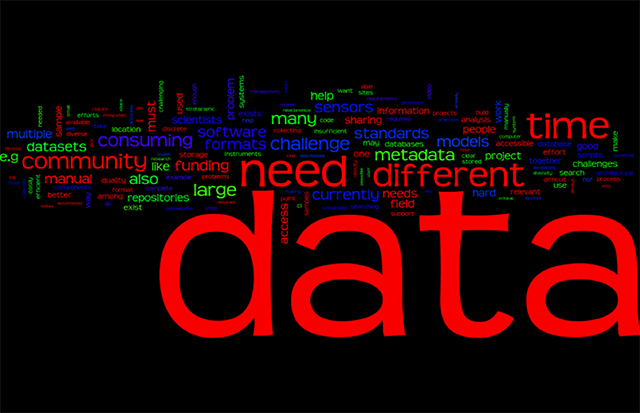
Figure 1
A word cloud created from the summary of cyberinfrastructure challenges extracted from each user scenario. The size of each word is approximately proportional to the number of uses of that word. Common words and numbers are not included.
Table 3
Standards mentioned in user scenarios. Note that this represents the scientists’ reporting on the standards they use, and items like ‘GPS’ are included even though a technologist would not consider them a standard.
| Standard | # of Use Cases |
|---|---|
| OGC | 5 |
| DOI | 2 |
| EML | 2 |
| GPS | 2 |
| iGSN | 2 |
| NetCDF | 2 |
| BagIt | 1 |
| CDF | 1 |
| CF metadata | 1 |
| CUAHSI WFS | 1 |
| DCAT | 1 |
| Excel | 1 |
| GCIS | 1 |
| iPLANT | 1 |
| IRIS | 1 |
| ISO19115 | 1 |
| Memex | 1 |
| MIMS/MIGS | 1 |
| NOAA | 1 |
| Nutch | 1 |
| SEAD | 1 |
| SEASAS | 1 |
| SensorML | 1 |
| USDA | 1 |
| UTF-8 | 1 |
| VIVO | 1 |
| WOCE | 1 |
Table 4
Data formats mentioned in user scenarios.
| Format | # of Use Cases |
|---|---|
| CSV | 14 |
| NetCDF | 11 |
| MATLAB .mat | 6 |
| Excel | 6 |
| txt | 5 |
| ArcGIS/ESRI shapefiles | 4 |
| jpeg | 3 |
| tiff | 3 |
| tsv | 2 |
| SEED | 2 |
| xls | 1 |
| mzML | 1 |
| mzXML | 1 |
| geojson | 1 |
| geotiff | 1 |
| GIS | 1 |
| grib | 1 |
| HDF | 1 |
| HTML | 1 |
| IRIS | 1 |
| JSON | 1 |
| miniC | 1 |
| MSAccess | 1 |
| Pivotpilot | 1 |
| png | 1 |
| UTF-8 unicode | 1 |
Table 5
Software mentioned in user scenarios. Only those found in two or more use cases are listed. Note that the category ‘in-house’ is not a single software, but includes any mention of unnamed software/code developed by the group of the interviewee.
| Format | # of Use Cases |
|---|---|
| MATLAB | 17 |
| In-house code | 10 |
| Excel | 9 |
| ArcGIS | 7 |
| R | 5 |
| Adobe Illustrator | 4 |
| Python | 3 |
| Google Earth Engine | 3 |
| IRIS/DMC tools | 3 |
| IDL | 2 |
| NCAR Tool, NCL | 2 |
| Fledermaus | 2 |
| Mathematica | 2 |
| ODV | 2 |
| Paraview | 2 |
| GDAL | 2 |
| VLC | 2 |
| Petrel | 2 |
| SQL | 2 |
| STRABO | 2 |