
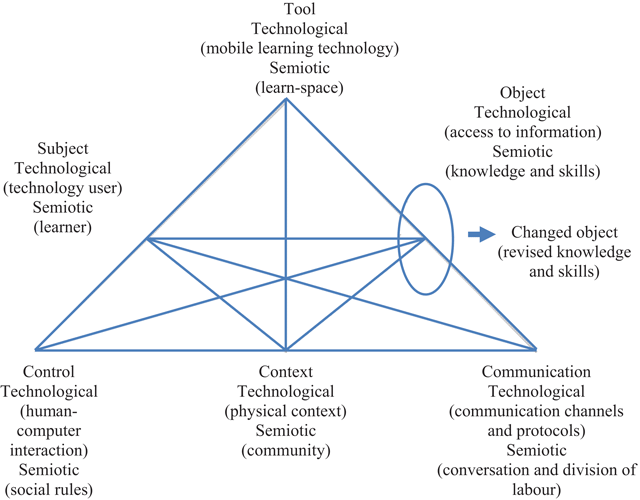
Figure 1
A task model for mobile learners (Sharples, Taylor and Vavoula, 2005; Bo, 2005; Taylor, et al., 2006).
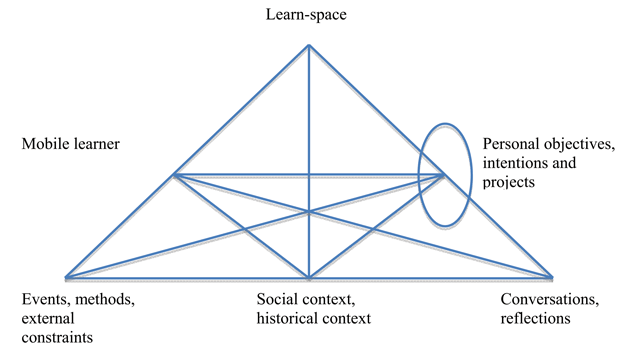
Figure 2
Mobile learning episodes in the semiotic space (Vavoula, 2005).
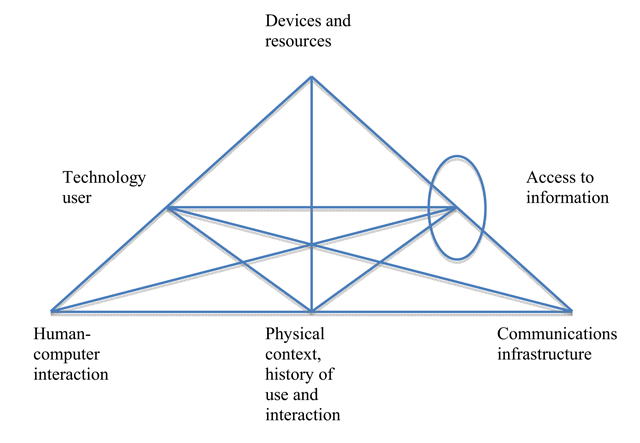
Figure 3
Mobile learning episodes in the technological space (Vavoula, 2005).
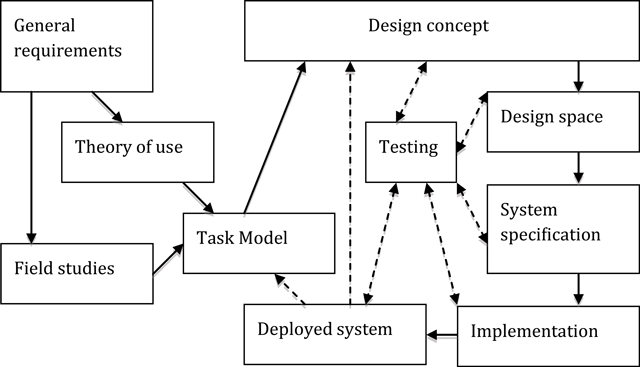
Figure 4
Flow and main product of design process (Bo, 2005; Taylor, et al., 2006).
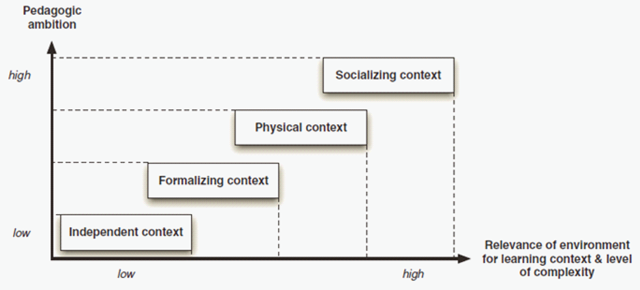
Figure 5
Classification of context (Frohberg, Goth and Schwabe, 2009).
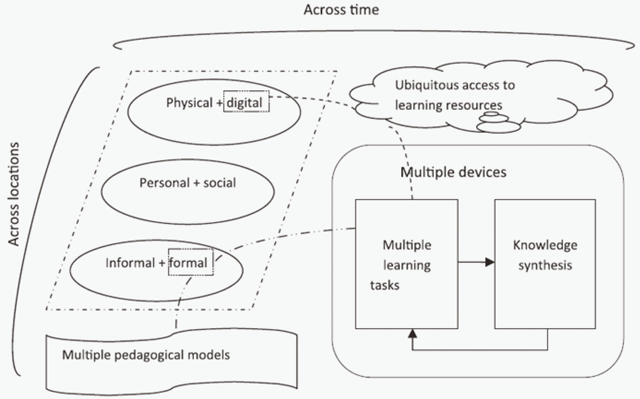
Figure 6
Features to support seamless learning (Wong, 2012).
Table 1
List of relevant pedagogical requirements identified for each factor based on the research questions.
| Research question | Task model factor | Relevant pedagogical requirements | References |
|---|---|---|---|
| 1. What learning activities are performed and resources accessed by learners in mobile environment? | Subject | Learn across spaces, times and topics by taking and applying ideas and resources (S1) | Sharples, Taylor and Vavoula, 2005; Edirisingha, Salmon and Nie, 2008; Economides, 2008. |
| Capture data, create and share materials (S2) | Sharples et al., 2007; Botha, Herselman and Greunen, 2010; Sharples, 2013. | ||
| Communicate, collaborate, annotate resources, personalise information and messaging, seamless access to services, resources and people (S3) | Sharples, Taylor and Vavoula, 2005; Bo, 2005; Taylor et al., 2006; Botha, Herselman and Greunen, 2010. | ||
| Access and capture multimedia contents (S4) | Xia et al., 2013. | ||
| Perform rapid learning activities on the move (eg. photo taking, Internet search, map navigation) (S5) | Wong, 2012. | ||
| Discussion, read, take note, search information, reflect, observe, solve problem and collaborate (S6) | Vavoula, 2005; Klopfer and Squire, 2008. | ||
| Run experiments in the field study, capture, store and manage everyday events (S7) | Sharples, Corlett and Westmancott, 2002; Churchill, 2011. | ||
| Collect and store data (S8) | Peters, 2007 | ||
| Converse and work together, compare conceptions and experiences, actively seek information and build up answer (S9) | Zurita and Nussbaum, 2004; Taylor et al., 2006; Beckmann, 2010. | ||
| Object | Information, knowledge or learning resources (O1) | Taylor et al., 2006; Frohberg, Goth and Schwabe, 2009. | |
| Reusable, sustainable and scalable (O2) | Herrington, Herrington and Mantei, 2009; Barbosa, 2013. | ||
| Online data and information, teacher-created materials, student artefacts and student’s online interactions (O3) | Wong, 2012 | ||
| Audio recordings (eg. notes, feedback) (O4) | Nortcliffe and Middleton, 2008; Rossiter et al., 2009; Middleton, Nortcliffe and Owen, 2009 | ||
| Digital files and records, web-based and conversations content (O5) | Naismith et al., 2004; Vavoula, 2005; Sharples, Taylor and Vavoula, 2005. | ||
| Micro-content which integrates text, image, video, audio and interactive elements (O6) | Bruck, Motiwalla and Foerster, 2012 | ||
| Multimedia resources (video, audio, voice recognition, image, web pages, notes, readings, podcast, vodcast, e-books, presentation) (O7) | Bacon, Windall and MacKinnon, 2011; Churchill, 2011; Heng, Sangodiah and Ahmad, 2012; Barbosa, 2013 | ||
| 2. How can control, context and communication support pedagogical needs in mobile environment? | Control | Access materials as and when convenient, work at own speed, revise and recheck them as they wish, able to test ideas, ask questions, collaborate, seek out new knowledge, plan new actions and control activity (CR1) | Taylor et al., 2006 |
| Manage learning pace and style (CR2) | Liaw, Hatala and Huang, 2010. | ||
| Balance and optimal distribution between learner and teacher, act and reflect on activity (CR3) | Frohberg, Goth and Schwabe, 2009. | ||
| Distributed across learners, guides, teachers, technologies and resources (CR4) | Sharples, Taylor and Vavoula, 2005; McAndrew, Taylor and Clow, 2007; Sharples, Taylor and Vavoula, 2007; | ||
| Personal control and ownership of the learning, able to perform, and seamlessly switch between multiple learning activities (CR5) | Naismith and Corlett, 2006; Wong, 2012. | ||
| Ownership of mobile device which integrates personal learning tools, resources and artefacts, use device autonomously (CR6) | Sharples et al., 2007; Woodcock, Middleton and Nortcliffe, 2012; Nerantzi and Beckingham, 2014. | ||
| Context | Capture material and immediately transfer to others (CX1) | Frohberg, 2004; Naismith et al., 2004; Peters, 2007; Sharples, 2013. | |
| Constructed by the interactions between learner and environment (CX2) | Sharples, Taylor and Vavoula, 2005; Sharples, Taylor and Vavoula, 2007; Uden, 2007 | ||
| Multiple communities of actors who interact around a shared objective (CX3) | Liaw, Hatala and Huang, 2010. | ||
| Personal meaning and relevance for learners (CX4) | Uden, 2007; Herrington, Herrington and Mantei, 2009. | ||
| Ability to gather data unique to the current location, environment, and time (CX5) | Klopfer and Squire 2008 | ||
| Independent, formalized, physical and socializing (CX6) | Frohberg, Goth and Schwabe, 2009 | ||
| Constructs as historical/cultural/social, location, activity, user and content (CX7) | Winters and Price, 2005 | ||
| Seamlessness in learning in a variety of scenarios and switching from one context to another easily and quickly (CX8) | Wong, 2012; Sharples, 2013. | ||
| Communication | Connect the learners to their learning community at any given time and location (CM1) | Peters, 2007; Heng, Sangodiah and Ahmad, 2012 | |
| Community centred for sharing knowledge and supporting less able students (CM2) | Sharples, Taylor and Vavoula, 2005; Kearney et al., 2012 | ||
| Converse with each other (CM3) | Laurillard, 2002, Taylor et al., 2006 | ||
| Discuss, analyse and work together with other learners (CM4) | Frohberg, Goth and Schwabe, 2009. | ||
| Support various meaningful interaction and communication channels (CM5) | Sharples, Taylor and Vavoula, 2007; Anani, Zhang and Li, 2008; Liaw, Hatala and Huang, 2010; Nouri et al., 2010; Pachler, Cook and Bachmair, 2010. | ||
| Chat forum and discussion tool for brainstorming, decision making and discussing complex questions (CM6) | Frohberg, 2004; Motiwalla, 2007 | ||
| Engaging with different communities (CM7) | Beckmann, 2010. | ||
| Service-based components (CM8) | Barbosa, 2013. | ||
| SMS (CM9) | Taylor et al., 2006; Botzer and Yerushalmy, 2007; Motiwalla, 2007; Peters, 2007; Marston and Cornelius, 2010; Udanor and Nwodoh, 2010; Heng, Sangodiah and Ahmad, 2012; Sharples, 2013 |
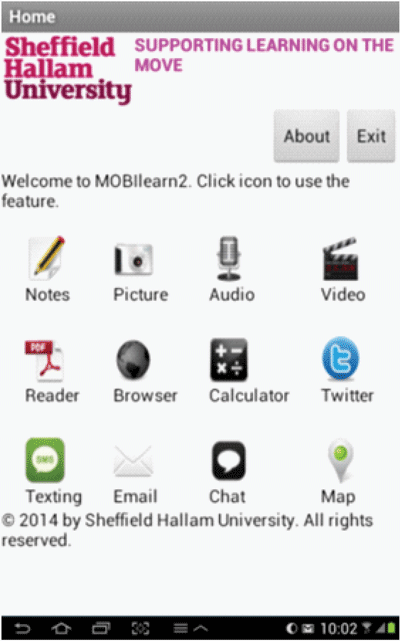
Figure 7
Main interface of MOBIlearn2 v1.0.
Table 2
Components in the MOBIlearn2 v1.0.
| Component | Functionalities | Requirements supported |
|---|---|---|
| Note | Learner can write and save notes into txt files. The notes can be opened for reading or editing as well as shared with peers. | S1, S2, S6, O1, O2, O5, CR1, CR2, CR6 |
| Picture | Learner can take a new picture, pick a saved picture from gallery as well as share it with others. | S1, S2, S5, S7, S8, O1, O2, O6, O7, CR5, CR6, CX1, CX2, CX4, CX5, CX7, CX8 |
| Audio | Learner can record, play, share and delete audio files. The recorded files will be displayed in a list which the latest file is on top. | S1, S2, S3, S4, S7, S8, O1, O2, O4, O6, O7, CR1, CR2, CR5, CR6, CX1, CX4, CX5, CX7, CX8 |
| Video | Learner can capture, play, share and delete video files. The recorded videos will be displayed in a list which the latest file is on top. | S1, S2, S4, S5, S7, S8, O1, O2, O3, O6, O7, CR1, CR2, CR3, CR5, CR6, CX1, CX2, CX4, CX5, CX7, CX8 |
| Reader | Learner can open and read pdf files. | S6, O1, O5, O6, O7, CR1, CR2, CR4, CR5, CR6, CX6 |
| Browser | This component act as a browser. Learner can surf or access a web page by typing the keyword in the search textbox. | S1, S4, S5, O3, O5, O6, O7, CR4, CR6, CX6, CM6, CM8 |
| Calculator | This component works as a standard calculator. | S5, CR5, CR6, CX4, CX8 |
| This twitter client allows learner to post and share their thoughts with communities of interest. | S1, S3, S4, S6, S9, O3, O5, O6, O7, CR1, CR3, CR4, CX3, CX4, CX6, CX7, CM1, CM2, CM3, CM4, CM5, CM6, CM7 | |
| Texting | Learner can type a message and send it to the other learners individually or by group. The learner can add or remove a member’s contact number. All members are displayed in a list. | S1, S3, S6, S9, O5, CR1, CR6, CX4, CX6, CM1, CM3, CM4, CM5, CM6, CM9 |
| Learner can write email with attachment to peers. | S3, CR1, CR6, CX3, CX4, CX6, CM4, CM5, CM6, CM7 | |
| Chat | Two learners can establish a real-time chat session whereby one of them is acting as a server and the other is a client. | S3, S6, S9, O5, CR1, CR6, CX4, CX6, CM3, CM4, CM5, CM6 |
| Map | Learners can navigate within a location by using this component. They also can save the location that is interesting to them for future use. | S5, O1, O2, O6, CR4, CR6, CX2, CX4, CX5, CX7, CM8 |