
Figure 1
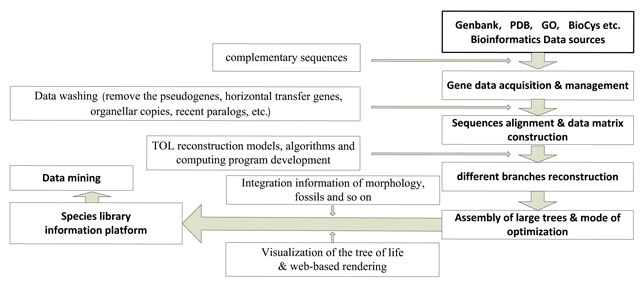
Modules of the DarwinTree: 1. synchronization with public bioinformatics data sources; 2. gene data acquisition and management; 3. sequences alignment and data matrix construction; 4. different branches reconstruction; 5. assembly of large trees and modes of optimization; 6. species library information platform; 7. data mining.
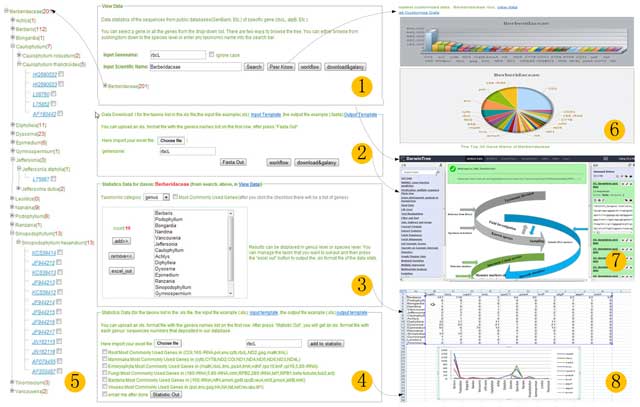
Figure 2
Data View in DarwinTree: 1) data search; 2)data download according to users’ taxonomy with an .xls file input; 3) data statistics according to public taxonomy; 4) data statistics according to users taxonomy with input of an excel file and any sequence gene mark; 5) sequence data view according to taxonomy and any sequence gene mark; 6) “peer known” of taxon (any taxon of the top 30 gene mark sequences); 7) data submission to Galaxy or local workflow for analysis; 8) output of sequences data statistics with each mark.
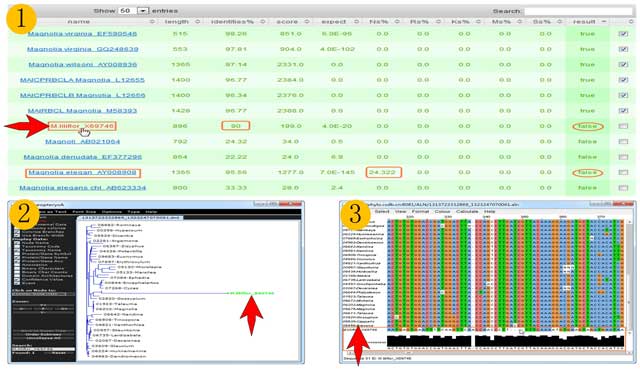
Figure 3
GSQCT Reports. The sequence needed for verification is marked “F” (accesion: X69746, shown in 1). It is clear that it is the sequence marked “F”, whose genetic distance (divergence time) is much larger than any in the homologous gene sequence clusters (shown in 2) and whose key point is also not matched to the homologous gene sequence clusters’ alignment (shown in 3).
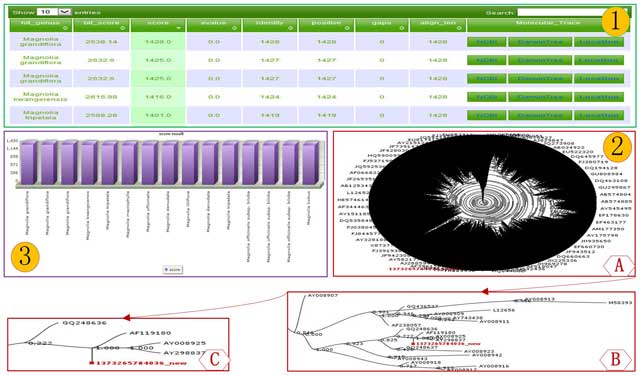
Figure 4
Reports possible using RapidTree. Typical reports from the use of the tree identification features of Rapid Tree are shown in 1. It lists the identification score, scientific name, positive score, and so on. Meanwhile, there are the links of the specific “Hit_genus/Hit_species” to COL (Catalogue of Life, http://www.catalogueoflife.org), and BHL (Biodiversity Heritage Library, http://www.biodiversitylibrary.org), the links of “Molecular trace” to sequence databases, NCBI and DarwinTree sequence details page, and the link of “ Location” to the location at the big tree in the report web page. The rank of the identification score is presented as shown in 3. The visualization of the location at the big tree is shown in 2, in which the location becomes gradually more detailed moving from (A)→(B)→(C) and the location can be viewed via dragging of the mouse.