
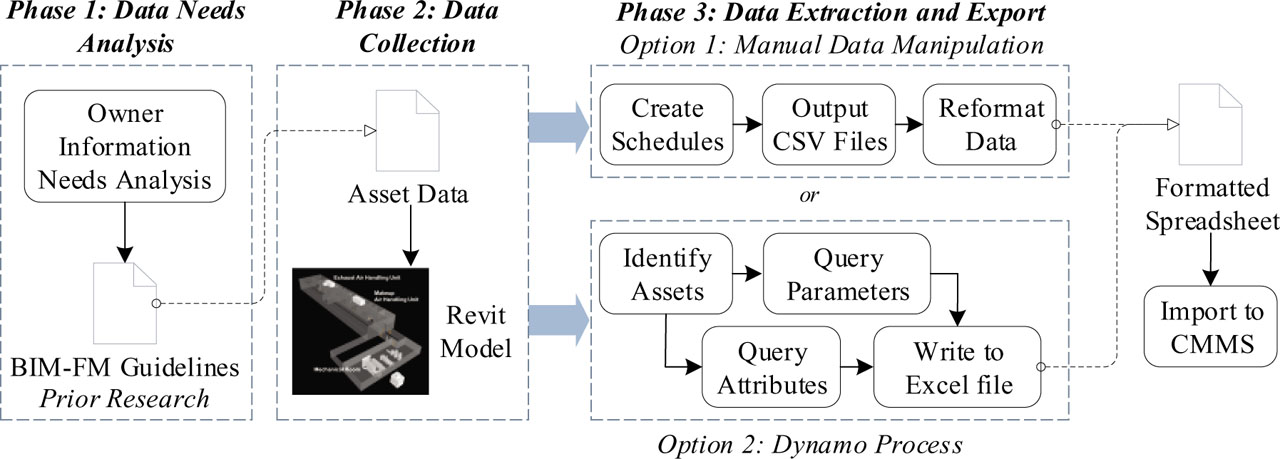
Fig. 1
Research methodology.
Tab. 1
Asset groups and equipment information
| Asset group | Equipment name | Parent | Location |
|---|---|---|---|
| AHU | MAU-1 (Supply Air Handler) | Roof | |
| AHU | EAU-1 (Exhaust Air Handler) | Roof | |
| ERU | Energy Recovery Unit | EAU-1 | Roof |
| FAN | Supply Fan | MAU-1 | Roof |
| FAN | Exhaust Fan | EAU-1 | Roof |
| FAN | F-1 | Basement—Mech/Elec Rm 7 | |
| FAN | F-2 | ERU | Roof |
| FCU | FC-1 through FC-8 | Main Floor | |
| FCU | FC-9 | Basement | |
| HTR | HUH-1 | Basement—Mech/Elec Rm 7 | |
| HTR | ECH-1 | ERU | Roof |
| HTR | ECH-2, ECH-3, ECH-4 | MAU-1 | Roof |
| HUD | HUM | MAU-1 | Roof |
| P | HWP-1, HWP-2 | Basement—Mech/Elec Rm 7 | |
| P | ERP-1 | ERU | Roof |
| P | CWP-1 | Basement—Mech/Elec Rm 7 | |
| SEP | AS-1 | Basement—Mech/Elec Rm 7 | |
| SEP | AS-2 | ERU | Roof |
| TNK | PET-1 | Mech/Elec Rm 7 | |
| TNK | PET-2 | Roof | |
| EMER-ATS | ATS-1, ATS-2 | Basement—Mech. Equip. Rm | |
| EMER-GEN | Emergency Generator | Basement—Mech. Equip. Rm |
Tab. 2
Common asset attributes for MAU-1 (AHU asset group)
| Common attributes | Common attribute value | Data source/remarks |
|---|---|---|
| ASSET_TAG | 00441-AHU-RT-0001 | VT Asset Tag Naming Convention |
| ASSET_GROUP | AHU | VT Asset Groups List |
| DESCRIPTION | MAU-1—MAKEUP AIR HANDLING UNIT | SHEET M1.2 |
| LOCATION_CODE | ROOF | SHEET M2.6 |
| DATE_PURCHASED | ||
| LONG_DESC | AIR INTAKE SECTION W/FILTERS (100 PERCENT OUTDOOR AIR HOOD), ENERGY RECOVERY COIL SECTION (GLYCOL LOOP), 24″ ACCESS SECTION, STEAM PREHEAT COIL SECTION, 24″ ACCESS SECTION, CW COIL SECTION, PLENUM SUPPLY FAN, HUMIDIFICATION SECTION FOR DISPERSION MANIFOLD, 48″ PLENUM W/TWO BOTTOM DISCHARGE OPENINGS. OVERALL UNIT DIMENSIONS APPROX. 27′–6″L ′ 7′–10″W ′ 5′–8″H. APPROXIMATE UNIT OPERATING WEIGHT 8,000 LBS; OMNICLASS23: BUILT UP ROOFTOP AIR HANDLING UNITS | OMNI CLASS 23 |
| LOCKOUT | Y | SUBMITTAL EAU_MAU_050216—p12 |
| SERIAL_NO | K16E36891 | Bldg. Walkthrough |
| MANUFACTURE_CODE | TRANE | SHEET M1.2 |
| MANU_PART_NUMBER | CSAA030UB | SUBMITTAL EAU_MAU_050216—p37 |
| PROCEDURE_YN | Y | SUBMITTAL EAU_MAU_050216 |
| PARENT_ASSET_TAG | N/A | |
| YEAR_INSTALLED | 2017 | |
| PART | 12′ 24 2″ Pleated Media MERV 8 | SUBMITTAL EAU_MAU_050216—p35 |
| QUANTITY | 3 | |
| PART | 20 ′ 20 2″ Pleated Media MERV 8 | SUBMITTAL EAU_MAU_050216—p35 |
| QUANTITY | 8 | |
| PART | BX-98 Belt | |
| QUANTITY | 2 | |
| PART | 12 ′ 24 12″Cartridge 95% MERV 15 | SUBMITTAL EAU_MAU_050216—p35 |
| QUANTITY | 3 | |
| PART | 20 ′ 20 12″Cartridge MERV 15 | SUBMITTAL EAU_MAU_050216—p35 |
| QUANTITY | 8 | |
| WARR_DESC | 1 YEAR PARTS AND LABOR; 5 YEARS PARTS ONLY for ECONOMIZER | SUBMITTAL EAU_MAU_050216—p3, 11 |
| WARR_DATE_FR | ||
| WARR_DATE_TO | ||
| LOCATION | BLDG441—BASEMENT & MAIN FLOOR | M2.4, M2.5 AND M2.6 |
| USAGE_FACTOR | 50, 50 | |
| CLASS_STANDARD | OMNICLASS, Master Format | OMNI CLASS 23, Master Format 2016 |
| LEVEL_1 | 23, 23 | OMNI CLASS 23, Master Format 2016 |
| LEVEL_2 | 33, 74 | OMNI CLASS 23, Master Format 2016 |
| LEVEL_3 | 25, 16 | OMNI CLASS 23, Master Format 2016 |
| LEVEL_4 | 11 | OMNI CLASS 23, Master Format 2016 |
| LEVEL_5 | 13 | OMNI CLASS 23, Master Format 2016 |
| LEVEL_6 |
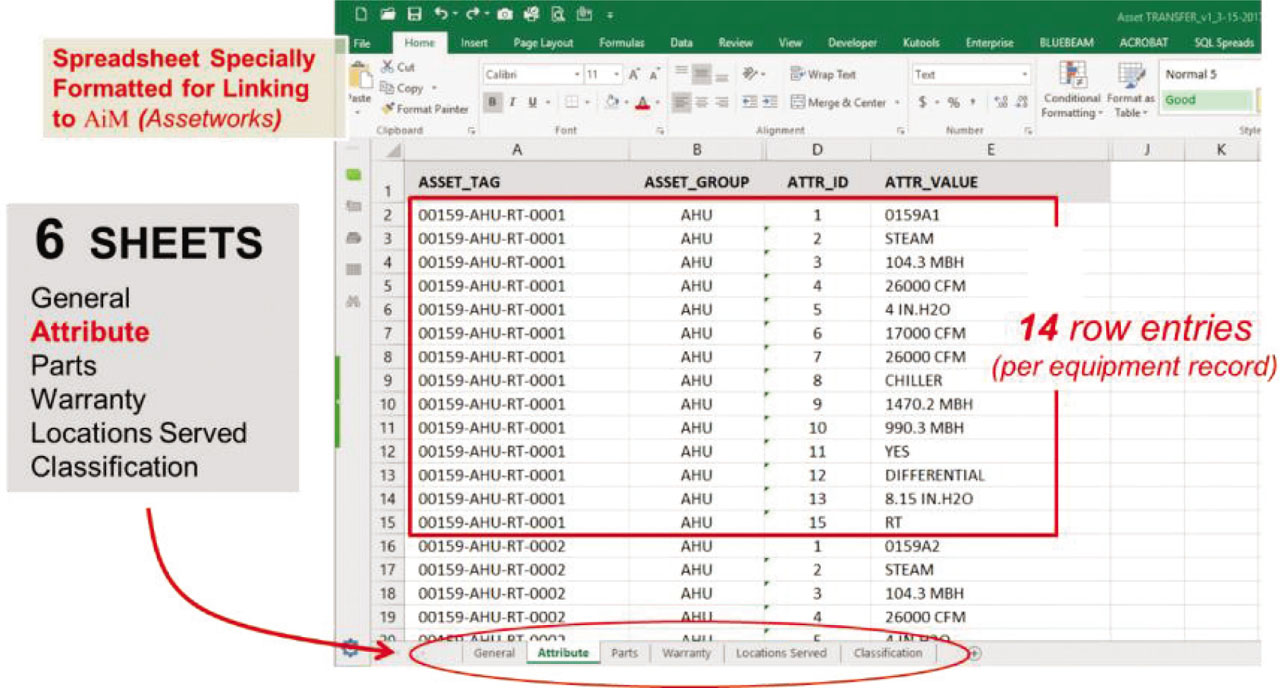
Fig. 2
Allocation of asset properties and attributes in the formatted Excel spreadsheet.
Tab. 3
Specific asset attributes for Air Handler Unit (AHU) asset group
| AHU common attribute | Common attribute value (MAU-1) | Source/remarks |
|---|---|---|
| Bas point address | CMMU1SAF | Bldg. WALKTHROUGH |
| Heating source | BOILER | SHEET M1.2 |
| Heating capacity | 13,500 | |
| Total air flow | 13,330 | SHEET M1.2 |
| External static pressure | 1.5 | SHEET M1.2 |
| Min. outside air | ||
| Max. outside air | ||
| Cooling source | CHILLER | |
| Total cooling capacity | 704.09 | SUBMITTAL EAU_MAU_050216 |
| Sensible cooling cap | 455.52 | SUBMITTAL EAU_MAU_050216 |
| Economizer | Y | |
| Economizer type | ||
| Total static pressure | 5.006 | SUBMITTAL EAU_MAU_050216 |
| Type | RT (Roof Top) | SHEET M1.2 |
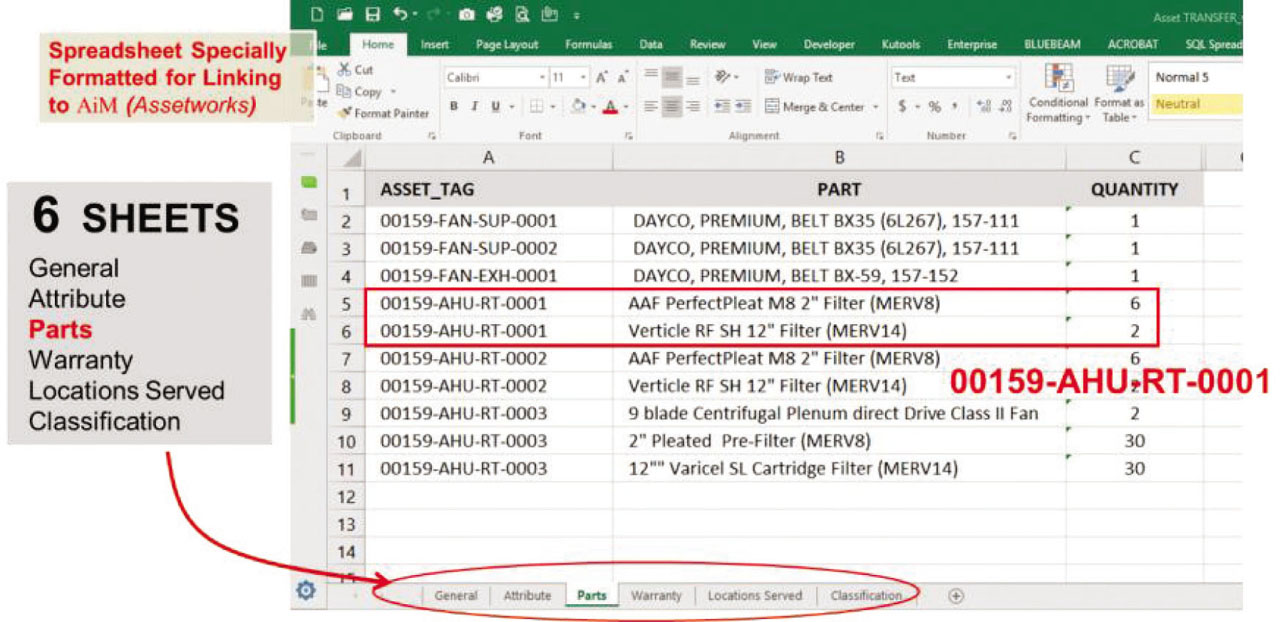
Fig. 3
Example of the “Parts” tab.
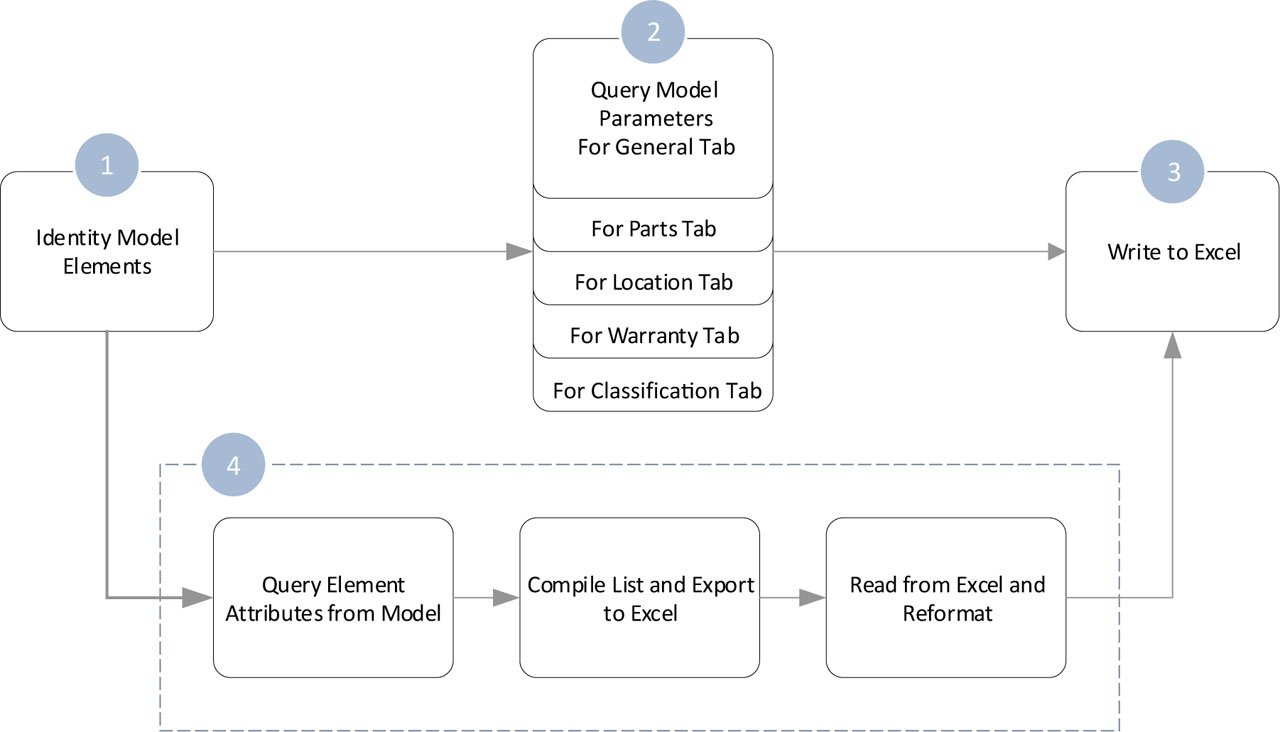
Fig. 4
Summary of the proposed Dynamo workflow.
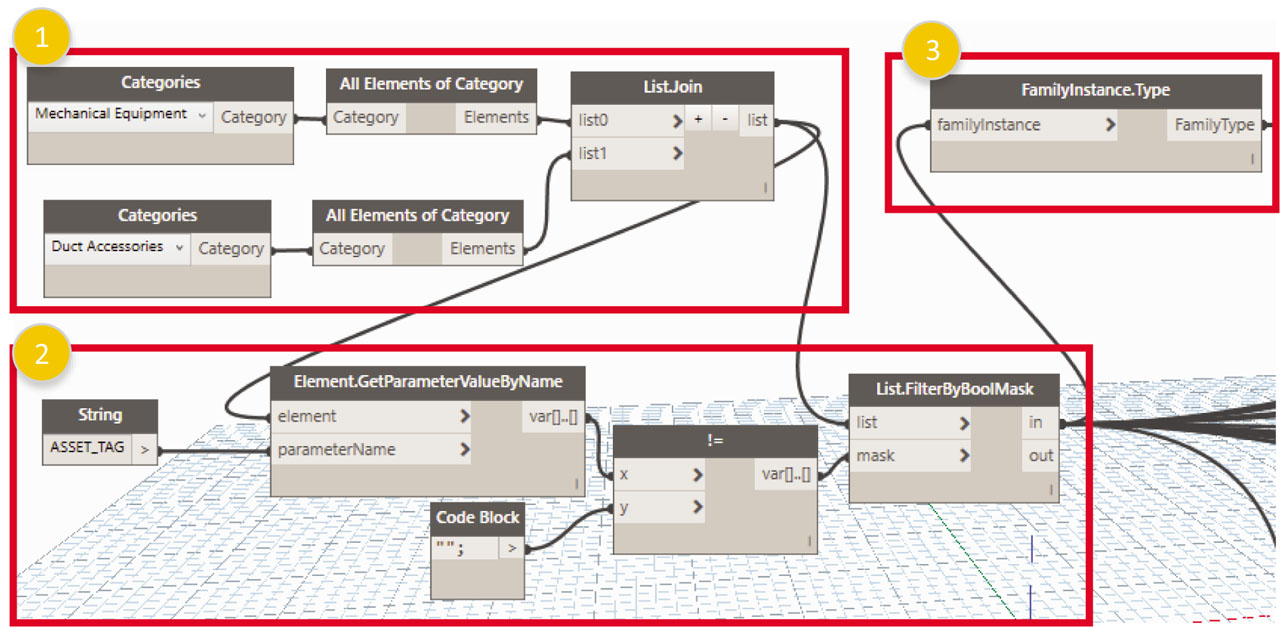
Fig. 5
Step 1: Identifying model elements.
Tab. 4
Parameter types and corresponding input list
| Sheet | Parameter name (input) | List used as input | |
|---|---|---|---|
| List.FilterByBoolMask | FamilyInstance.Type | ||
| General | ASSET_TAG* | X | |
| ASSET_GROUP | X | ||
| DESCRIPTION | X | ||
| LOCATION_CODE | X | ||
| DATE_PURCHASED | X | ||
| LONG_DESC | X | ||
| SERIAL_NO | X | ||
| LOCKOUT | X | ||
| MANU_PART_NUMBER | X | ||
| MANUFACTURE_CODE | X | ||
| PROCEDURE_YN | X | ||
| PARENT_ASSET_TAG | X | ||
| YEAR_INSTALLED | X | ||
| Classification | ASSET_TAG* | X | |
| CLASS_STANDARD | X | ||
| LEVEL_1 | X | ||
| LEVEL_2 | X | ||
| LEVEL_3 | X | ||
| LEVEL_4 | X | ||
| LEVEL_5 | X | ||
| LEVEL_6 | X | ||
| Location | ASSET_TAG* | X | |
| LOCATION | X | ||
| USAGE_FACTOR | X | ||
| Parts | ASSET_TAG* | X | |
| PART | X | ||
| QUANTITY | X | ||
| Warranty | ASSET_TAG* | X | |
| WARR_DESC | X | ||
| WARR_DATE_FR | X | ||
| WARR_DATE_TO | X | ||
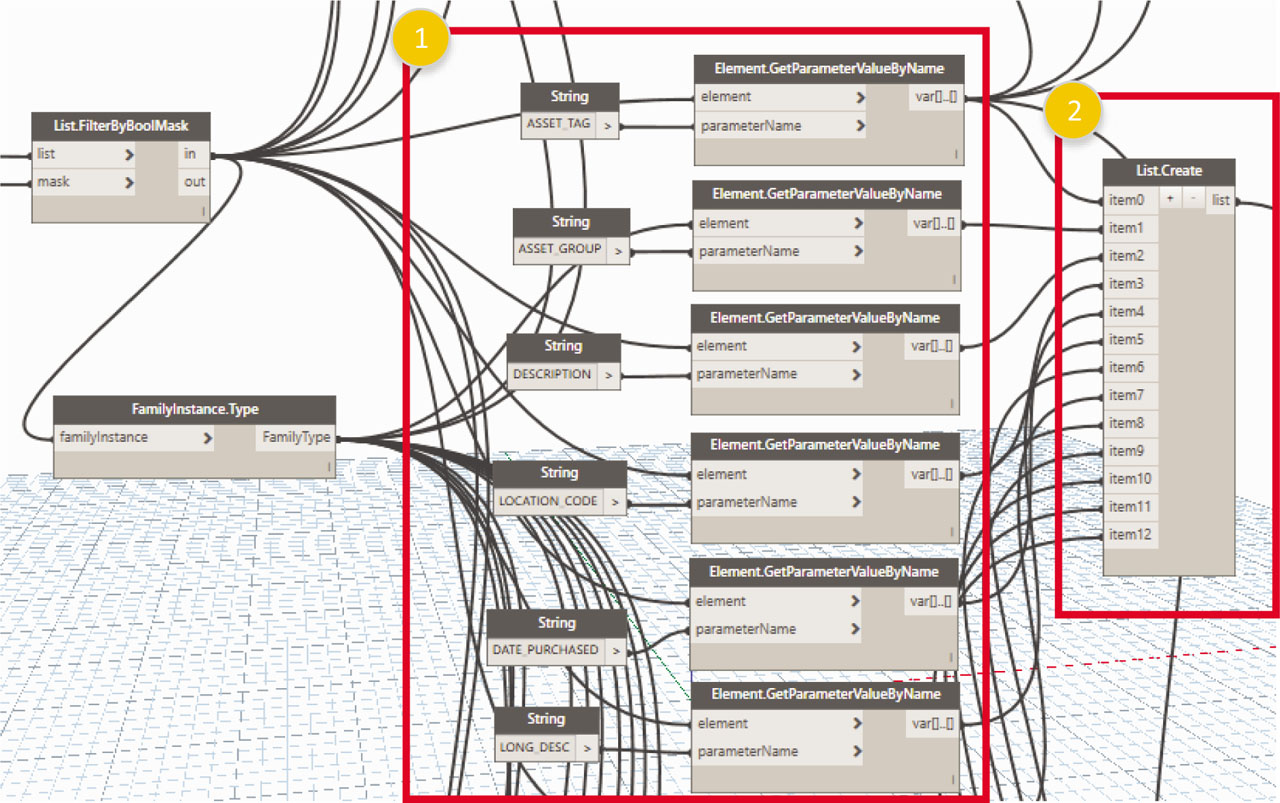
Fig. 6
Step 2: Querying model parameters.
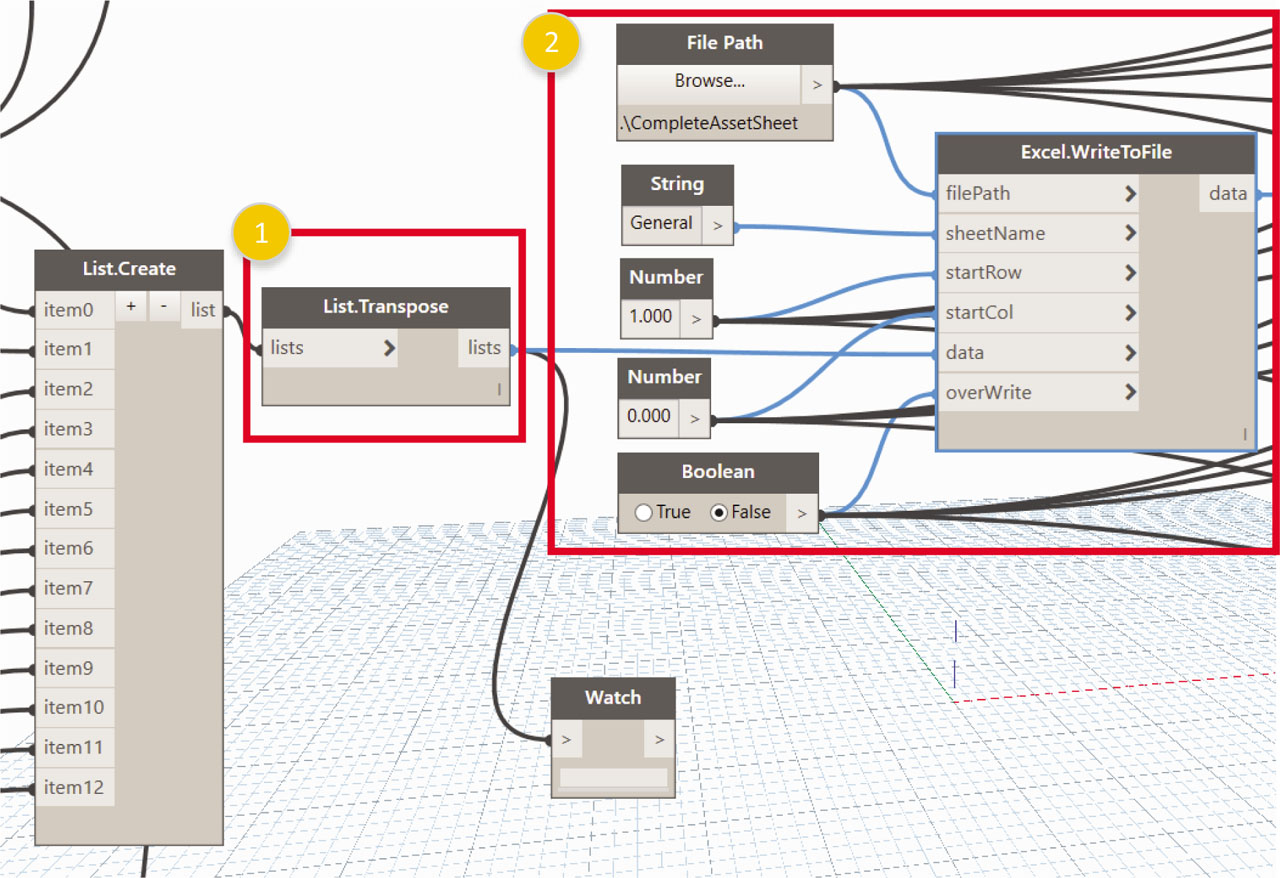
Fig. 7
Step 3: Writing data to Excel (“General” tab).
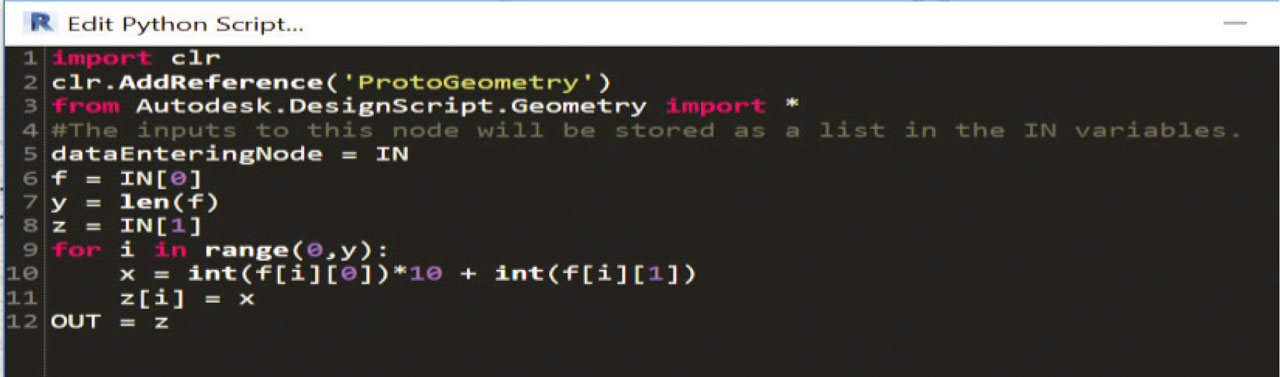
Fig. 8
Python code for converting OmniClass values.
Tab. 5
Stored OmniClass values
| Element index | |||
|---|---|---|---|
| 0 | 1 | ||
| Value index | Value | Value index | Value |
| 0 | 2 | 0 | 2 |
| 1 | 3 | 1 | 3 |
| 2 | . | 2 | . |
| 3 | 2 | 3 | 2 |
| 4 | 7 | 4 | 7 |
| 5 | . | 5 | . |
| 6 | 1 | 6 | 1 |
| 7 | 9 | 7 | 7 |
| 8 | . | 8 | . |
| 9 | 1 | 9 | 1 |
| 10 | 5 | 10 | 3 |
Tab. 6
Query functions to access value
| Query function | Value |
|---|---|
| f[0] | 23.27.19.15 |
| f[0][0] | 2 |
| f[0][1] | 3 |
| f[1] | 23.27.17.13 |
| f[1][4] | 7 |
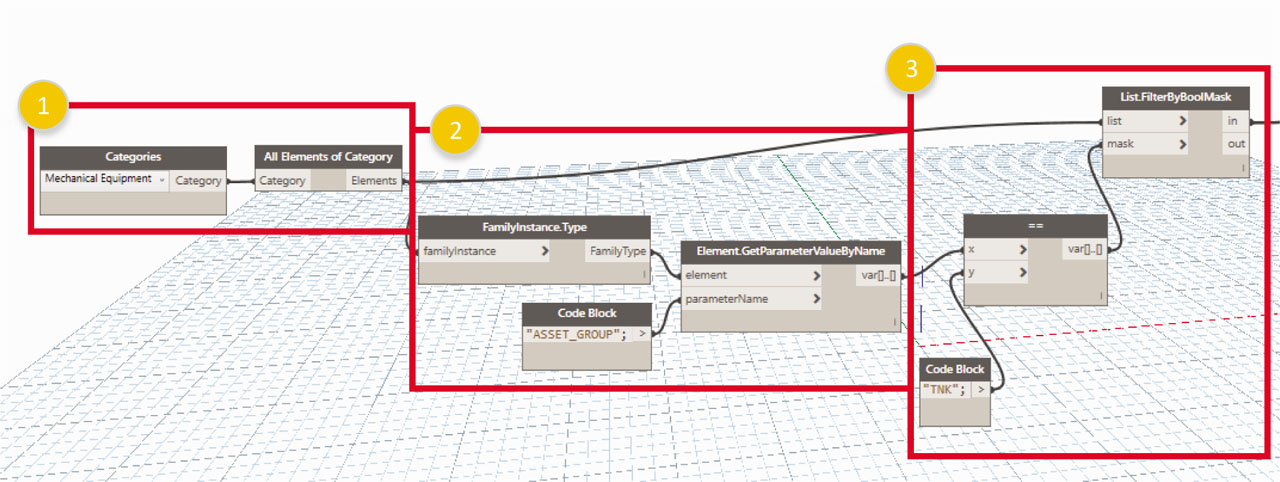
Fig. 9
Step 4.1: Access all elements of a specific asset group.
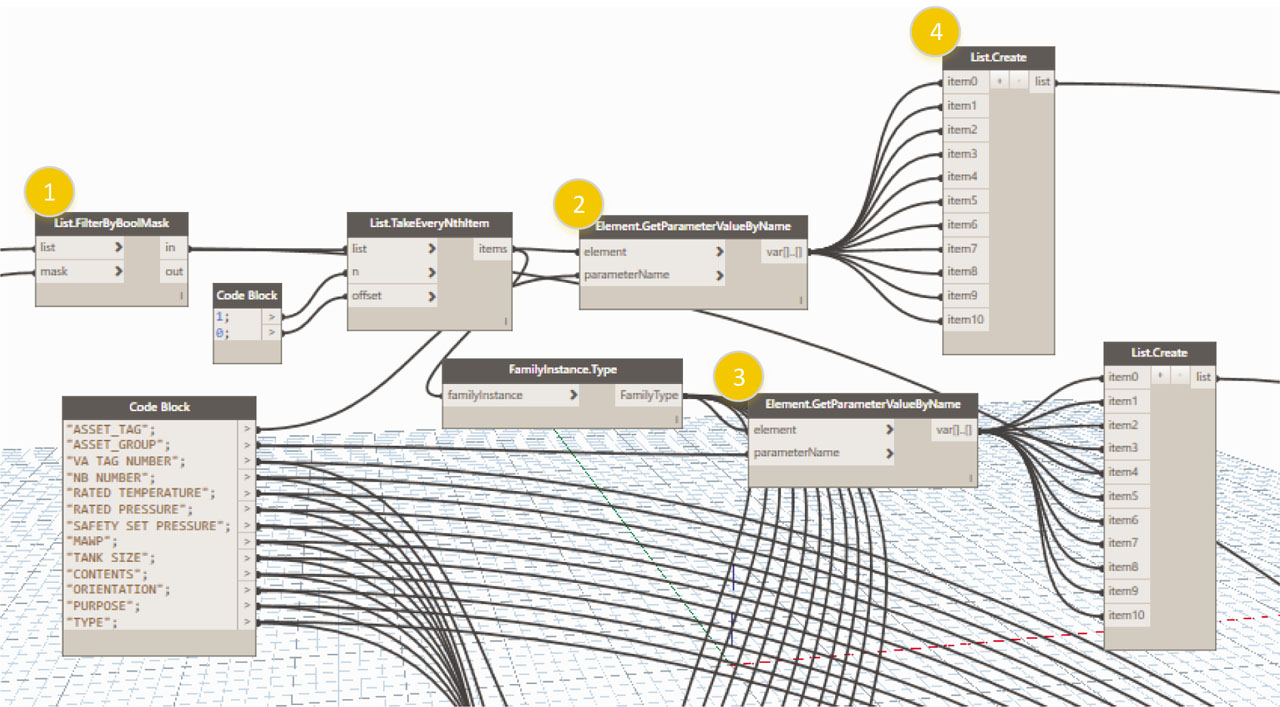
Fig. 10
Step 4.2: Creating column 1 (ASSET_TAG) and column 2 (ASSET_GROUP).
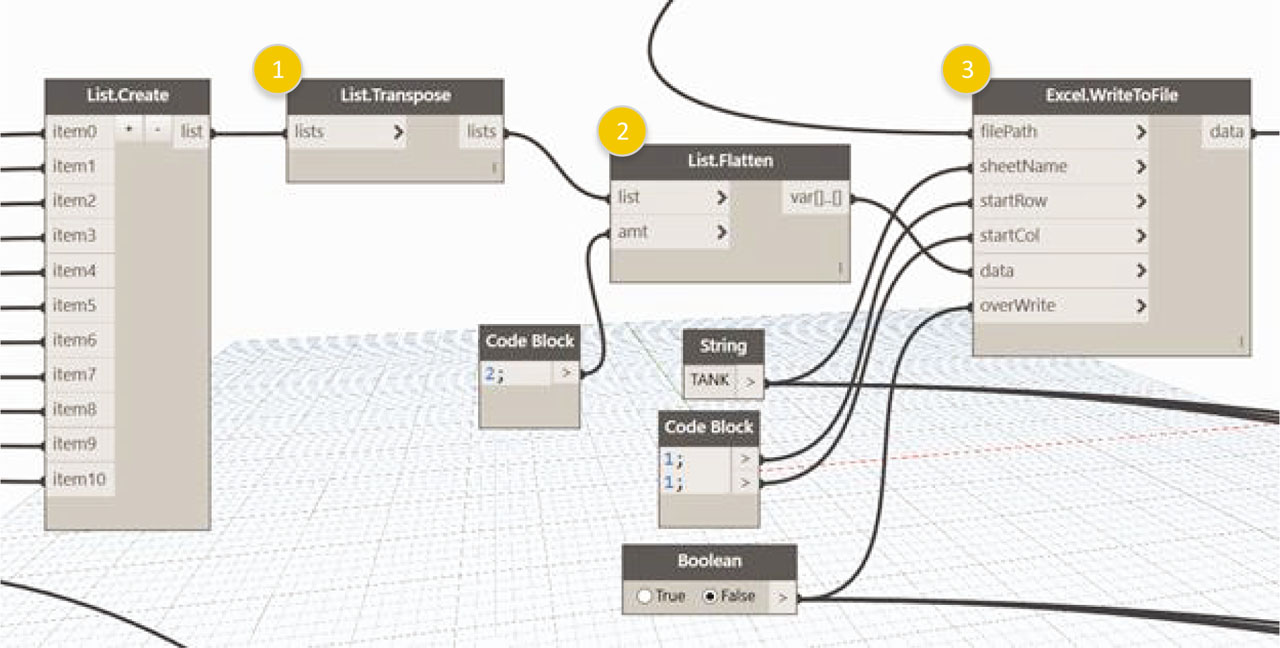
Fig. 11
Step 4.2: Transpose and write columns 1 and 2 to a temporary Excel file.
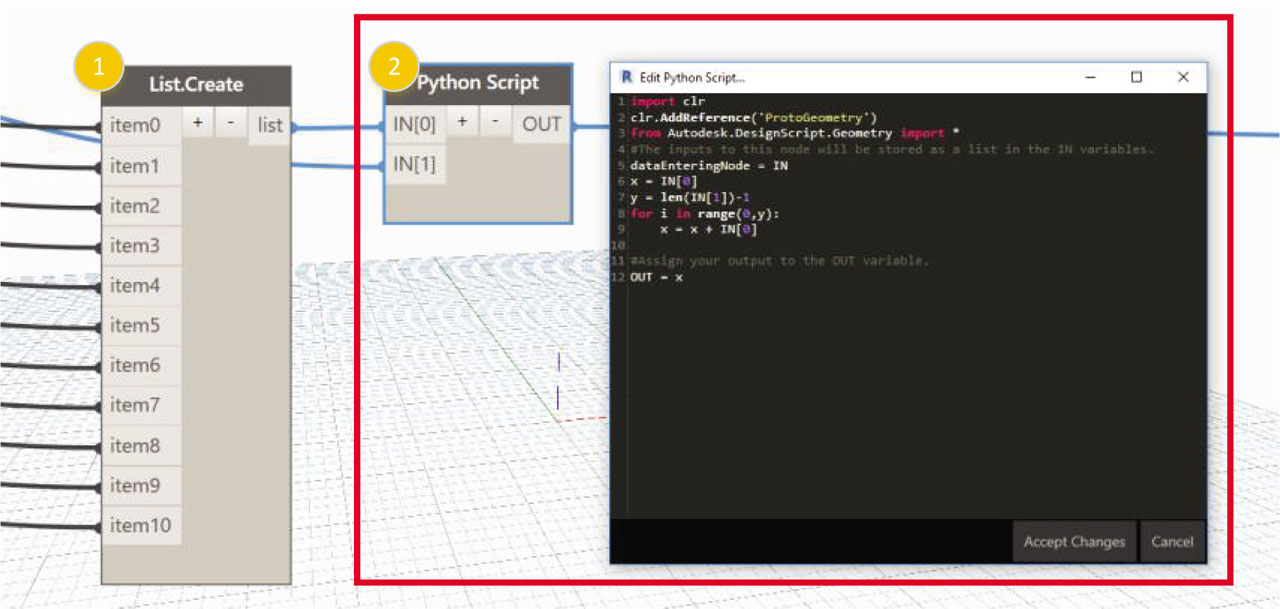
Fig. 12
Step 4.2: Column 3—Writing Attribute ID for each asset.
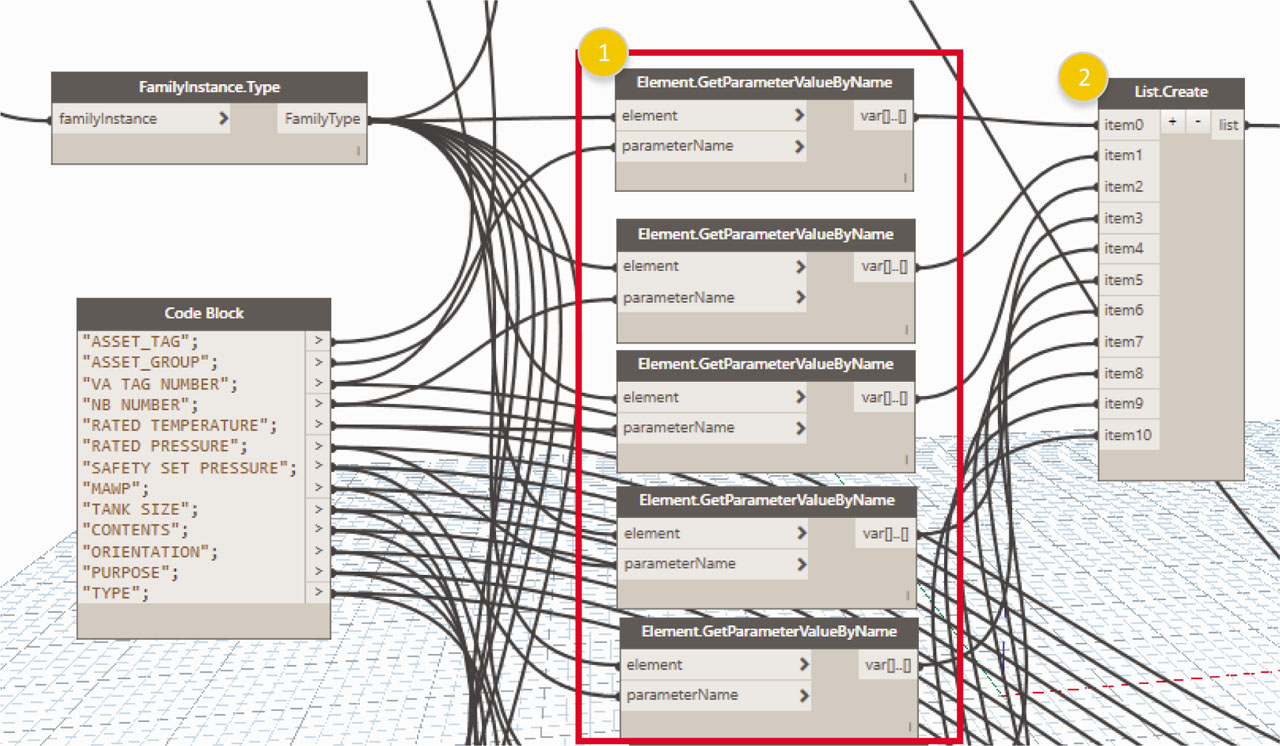
Fig. 13
Step 4.2: Column 4—Writing attribute values.
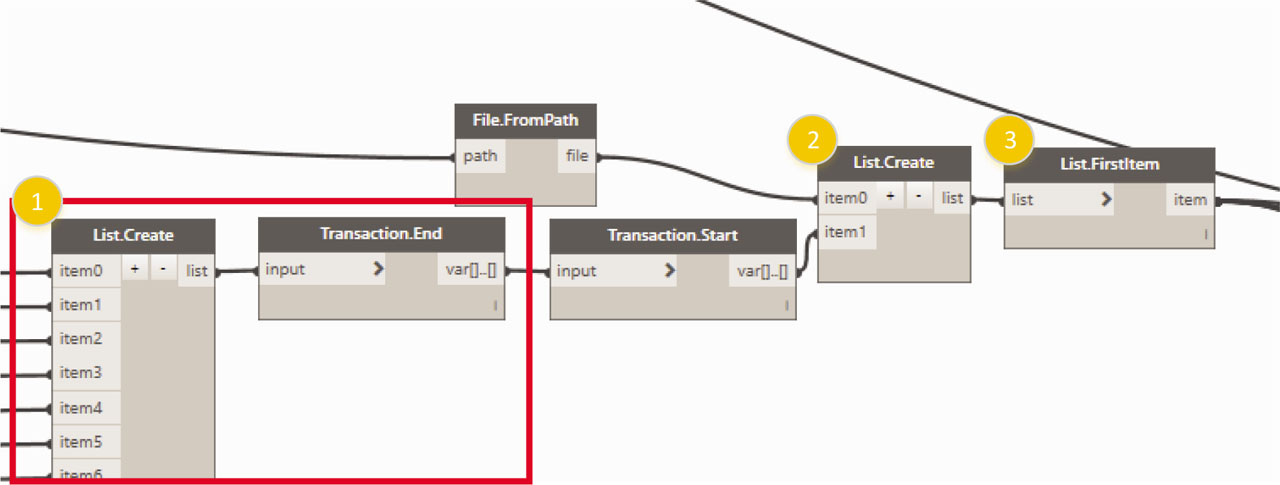
Fig. 14
Step 4.3: Preparing to read data from temporary file.
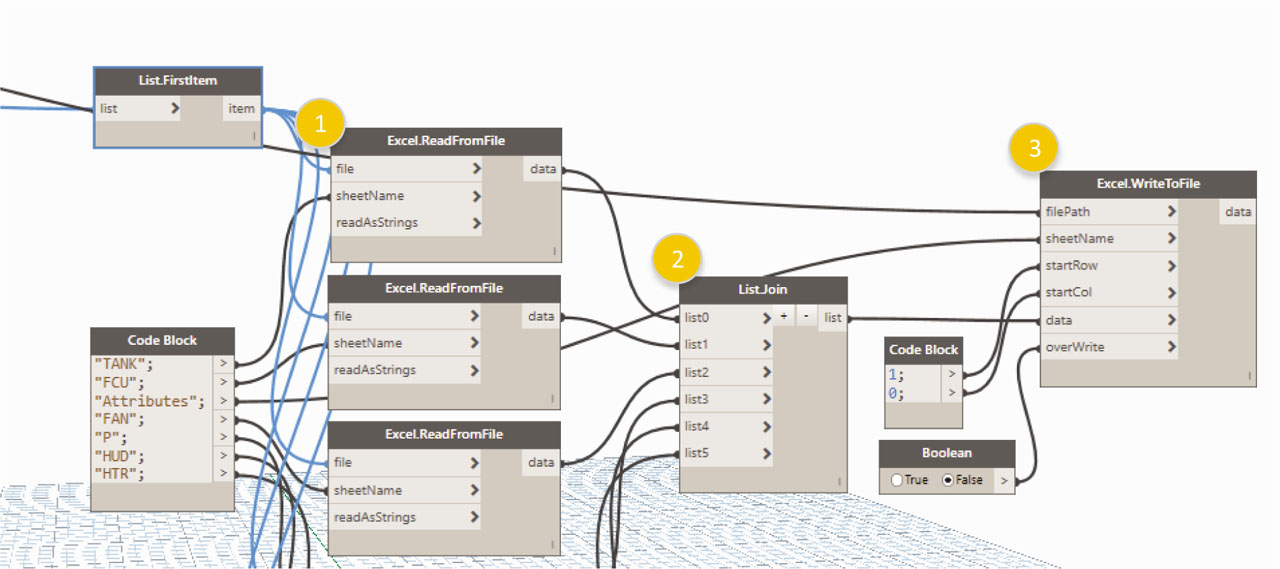
Fig. 15
Steps 4.3 and 4.4: Reading temporary data and writing to final file.