
I. Introduction
Although power optimization is the process of reducing power consumption in electronic devices or systems while maintaining functionality, performance, and reliability. It involves using various techniques and tools to minimize energy usage, often by targeting static and dynamic power consumption. This can be achieved by optimizing CMOS circuits, using techniques like voltage scaling, clock gating, and power gating, and by considering trade-offs between power, performance. Power optimization is the process of reducing the power consumption of a digital electronic design to its optimal level while preserving design functionality, safety, and security. The process uses electronic design automation tools and methodologies for optimal power levels. Nevertheless, this process of finding the best operating conditions for a complex network of electrical components, sources, and loads. It involves balancing multiple objectives, such as minimizing cost, maximizing reliability, reducing losses, and improving efficiency. Power flow optimization is a technique that aims to control the generation and consumption of power sources and loads in a network to optimize certain objectives, such as minimizing generation cost, network losses, voltage deviation, or environmental impact. Than optimization is the process of improving a portfolio, algorithm or trading system to reduce costs or increase efficiency [15]. Portfolios can be optimized by reducing risks, increasing expected returns, or changing the frequency of rebalancing.Though power optimizers maximize energy output by monitoring and adjusting the performance of each panel, ensuring that shading, dirt, or differences in panel orientation don't reduce the overall efficiency of the system. This optimization leads to increased energy production and better system reliability. Now since power optimization in mobile operating systems refers to techniques used to minimize energy consumption while maintaining acceptable performance levels. This involves strategies to reduce power usage across various hardware and software components, ultimately extending battery life and improving the overall user experience. Though the operating system (OS) plays a crucial role in power management by overseeing how the computer uses energy, optimizing performance, and conserving battery life [10, 6]. It does this by managing hardware resources like the CPU, memory, and peripherals, adjusting power usage based on system activity, and implementing power-saving features. Whereas the operating system manages power in a controlled, uniform way across different hardware platforms, allowing maximum conservation of power on various devices. Better device integration. Device drivers that conform to industry-wide specifications ensure maximum conservation regardless of the hardware platform. While the Windows operating system uses power-management hardware to put the computer into a low-power sleep state instead of shutting down completely, so that the system can quickly resume working. After all, the OS performs a range of functions that impact the performance of a mobile device, such as booting, memory management, process management, device management, file management, and security and privacy. Booting involves loading the necessary files and drivers to start the device and run the applications. However mobile operating systems (OS) play a crucial role in energy management by controlling hardware, optimizing power consumption, and extending battery life. They manage resources like the CPU, memory, and wireless communication to minimize energy usage while ensuring optimal device performance [15]. This includes techniques like dynamic voltage and frequency scaling, idle power management, and workload prediction. Eventually mobile OSes control the power states of the CPU and memory, adjusting their performance based on the workload. This includes techniques like dynamic voltage and frequency scaling (DVFS), where the voltage and frequency of the processor are adjusted to match the processing needs, reducing power consumption when full power isn't required. After all, the mobile OS acts as a central controller for all power-related aspects of the device, aiming to maximize battery life while ensuring smooth and efficient performance.
II. Literature Review
Eventually the concept of power optimization in mobile operating systems (OS) emerged alongside the increasing complexity and power demands of mobile devices and applications. Early mobile devices relied on simpler hardware and operating systems, but as processing power, screen technology, and network capabilities advanced, so did the need to manage power consumption effectively. This led to the development of power-aware scheduling, and other techniques to optimize battery life. However early mobile devices were limited by their simple hardware, operating systems, and network capabilities. As technology advanced, processing power, screen technology, and network speeds increased, leading to more sophisticated devices and a wider range of functionalities. This evolution enabled the development of smart phones with features like high-resolution screens, advanced multitasking, and faster network connectivity [3]. Early mobile phones, like the Motorola DynaTAC 8000X, were characterized by their large size, heavy weight, and limited functionality. They primarily focused on voice calls and lacked features like texting or internet access. Key hardware components included a bulky casing, an LED display (often just for numbers), a large battery, and an antenna that needed to be extended before calls. As though size and weight in early mobile phones were significantly larger and heavier than modern smart phones. The DynaTAC, for example, weighed around 1.1 kilograms and was over 25 centimeters tall. Even the display of these phones typically featured LED displays that could show a limited number of digits, a far cry from the graphical screens of today. As though the battery life: was not as advanced, resulting in short talk times (often around 30 minutes) and long charging times (around 10 hours). Nevertheless the early mobile phones often had a protruding antenna that needed to be extended before making a call. Since it has limited functionality such as features like texting, internet access, and cameras were not available.
Before the widespread adoption of Android and iOS, several mobile operating systems powered smartphones and feature phones. Symbian OS, BlackBerry OS, and Palm OS were prominent players. Nokia, a major manufacturer at the time, heavily relied on Symbian, while BlackBerry devices were known for their unique operating system. Palm OS was also a significant platform, particularly for early smartphones like the Palm Treo. As though old phones, before the dominance of Android and iOS, primarily used operating systems like Symbian, BlackBerry OS, and Palm OS. Symbian, in particular, was a major player, especially in Nokia devices [10,12]. Other systems like Bada, RTOS, BREW, and Linux were also used, with some feature phones relying on J2ME for applications and WAP browsers. Symbian is a discontinued mobile operating system (OS) and computing platform designed for smartphones. It was originally developed as a proprietary software OS for personal digital assistants in 1998 by the Symbian Ltd. consortium. However, its technical and market control of the platform were limited by its customers, particularly Nokia. From 2007 onward, Symbian lost market share and developer loyalty to the new iPhone and Android platforms, leading to the extinction of the company and eventually its platform. Whereas modifications to the OS kernel can significantly impact power consumption, especially for background processes. Research explores techniques like dynamic voltage and frequency scaling (DVFS) for CPUs and power management for other components. While efficiently managing resources like CPU, memory, and network connections is essential. This includes techniques like dynamic power management (DPM) and dynamic voltage and frequency scaling (DVFS), which adjust resource allocation based on workload and user activity. After all, collaboration between hardware and software designers is crucial for achieving optimal power efficiency. This includes designing hardware components that are inherently more power-efficient and developing software that can effectively utilize those features [9]. Consequently, various methods like adaptive power management, power-aware scheduling, and power-aware routing are employed to reduce power consumption across different subsystems. Furthermore the field of power optimization in mobile operating systems is constantly evolving. Although low-power display technologies, specifically those based on liquid crystals (LCDs), began their development in the late 1960s. The first operational LCDs were developed in the late 1960s, with early applications in calculators and watches. Even though Low-power display technologies for mobile operating systems focus on reducing energy consumption while maintaining a usable display. Key technologies include LCDs (Liquid Crystal Displays), OLEDs (Organic Light Emitting Diodes), and EPDs (Electronic Paper Displays or e-paper). LCDs, while common, require backlighting, increasing power usage. OLEDs, with their self-emissive pixels, offer better power efficiency, especially when displaying darker images. EPDs, also known as eink, are exceptionally low-power, particularly for static content like text, but have limitations with refresh rates and color reproduction.
III. Methodology of Operating System’s Optimization Approaches:
A. Dynamic Voltage and Frequency Scaling (DVFS)
Dynamic voltage and frequency scaling (DVFS) is a power management technique that adjusts a processor's operating voltage and frequency to match the workload requirements. By reducing voltage and frequency when the workload is low, DVFS can significantly reduce power consumption, leading to energy savings and potentially extending battery life in portable devices. While DVFS exploits the relationship between power consumption, voltage, and frequency. Power consumption is roughly proportional to the square of the voltage and linearly proportional to the frequency [10, 15]. By lowering both voltage and frequency when possible, DVFS can dramatically reduce power usage. After all, Dynamic voltage and frequency scaling is a technique that aims at reducing the dynamic power consumption by dynamically adjusting voltage and frequency of a CPU. This technique exploits the fact that CPUS have discrete frequency and voltage settings as previously described.
Hence lowering the operating frequency of a system, whether it's a computer processor or a power grid, can indeed save power but at the expense of reduced responsiveness. This happens because lower frequencies mean fewer operations can be performed in a given amount of time, leading to slower processing speeds and a less reactive system [7]. Eventually in digital circuits, each operation (like adding two numbers) involves switching transistors on and off. Lowering the frequency reduces the rate of these switching events, which directly translates to lower power consumption. Often, lower frequencies allow for lower operating voltages. Lower voltages reduce power consumption, as power is proportional to the square of the voltage (P = CV^2, where C is capacitance). Operating systems often use DVFS techniques, dynamically adjusting both voltage and frequency based on the workload. When the system is idle or lightly loaded, it can operate at lower frequencies and voltages to save power.
B. CPU and Process Scheduling
Since modern mobile operating system (OS) schedulers often prioritize assigning tasks to CPU cores based on performance-per-watt efficiency. This means that the scheduler aims to choose the core that can perform the task with the least amount of energy consumption for the given level of performance [2]. This approach helps maximize battery life while maintaining acceptable performance levels. Many mobile devices utilize HMP architectures, such as ARM's big.LITTLE technology, which includes both high-performance cores (big cores) and energy-efficient cores (LITTLE cores).
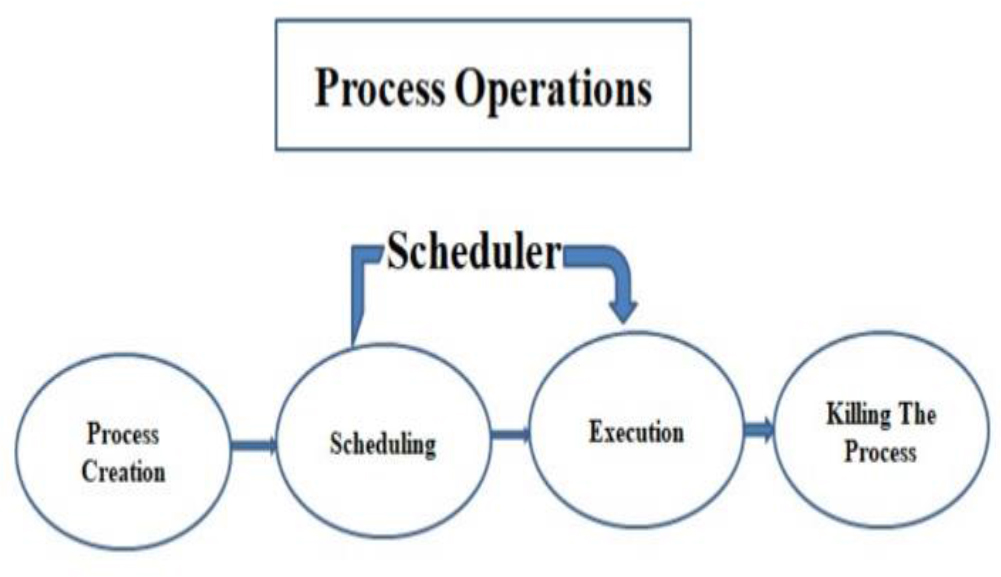
Figure 1.
Showing the process scheduling of mobile operating system
Optimizing process scheduling for power consumption in mobile operating systems is a key concern in modern computing. While full integration with a real mobile OS (like Android) involves low-level system interaction. In this article simulates a power-aware scheduling algorithm in Python to demonstrate the concept [18].
To simulate a power-optimized scheduler that prioritizes processes based on both their urgency such as deadline or priority and power consumption. Here the processes each has attributes like execution time, power usage, and priority. Then the power budget has max allowable power usage per time unit. The scheduling goal has maximized performance within the power budget. And scheduling policy uses a custom algorithm such as power-aware shortest job first or dynamic power scheduling.
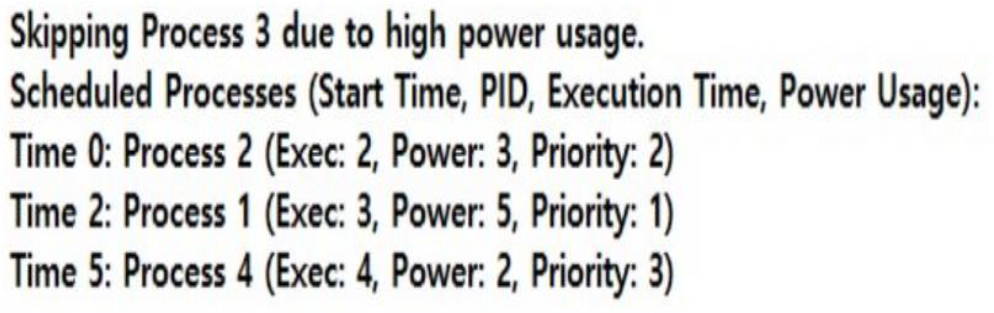
Figure 2.
Figure 2: Showing the power-aware scheduling algorithm that generated by python
In this demonstration, we employed the Dynamic Voltage and Frequency Scaling (DVFS) technology through simulation. Then, simulate the battery power situation and adjust the scheduling plan accordingly. Therefore, a real-time constraint or a scheduling method with deadline awareness should be implemented. Then add thermal constraints in addition to power. This metric reflects how much computational work a core can do for each unit of energy it consumes. The scheduler dynamically assesses the characteristics of each task and the capabilities of the available cores. It then assigns the task to the core that offers the best balance between performance and energy consumption. A computationally intensive task might be assigned to a high-performance core, while a background task with lower performance requirements might be assigned to an energy-efficient core. The scheduler may also adjust core frequencies and even migrate tasks between cores at runtime to optimize for performance and power consumption based on changing workloads and power conditions [10, 17].
C. App Standby and Doze Modes
After all, Android utilizes features like Doze and App Standby to optimize battery life by limiting background activity when a device is idle or apps aren't actively used. Doze suspends background CPU and network activity for apps when the device is unused for extended periods. App Standby defers background network activity for apps with no recent user interaction. These features help reduce power consumption and extend battery life. Furthermore Doze introduced in Android 6.0 (Marshmallow), Doze mode activates when a device is idle, meaning it's not charging, the screen is off, and it hasn't been moved for a while. During Doze, the system defers background CPU and network activity, and periodically enters maintenance windows to allow apps to complete pending tasks. Hence App Standby feature focuses on apps that haven't been recently used by the user. It defers background network activity for these apps, further reducing power consumption [11]. Both Doze and App Standby contribute to significant battery savings by limiting background processes and network access, which are major consumers of power. Android also offers system-wide settings like Data Saver Mode and App Standby Buckets, which provide broader controls over background data usage. Finally, while Doze and App Standby are beneficial, they can also be bypassed in certain situations. For example, high-priority push notifications and apps with specific exemptions can still perform background tasks. Users can also manually exempt apps from these optimizations in the settings. However, unnecessary exemptions can negate the benefits of these power-saving features.
D. Display and Sensor Management
Where as operating systems can reduce energy consumption by dynamically adjusting screen brightness using ambient light sensors. This feature, often called auto-brightness or adaptive brightness, uses the sensor to detect the ambient light level and then optimizes the screen brightness for both visibility and battery conservation [15]. By automatically lowering the brightness in darker environments, the device uses less power, extending battery life. Though ambient light sensors, built into many devices, measure the amount of light surrounding the device. The OS then uses this information to adjust the screen's brightness. In darker environments, the brightness is lowered, and in brighter environments, it's increased.
Nevertheless the operating system can indeed reduce energy consumption by dynamically lowering the refresh rate of the display when it's showing static content. This is a power-saving technique that's often used in laptops and other devices with batteries to extend their lifespan. Even higher refresh rates mean the display updates more frequently, requiring more power from the system's graphics processing unit (GPU) and the display itself. When the screen displays static content (like text on a document or a paused video), the information isn't changing rapidly [10, 6]. Therefore, it doesn't need to be refreshed as often. Operating systems with adaptive refresh rate features can detect when the content is static and lower the refresh rate to a lower, more power-efficient setting. By reducing the refresh rate for static content, the system uses less power, leading to longer battery life or reduced energy consumption overall. For example Windows 11 and some other operating systems have features like Dynamic Refresh Rate that automatically adjust refresh rates based on content and user activity.
Since temporarily disabling unused sensors is a valid technique to reduce energy consumption, especially in devices with limited power sources like mobile phones or IoT devices. By intelligently managing sensor usage, an operating system can significantly extend battery life. Sensors, like accelerometers, gyroscopes, GPS, and cameras, consume energy while active. When a device is not actively using data from a particular sensor (e.g., the device is stationary, and the accelerometer is not needed), the OS can put the sensor into a low-power or sleep mode [18]. The OS can dynamically enable or disable sensors based on application needs and device usage patterns. For example, if an application is not actively using the GPS, the GPS sensor can be disabled. Operating systems incorporate power management features that monitor device activity and intelligently manage sensor states to optimize battery life. For example doze on Android where a power-saving feature that intelligently manages sensor activity and app usage based on device inactivity.
E. Network Optimization
As power-saving modes on devices like smartphones and laptops manage Wi-Fi and mobile data access to minimize energy consumption and extend battery life. These modes achieve this by adjusting how the device interacts with wireless networks and reducing background data usage. Power-saving modes often limit or disable background data synchronization for apps like email, social media, and cloud storage, which would otherwise constantly consume power to maintain connections and update information. Wi-Fi power-saving modes, like PSM (Power Saving Mode) and U-APSD, can adjust how frequently a device checks for Wi-Fi networks and how it receives data. This can involve temporarily suspending connections or reducing the frequency of data transmission. Mobile data usage is also managed. When a device is in power-saving mode, it may restrict background data for mobile networks and potentially reduce the intensity of data connections [10, 13]. Wireless radios like Wi-Fi and Bluetooth consume energy even when not actively transferring data. Power-saving modes can reduce this consumption by putting these radios into a low-power state when they're not needed or by limiting their background activity. While power-saving modes extend battery life, they can also introduce some trade-offs. Users might experience slightly delayed notifications, slower app loading times, or a less responsive feel when using certain applications that rely on frequent background data updates.
F. Context-Aware Power Management
Whereas context-aware systems leverage information like location, user activity, and time to optimize power consumption. These systems dynamically adjust power settings based on the detected context, aiming to improve energy efficiency and user experience [15]. For example, a device might dim its screen when in a dark environment or reduce processing power when not actively used. Eventually a device can reduce power consumption when it's in a location where it's not needed, like turning off Wi-Fi when outside of a known network area or dimming the screen in a dark room. If a device detects that the user is inactive, it can reduce processing power or enter a sleep state to save energy. Conversely, when the user is actively engaged, it can prioritize performance and responsiveness. Time-based rules can be implemented to adjust power settings. For instance, a device might automatically dim its screen during nighttime or reduce power consumption during low-usage hours. After all, systems that utilize contextual information to provide relevant information and services to users, adapting their operations based on the user's task and environmental situation. While to conserve battery and optimize viewing, it's recommended to disable GPS when indoors and reduce screen brightness in dark environments. On most devices, this can be done by adjusting settings within the device's operating system such as Android or Windows. GPS uses a significant amount of battery power.
IV. Evaluation and Tools
Even though Trepn Profiler is a power profiling tool used by researchers and developers to optimize power consumption in mobile devices. It allows for detailed tracking of system components like CPU, GPU, and network, enabling the identification of areas where power is being wasted or consumed inefficiently. By using Trepn, developers can gain insights into how their code impacts power consumption and make informed decisions to improve energy efficiency [10]. As though Trepn provides real-time tracking of various system components, allowing developers to see how their code affects power usage as it runs. It allows for detailed analysis of power consumption by individual components like CPU cores, GPU, memory, and peripherals. Trepn can show which applications are consuming the most power, allowing developers to focus their optimization efforts on the most power-hungry apps.
Then power optimization strategies involve using tools like PowerTutor, a power profiling tool, to identify energy-consuming components and optimize performance. Researchers and developers use such tools to understand where power is being used in a system and then apply various techniques to reduce consumption. These techniques can range from low-level hardware optimizations like clock gating and DVFS to higher-level software optimizations such as algorithmic changes and efficient data handling. Whenever this tool, developed by the University of Michigan, provides detailed power consumption information for different applications and system components. It helps identify energy-intensive processes and functions, enabling targeted optimization. A process-level power profiling tool that provides real-time energy consumption data for each process, allowing developers to understand the power impact of their code.
Though power optimization strategies in Android development heavily leverage power profiling tools like Android Battery Historian and Android Studio's Profiler. Battery Historian specifically helps visualize battery data from bug reports, allowing developers to pinpoint resource-intensive components and optimize power consumption. Battery Historian is a tool that analyzes Android bug reports to visualize battery usage patterns. It takes data collected by dumpsys batterystats (a command-line tool) and transforms it into interactive charts and reports. Developers can use Battery Historian to identify which parts of their app (e.g., specific services, background tasks, or UI elements) are consuming the most power. For example if Battery Historian shows that a particular background service is frequently waking up the device, developers can investigate and potentially reduce the frequency of its execution or utilize more efficient scheduling mechanisms [15].
Where power optimization strategies utilize benchmarks like MobileMark to evaluate and compare the energy efficiency of different hardware and software configurations. By running standardized workloads and measuring power consumption, benchmarks like MobileMark allow developers to identify areas where power is being wasted and make informed decisions about optimizing performance for lower energy consumption. MobileMark provides a standardized set of workloads that simulate real-world usage scenarios on mobile devices. This allows for consistent and comparable measurements of power consumption across different devices and configurations. By analyzing the power consumption data collected during benchmark runs, developers can identify specific hardware components or software features that are consuming excessive power [10, 17]. Benchmarks allow developers to test and compare the effectiveness of different power optimization techniques, such as power gating, dynamic voltage and frequency scaling (DVFS), and energy-aware scheduling. The insights gained from benchmarking help guide the design of both hardware and software for optimal power efficiency. For example, if a particular CPU core is found to be a major power consumer, developers might choose to optimize its performance or replace it with a more energy-efficient alternative. Industry benchmarks like MobileMark can help create a more transparent and competitive landscape for power optimization, encouraging innovation and driving continuous improvement in energy efficiency. While MobileMark is specifically designed for mobile devices, other benchmarks like MLPerf Power are used for evaluating the energy efficiency of machine learning systems across different hardware platforms and scales.
V. Challenges and Future Directions
A. Trade-offs Between Performance and Energy
Now since aggressive power-saving techniques can indeed degrade user experience. While these techniques aim to extend battery life by limiting device functionality, they may result in noticeable performance slowdowns, delayed notifications, and reduced visual quality. Aggressive power saving often slows down the processor, limits background app activity, and restricts the device's ability to handle demanding tasks. To conserve power, some power-saving modes might delay or even prevent notifications from arriving, potentially causing users to miss important updates or messages [20]. The screen's brightness is often reduced to conserve power, which can make it harder to see content, especially in bright environments. Apps that rely on background processes, such as syncing or location tracking, may be restricted, impacting their functionality and potentially causing data loss. Some power-saving modes may limit the accuracy of location services, which can affect navigation and location-based apps. For Example: When a user activates extreme battery saver mode on their Pixel phone, most apps are paused and processing speed is slowed down to conserve power [2]. While power-saving modes can be beneficial in situations where battery life is critical, it's important to find a balance between power savings and user experience. Some devices offer customizable power-saving modes that allow users to choose which features to limit, enabling them to tailor the experience to their needs. Even though power optimization in mobile operating systems necessitates a delicate balancing act between performance and energy consumption [7]. Achieving this requires sophisticated predictive models and adaptive policies that can dynamically adjust system behavior based on various factors like user activity, application demands, and available energy. Mobile OSes need to anticipate future energy needs based on user behavior, application usage patterns, and environmental conditions. This allows the system to proactively adjust resources and settings to minimize energy waste before it happens. Once future needs are predicted, the OS needs to dynamically adjust various parameters to optimize power consumption [17]. This includes adjusting processor speed, screen brightness, network activity, and other power-intensive components. it's crucial to understand that there are inherent trade-offs between power consumption and performance. Reducing power often means sacrificing some processing speed or responsiveness. Therefore, the adaptive policies need to intelligently balance these factors based on user needs and context.
B. AI and Machine Learning Integration
Nevertheless Future mobile operating systems will leverage machine learning to anticipate user needs and personalize experiences by analyzing various data points and context. This includes predicting user behavior like app usage patterns, content preferences, and even potential actions, enabling proactive features and a more seamless user experience [16]. For example, algorithms like Recurrent Neural Networks (RNNs), specifically Long Short-Term Memory (LSTM), can analyze sequences of app usage to predict future actions with high accuracy. By predicting which apps a user will need, the OS can pre-load them, reducing launch latency and improving responsiveness [3]. Machine learning models can analyze user preferences, browsing history, and social media activity to recommend relevant content, articles, or products. The OS can learn the optimal time and method for delivering notifications, minimizing interruptions and maximizing engagement [17]. The OS can adjust the layout and features of the interface based on user behavior, prioritizing the most frequently used elements. By predicting when apps will be used, the OS can optimize power consumption, potentially extending battery life. The OS can intelligently allocate system resources (CPU, memory) based on predicted usage patterns, preventing slowdowns and improving overall performance.
Even machine learning will improve the accuracy and speed of predictive text input, anticipating what users are likely to type. The OS can anticipate search queries based on user context and previous searches, providing faster and more relevant results. Machine learning
Algorithms can be used to recognize user gestures and provide intuitive control of the device [15]. As though Protecting user privacy and ensuring transparency in data collection and usage will be crucial. Machine learning models can be prone to bias, so it's important to ensure that predictions and recommendations are fair and equitable. As a result of continuously learning from user behavior and context, future mobile operating systems will become more proactive, personalized, and efficient, leading to a more seamless and intuitive user experience.
C. Support for Heterogeneous Architectures
Furthermore, mobile operating systems (OS) increasingly optimize for power consumption, which in turn drives hardware complexity. As users demand more from their devices, OSes must manage increasingly complex hardware (like multi-core processors, high-resolution displays, and numerous sensors) to balance performance and battery life. This leads to specialized hardware designs and sophisticated power management techniques within the OS [2]. OSes dynamically adjust CPU and GPU frequencies and voltages to match workload demands, saving power when full performance isn't needed. The OS scheduler can prioritize tasks to minimize power consumption, potentially using lower-power cores when possible. OSes work with hardware vendors to integrate power-saving features like specialized hardware accelerators such as for video encoding, decoding and power management units. Modern OSes manage power consumption at a very granular level, down to individual cores, memory controllers, and even specific hardware components. Hence To handle diverse workloads efficiently and enable power-saving techniques like DVFS, hardware designs have evolved to include multiple processor cores, each with its own power management capabilities. To offload computationally intensive tasks such as video encoding, AI processing, hardware accelerators like GPUs and dedicated AI chips are integrated, adding to the system's complexity. While mobile devices are equipped with a wide array of sensors, accelerometers, gyroscopes, proximity sensors, etc. that consume power. OSes must manage these sensors effectively, often through specialized hardware and software interfaces. To balance performance and power, modern systems use complex memory hierarchies, including caches and different types of memory, which adds to the hardware's complexity. Power management units are responsible for monitoring and controlling the power consumption of various components, requiring sophisticated hardware and software integration. DFVS is an important technique for saving energy by adjusting the voltage and frequency of a component. Some processors also offer multiple voltage and frequency domains (VDMs), which allow the cores and memory controller to run at different voltages and frequencies. Instead of running tasks at maximum speed all the time, mobile operating systems use scheduling techniques to ensure tasks are completed in a way that optimizes energy usage. This can involve dynamically adjusting CPU frequency based on the task requirements, potentially reducing the frequency when possible to save power [10, 4]. Though the OS plays a crucial role in managing the power consumption of the hardware by utilizing the features provided by the hardware and by implementing power-saving algorithms. The hardware must be designed to support the OS's power management capabilities. For example, a CPU needs to support DVFS to enable the OS to dynamically adjust its frequency. OSes also employ various software optimizations such as fine-grained memory management, efficient thread scheduling to reduce power consumption [11]. As a result the increasing complexity of mobile hardware is driven by the need to provide users with powerful and feature-rich devices while also ensuring acceptable battery life. The OS plays a critical role in managing this complexity to achieve power optimization [18, 14].
D. Sustainability and Eco-Efficiency
After all, power optimization in mobile devices is increasingly linked to sustainability, extending beyond just extending battery life to encompass reducing the overall environmental impact of device usage [6]. This involves minimizing the carbon footprint throughout the device's lifecycle, from production and usage to disposal. Beyond battery life causes resource consumption that producing a smartphone involves significant resource extraction and manufacturing processes, contributing to the device's overall carbon footprint [1]. Extending a device's lifespan through efficient power usage and repairability reduces the amount of e-waste generated when devices are discarded. Many mobile apps rely on server-side processing, and optimizing these server applications for energy efficiency is also crucial. While developing energy-efficient apps and operating systems is vital. This includes optimizing background processes, using location data judiciously, and minimizing unnecessary resource consumption [10,5]. Designing and using hardware components that are more power-efficient is another key aspect. Extending the lifespan of devices through repairs, refurbishment, and responsible recycling is essential to reduce the need for new devices and minimize environmental impact [10]. Datacenters that support mobile services also play a role. Optimizing their energy usage contributes to a more sustainable digital ecosystem. Whereas in consumer awareness and actions, consumers are increasingly aware of the environmental impact of their electronics and are looking for more sustainable options. Keeping devices longer, repairing them instead of replacing them, and choosing reconditioned tech can make a big difference. Properly recycling or donating old devices ensures that valuable materials are recovered and harmful materials are handled safely [9, 2]. Finally power optimization in mobile devices is no longer just about squeezing more hours of usage from a battery. It's a multifaceted approach that considers the entire lifecycle of the device and its impact on the environment.
VI. Conclusions
Power optimization in mobile operating systems is crucial to enhancing battery life, user satisfaction, and device sustainability. Furthermore power optimization in mobile operating systems is essential for extending battery life, improving user experience, and promoting device sustainability. By reducing power consumption, operating systems can enable longer usage times, smoother performance, and contribute to a more environmentally friendly approach to mobile technology. Optimized power management allows users to enjoy their devices for longer periods without needing to recharge frequently. Efficient power usage leads to a smoother, more responsive, and less interrupted user experience. Reducing strain on the battery through optimization can extend the overall lifespan of the device. Lowering energy consumption contributes to reduced electronic waste and a smaller environmental footprint. Through a combination of hardware-aware scheduling, dynamic resource management, and context-sensitive strategies, mobile OSs can deliver efficient energy use without sacrificing performance. As mobile computing continues to evolve, adaptive and intelligent power management will be essential in meeting the needs of future applications and devices.