
Introduction
Patients with hemianopia are blind in one half of their visual field, due to damage to the visual system posterior to the optic chiasm. This large visual field defect may lead to difficulties in different daily life situations, such as mobility related activities. There is however a large variability in how severely different individuals are impacted by their visual field loss. A crucial factor that determines if an individual can successfully adapt to visual field loss is the development of compensatory strategies, such as certain eye movement patterns (Howard and Rowe, 2018). While some hemianopia patients are able to spontaneously develop compensatory strategies for their visual field loss, others retain difficulties, in particular with detecting objects in the periphery in situations when they are moving, e.g. during walking (Iorizzo et al., 2011). These patients can enter vision rehabilitation to learn compensatory eye movement strategies (for an overview see Pollock et al., 2019). In one type of compensatory scanning training, InSight-Hemianopia Compensatory Scanning Training (IH-CST), these patients learn to make horizontal scanning eye-movements (De Haan et al., 2015) in order to compensate for the field defect during mobility-related activities. In IH-CST training, hemianopia patients learn to repetitively perform a triad of saccades including an initial large saccade made towards the blind hemifield. Training hemianopia patients in making this type of scanning patterns improves their detection of peripheral stimuli and their avoidance of obstacles while walking (De Haan et al., 2015).
IH-CST consists of the following exercises:
1. Creating awareness of the extent of visual field loss. The therapist presents objects in different parts of the visual field (while patients keep their gaze fixated on a single location).
2. Learning the scanning pattern. The patient is taught to systematically make the eye movement pattern, being seated and fixating objects in the desired gaze locations at different distances. The occupational therapist observes the eye movements of the patient.
3. Further practice to automate the scanning pattern in a static condition. The patient has to call out numbers presented on a screen. If numbers are named correctly and quickly, it is assumed that the scanning pattern is also performed correctly.
4. Applying the scanning pattern in indoor mobility conditions. Again, the therapist observes the patient’s eye movements.
5. Applying the scanning pattern in outdoor mobility conditions. The scanning pattern is practiced in different traffic situations outside the therapy centre with increasing complexity. Patients walk, cycle or drive a mobility scooter, depending on their needs.
Studies investigating the effect of eye movement compensatory strategies, so far, have only compared the performance of participants in certain tasks, such as visual scanning or detecting obstacles while walking, before and after compensatory scanning training (Nelles et al., 2001; De Haan et al., 2015). They did not evaluate whether participants had correctly performed the scanning pattern during the training exercises. In the practical application of IH-CST at Royal Dutch Visio, there is also no objective measure of the eye movements during rehabilitation training. Instead, therapists attempt to gauge the approximate gaze direction of the patient or judge whether the scanning pattern was correctly applied based on the behaviour of the patient. As this procedure is rather subjective and error-prone, adding eye tracking in the IH-CST training would provide the patient and the therapist with better insights into the actual scanning patterns made during the different exercises. These insights will then be the basis for better feedback to the patients, which should in turn improve their progress in visual rehabilitation.
Secondly, the change in difficulty when transitioning from one step to the next in the training procedure can be too large for some people, as it is difficult to transfer learned perceptual skills to a new task (Ellison and Walsh, 1998). At present, the training environment transitions from a rather simple, static and predictable situation (step 3) to a dynamic environment (step 4 and 5). Therefore, having intermediate levels of difficulty, complexity and predictability would ease the transition between these steps. A possible way to achieve this is by using virtual reality (VR). In VR it is possible to create environments with increasing complexity, which can be controlled by the occupational therapist and are safe by nature (Rizzo, 2005).
An important aspect for successful integration of eye tracking and VR is that individuals with hemianopia and occupational therapists need to be willing and able to use the devices without external help.
We therefore want to assess the user experience of individuals with hemianopia, normal-sighted controls and the occupational therapists with a mobile eye tracker (study 1) and a VR headset (study 2) during different exercises for mobility training. The devices were tested in exercises that were part of the current IH-CST protocol. We established a list of requirements, which should be fulfilled by the tested devices, based on the expertise of occupational therapists, technical staff of Royal Dutch Visio and the authors of the study. Given this list of requirements we designed a questionnaire to assess the usability of the devices (Appendix A and B). The goals of this study are to find out whether the overall user experience of participants is sufficiently positive to continue working with these devices. In addition, we want to establish which criteria still need improvement based on the feedback of our participants to make the integration into IH-CST training possible.
Methods
Questionnaire for both studies
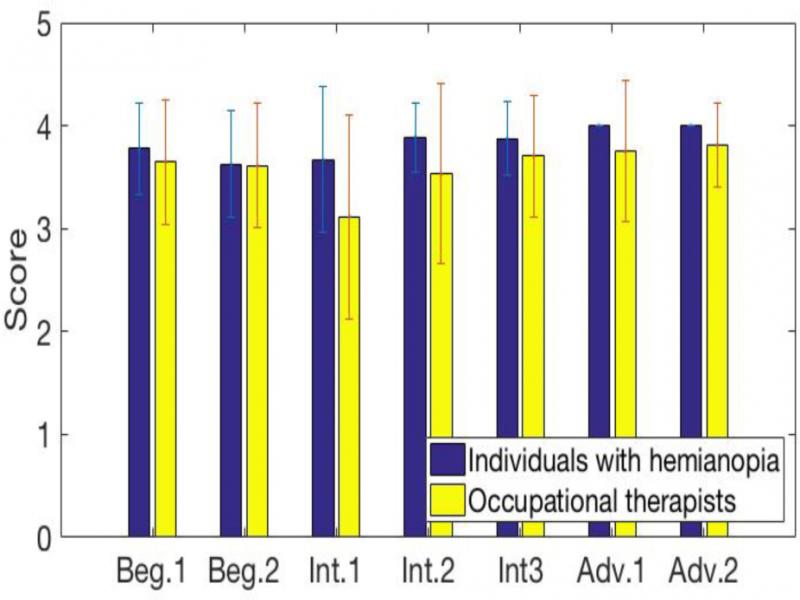
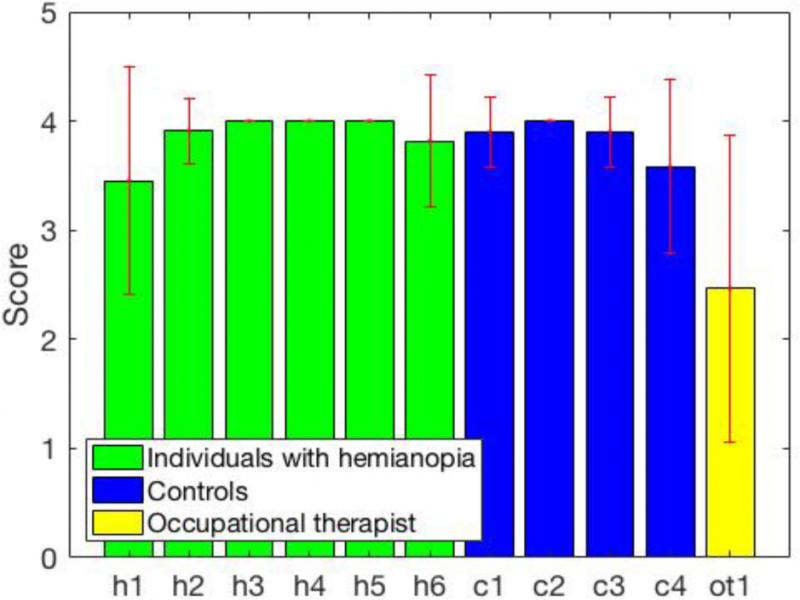
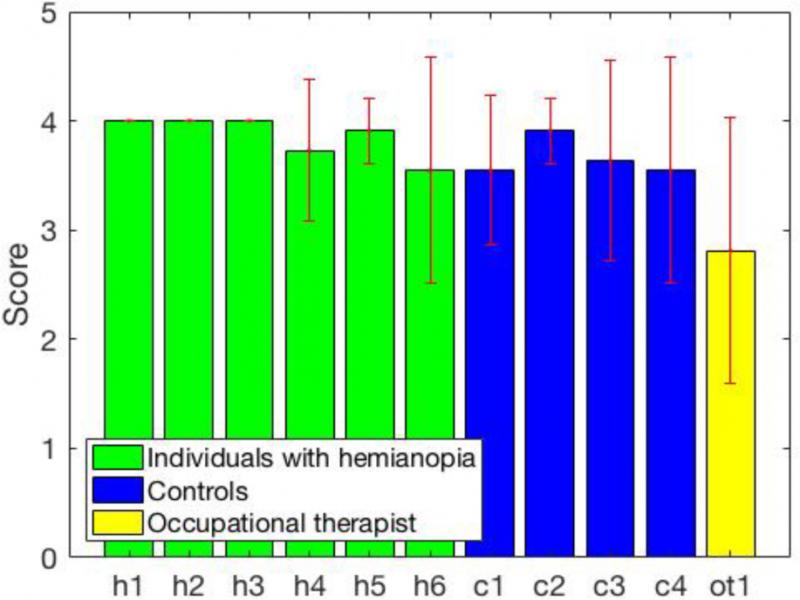
The first part of the questionnaire (part A) consisted of questions for individuals with hemianopia and normal-sighted control subjects. The second part (part B) consisted of the questions for occupational therapists. Each question could be answered by ticking one of four boxes, which stood for the options: strongly disagree, somewhat disagree, somewhat agree and strongly agree. For the analysis, the answers were then converted to a score. This ranged from 1 to 4 if a positive answer to the question meant that the requirement was fulfilled. The score ranged from 4 to 1, if a negative answer to the question meant that the requirement was fulfilled. In addition, participants could comment on each question in an additional box giving them the opportunity to explain their answer and provide details about problems that occurred.
Study 1) Eye tracking
Participants
Seven individuals with hemianopia (mean age: 53 years, SD 17), who were enrolled in the vision rehabilitation program at Royal Dutch Visio in Amsterdam, and three occupational therapists tested the head mounted eye tracker. We did not include the normal-sighted controls in the first study, as the device is intended for usage with individuals with hemianopia. As the exercises that were performed in this study wer already established as part of IH-CST training, we knew the effect of exposing our participants to these exercises.
Detailed information about the individuals with hemianopia who participated in study 1 is provided in Table 1. All occupational therapists had received the standard education for their profession in the Netherlands had several years of professional experience in visual rehabilitation and they were trained and highly experienced in providing the IH-CST.
Table 1.
Information on participants (individuals with hemianopia) in study 1.
| Category | Visual field | Age | Gender | Glasses/Lens | |
|---|---|---|---|---|---|
| Beginner | Hemianopia on left side | 63 | M | OD: S +0.50 | OS: S +0.50 |
| Beginner | Hemianopia on left side | 20 | F | OD: S -0.5 | OS: S -1 |
| Intermediate | Hemianopia on left side | 70 | M | OD: S-6.25 | OS: S-5.25 |
| Intermediate | Hemianopia on right side | 41 | M | OD: S-4.25 | OS: S-4.50 |
| Intermediate | Hemianopia on right side | 65 | M | OD: S-2.75 | OS: SO |
| Advanced | Quadrantanopia upper left | 53 | M | OD:S+1.50 | OS: S +1.25 |
| Advanced | Hemianopia on right side | 52 | M | No glasses | |
| Visual field defect | Age | Gender | Glasses/Lenses |
|---|---|---|---|
| Hemianopia on right side | 46 | M | Multifocal, +1,2 |
| Hemianopia on right side | 70 | M | Multifocal, +0,8 |
| Hemianopia on right side, sparing at 20 degrees | 65 | M | Multifocal, +1 |
| Hemianopia on right side | 58 | M | Multifocal, +1.25 |
| Hemianopia on left side with sparing (intact vision in the foveal region of the visual field) | 56 | F | +0.8 |
| Bottom right quadrantanopia | 65 | F | Multifocal +1 |
| Intact | 65 | M | Glasses (no further specification) |
| Intact | 27 | M | Glasses (no further specification) |
| Intact | 30 | M | No glasses or lenses |
| Intact | 70 | F | Glasses (no further specification) |
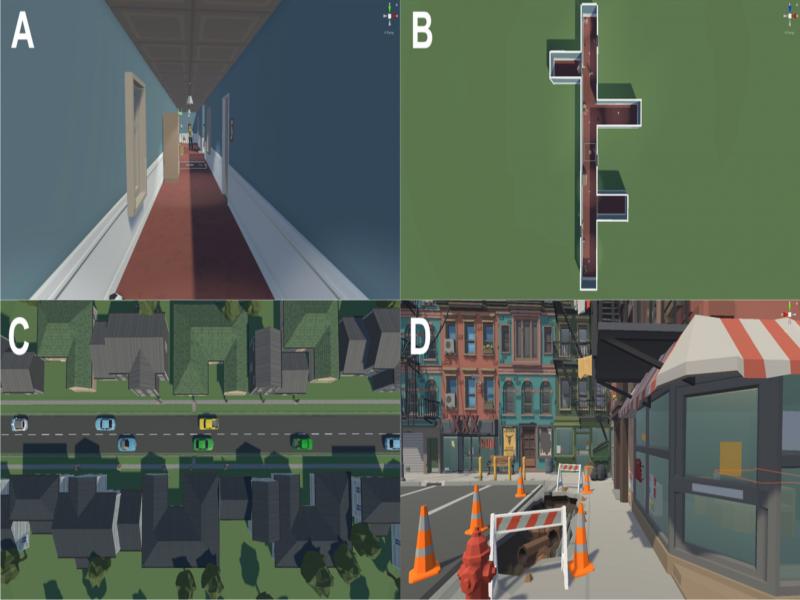
| Exercise | Scenarios | |
|---|---|---|
| Walking along a virtual hallway | 1: Empty hallway with open and closed doors | |
| 2: Hallway with traffic cones | ||
| 3: Hallway with more traffic cones than in scenario 2 | ||
| 4: Hallway with traffic cones, windows and doors | ||
| 5: Different obstacles, like plants, cupboards, bins, traffic cones | ||
| 6: With people, other hallways on the side, windows and doors | ||
| Crossing a road | 1: Without traffic or pedestrians | |
| 2: With traffic and pedestrians | ||
| Walking along a pavement | 1: with construction site | |
| Criterion | Comments | |
|---|---|---|
| Patients | Therapists | |
| Usability in mobile situations and outside | Would be more comfortable without the cable (1) | Would be better to do the exercise with tablet (1) |
| Laptop carried in backpack (2) | ||
| Calibration can be difficult under varying luminance conditions(1) | ||
| Usability with glasses | Uncomfortable to wear with own pair of glasses (1) | Calibration can be difficult with glasses/lenses (2) |
| Improvement of feedback | Watching the eye movements to give feedback is a good addition to the performed exercises (1) | Watching the eye movements to give feedback is a good addition to the performed exercises (1) |
| Confirmation that the client is actually doing the scan rhythm (1) | ||
| Have not watched the recording, but expect it to be good material to reflect on exercise(1) | ||
| Easy to use/no disruption of regular procedure of therapy session | Eye cameras in the field of view, could be corrected (3) | Need practice to perform setup of device (1) |
| Eye cameras in the field of view, could be corrected (1) | ||
| Laptop cannot be closed; that would stop recording (1) | ||
| Battery of the laptop was empty before end of session (1) | ||
| In exercise 1 (calling out numbers presented on a large screen) it is not possible to watch eye movements and screen at the same time (1) | ||
| Criterion | Comments | |
|---|---|---|
| Patients | Controls | |
| Large range of mobility | Turning around a lot is irritating, would prefer to continue walking (2) | Range of mobility too short for this exercise (1) |
| Cables are in the way when turning therefore 1 have to remember which way to turn (2) | Cable in the setup make it harder to move in VR (1) | |
| Safety | Scenery going blank when turning leads to problems with balance (1) | Higher risk of injury than when exercise is done in actual hallway (1) |
| Criterion | Comments | |
|---|---|---|
| Patients | Controls | |
| Immersive and pleasant virtual environment | Did not feel as safe as when walking in the hallway: cars were too close to me (1) Avatars were walking through me (2) Stood too close to the street (2) Blue line that marks end of mobility range irritating (1) Cars are too close, too large (1) Pavement needs to be wider (2) | Adding sound would be helpful; horn before collision with car (1) Blue line that marks end of mobility range irritating (1) Cars show up too late in scene (1) Faces of people do not look realistic (1) |
| Criterion | Comments | |
|---|---|---|
| Patients | Controls | |
| Immersive and pleasant virtual environment | Scenery was a bit too crowded (1) | |
| Avoid motion sickness | Scenery stopped moving due to an error. This led to dizziness (1) | |
| Moving in VR | Range of movement too short (1) | |