
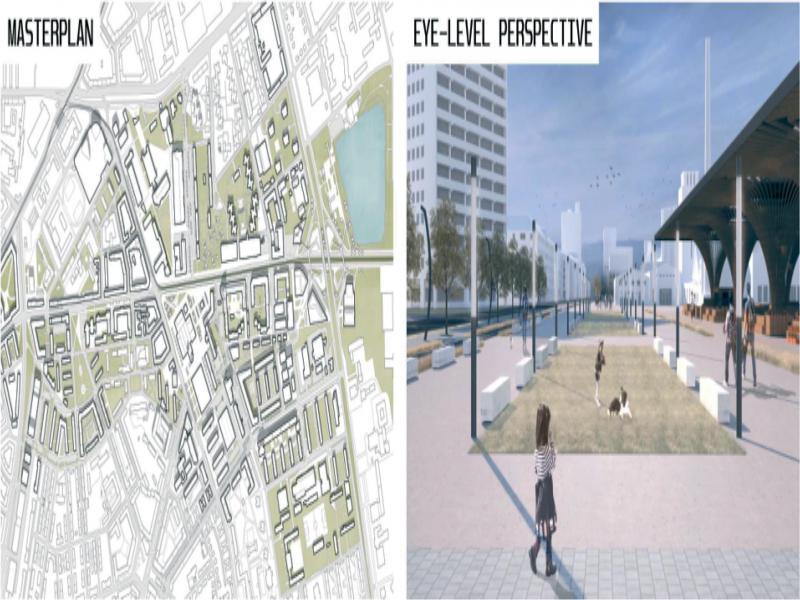
Figure 1.
Masterplan 1:1000, Eye-level perspective (without scale). Authors: Lešková, Ladacsi, Štefancová
Table 1.
Content advantages and disadvantages of the master plan and the eye level perspective (inspired by Meeda, 2006: 41 and added by the authors of this paper)
| Masterplan 1:1000 | Eye-level perspective | |
|---|---|---|
| What it shows |
|
|
| Why it is graphically right |
|
|
Table 2.
Comparison between hand-drawn images and computer graphics – strengths and weaknesses (inspired by Meeda, 2006: 14 and added by the authors of this paper)
| Hand-drawn images | Computer graphics | |
|---|---|---|
| Strengths |
|
|
| Weaknesses |
|
|
Table 3.
Table diagram of the procedure
| no. | part of the procedure | explanatory notes |
|---|---|---|
| 01. | selection of urban design students proposals based on the evaluation | “A” grade only |
| 02. | selection of the 10 proposals | 5 sketched and 5 done by computer |
| 03. | selection of the researched outputs | masterplan (M = 1:1000) and perspective views |
| 04. | creation of set of criteria – evaluation factors | based on the theoretical background |
| 05. | evaluation of all outputs from the perspective of the chosen criteria | average of 3 independent experts |
| 06. | correlation analysis | between the results of the different categories |
| 07. | interpretation of the results | focused on the most remarkable findings |
| 08. | recommendations for practice | possibilities for improving the graphics |
Table 4.
Comparison between hand-drawn images and computer graphics from Masterplan 1:1000
| Masterplan 1:1000 10 chosen project – average value of 3 evaluators | sketching technique  | computer based technique  | |||
|---|---|---|---|---|---|
| Evaluation category | Description | Average value of 5 projects | Average value of 5 projects | ||
| 01. FIRST IMPRESSION/subjective/ | First impression from the drawing | 3.27 | 3.47 | ||
| 02. ACHIEVEMENT OF GRAPHIC DISPLAY PRINCIPLE/objective | SPACES | 3D Effect | contours, terrain, shadows | 3.20 | 3.40 |
| Differentiation of Lines of Terrain and Surfaces | pedestrian and car communications, cycle paths | 3.33 | 3.40 | ||
| Hierarchy of the Spaces | distinction of the main spaces, public, semi-public, and private spaces | 3.47 | 3.40 | ||
| Static Traffic | rendering of parking lots | 3.60 | 4.13 !  | ||
| Active Areas | playgrounds, sport/leisure dedicated areas | 2.00 | 3.60!  | ||
| OBJECTS | Differentiation of Greenery | park, garden, alley, aesthetical greenery, wild greenery | 2.87 | 2.60 | |
| Typology of the Objects | differentiation of the character of the buildings | 3.93 | 3.73 | ||
| Small Architecture | characteristic elements – pavilion, podium, kiosk, art elements | 2.87 | 3.20 | ||
| COMPLEMENTS | Additional Markings of the Use of Objects and Areas | cycling lanes, public transport elements, entrances/passageways to the objects | 3.00 | 2.87 | |
| 03. CLARITY/subjective | understanding the main idea and content | 3.47 | 3.13 | ||
| OVERALL RATING | 35.00  | 36.93  | |||
Table 5.
Comparison between hand-drawn images and computer graphics for Eye-level perspective
| PERSPECTIVE VIEWS (scale not specified) 10 chosen project – average value of 3 evaluators | sketching technique  | computer based technique  | ||
|---|---|---|---|---|
| Evaluation category | Description | Average value of 5 projects | Average value of 5 projects | |
| 01. FIRST IMPRESSION/subjective | First impression of the drawing | 2.67 | 2.60 | |
| 02. ACHIEVEMENT OF GRAPHIC DISPLAY PRINCIPLE/objective | SPACE AND MASSING | suitability of chosen view – main public space, accents, dominants | 3.87!  | 2.53 |
| CHARACTER OF THE SPACES AND MASSING | characterization and presentation of the surfaces (pedestrians, cars, main public space); of the objects depending on the program, choice of the scale | 2.93 | 2.27 | |
| AMBIENCE | usage of shadows, greenery, staffage – correct measure according to the nature of the space | 2.60 | 2.27 | |
| 03. CLARITY/subjective | understanding the main idea and content, clear localization of the perspective on a masterplan drawing | 2.93 | 2.27 | |
| OVER ALL RATING | 14.20!  | 11.93 | ||
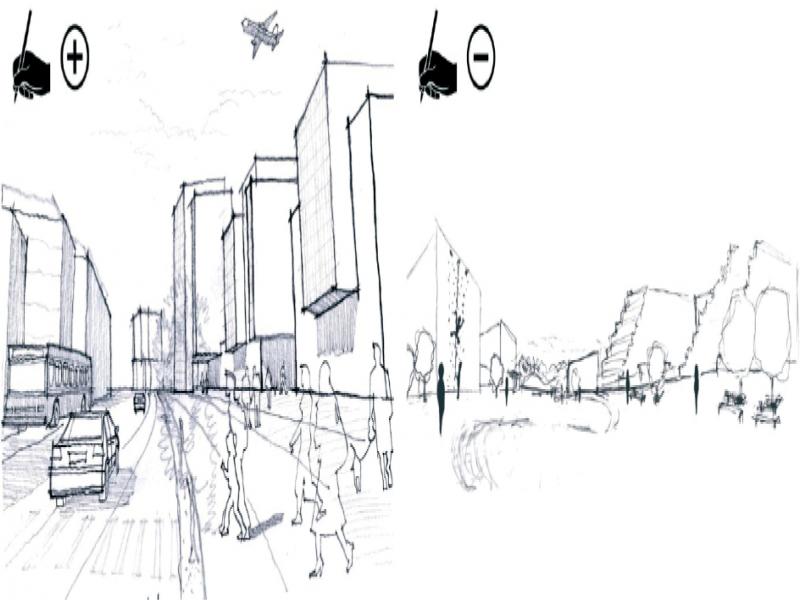
Figure 2.
Best and worst-rated hand-sketched perspective views – left Authors: Štefancová, Šutková, Kollár, right Authors: Michalka, Michalová, Štefancová
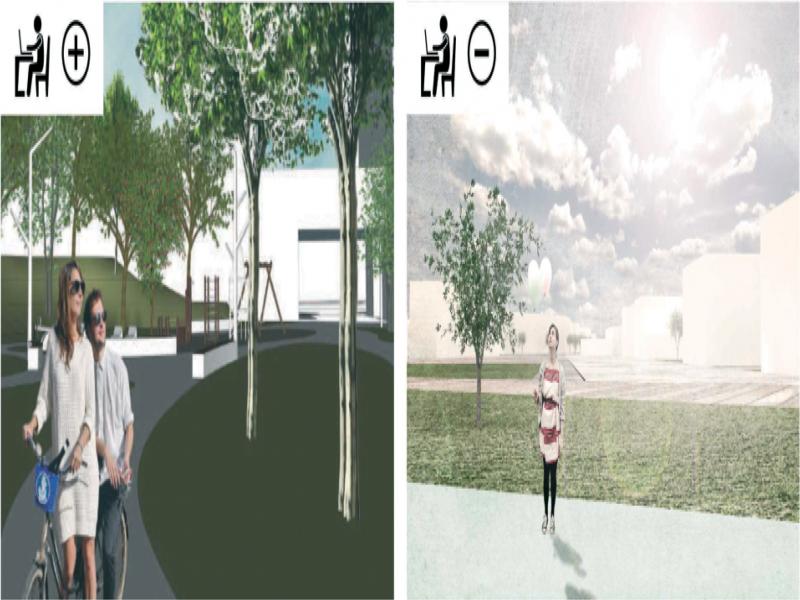
Figure 3.
Best and worst-rated computer generated perspective views – left Authors: Miklušková, Tarhaničová, Štefancová, right Authors: Koósová, Ladacsi, Štefancová
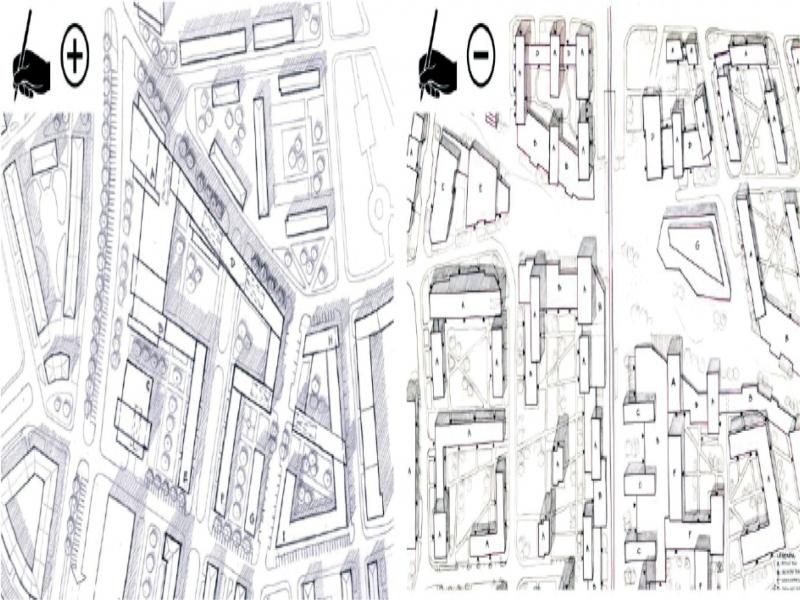
Figure 4.
Best and worst-rated hand sketched masterplans – left Authors: Štefancová, Šutková, Kollár, right Authors: Michalka, Michalová, Štefancová
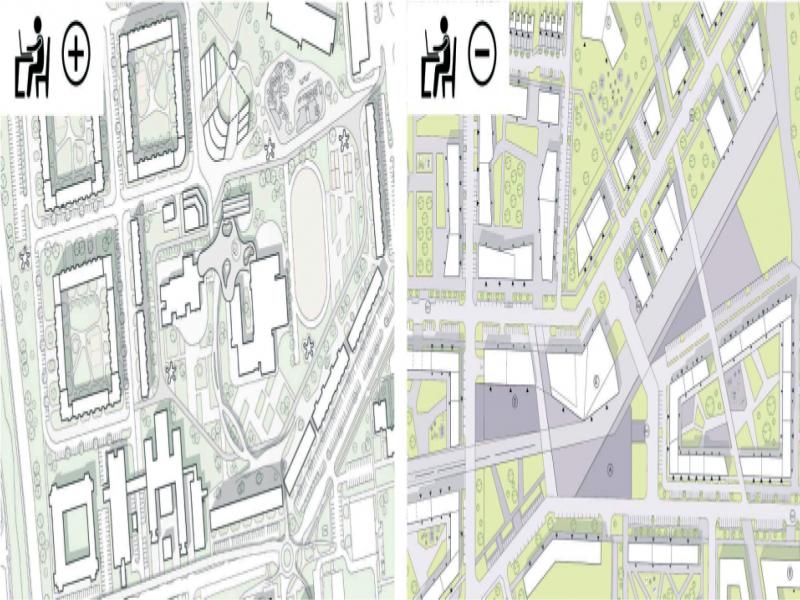
Figure 5.
Best and worst-rated computer generated masterplans – left Authors: Ďuďajová, Bubláková, Štefancová, right Authors: Koósová, Ladacsi, Štefancová